


Easily add tracking parameters to hyperlinks in signatures
CodeTwo Exchange Rules and CodeTwo Exchange Rules Pro make it easier to add tracking parameters to hyperlinks used in your company email signature. Using links with tracking parameters is helpful to measure performance of email marketing campaigns, check the traffic to your websites from these links, then analyze the results and better plan future movements. The programs allow you to add tracking tags of the most popular web analytics platforms like Google Analytics, Woopra or Matomo (Piwik).
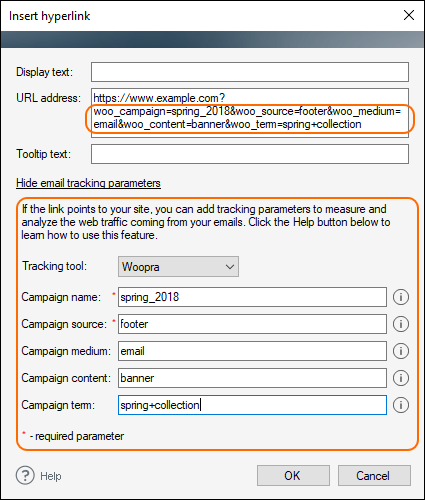
This new option is available from the Insert hyperlink window under the Email tracking parameters section.
To learn more about integrations with web tracking platforms, visit this user’s manual.
Easily integrate email signatures with external services
If you want to add to your signature some fancy snippets like e.g. one-click CSAT surveys from CrewHu or Hively, the Signature Editor makes it easier to manage such integrations. Instead of editing the signature’s code, you can now use the Insert HTML snippet option which gives you more user-friendly experience. Just place the cursor in the signature where the snippet should appear and paste the code into the Insert HTML snippet window.
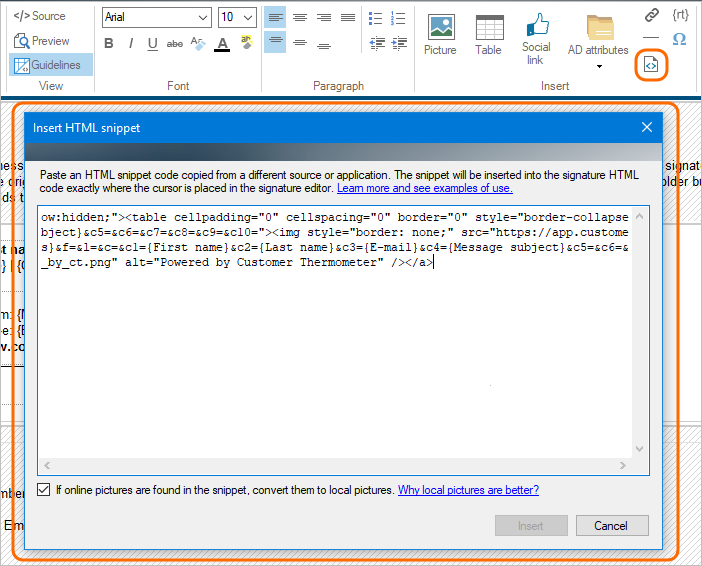
The wizard will automatically convert the code and insert the nice-looking snippet into your signature. For example, this can look like this:

One-click surveys is a service provided by third-party companies to help you gather valuable feedback from your customers. When you can hear the voice of your potential or existing clients, you can better adjust your business direction to meet your clients’ needs.
To check a full list of changes that come with this update, visit version history pages of CodeTwo Exchange Rules 2016, 2013, 2010, 2007, and CodeTwo Exchange Rules Pro.
How to update?
To update your current installation of CodeTwo Exchange or CodeTwo Exchange Rules Pro, you need to download the newest version of the program using one of the links below and install it on top of the existing installation. All settings will be kept.
Download CodeTwo Exchange Rules Pro ver. 2.11
Download CodeTwo Exchange Rules 2016 ver. 1.11
Download CodeTwo Exchange Rules 2013 ver. 2.11
Download CodeTwo Exchange Rules 2010 ver. 3.11
Download CodeTwo Exchange Rules 2007 ver. 4.11
NOTE: The update is free of charge for all license holders unless the first figure of the program’s version being currently used does not match the first figure of the newest version. To learn more click here.
If you have any questions regarding this update, feel free to contact us.
Useful links:
Recommended articles



CodeTwo sp. z o.o. sp. k. is a controller of your personal data.
See our Privacy Policy to learn more.