Prices


World's #1 Microsoft 365 email signature management software
CodeTwo
Email Signatures 365

One plan. All features.
Unlimited signature templates
1 month minimum subscription period
(+14-day fully functional free trial)
(+14-day fully functional free trial)
Centrally managed signatures, legal disclaimers & auto-reply messages
All email apps & devices supported (including mobiles)
Full automation & advanced scheduling: signature targeting based on rules
Signatures added in the cloud (with user preview) or directly in Outlook as users type
Built-in customer satisfaction analytics
Top-rated 24/7 Customer Support via email & phone. Contact us
Pricing details & information
All prices shown on the website are net of Value Added Tax and any other taxes or duties.
The license is assigned to each user (or shared mailbox) whose emails are routed through the CodeTwo service (cloud signatures) or who uses the CodeTwo Outlook add-in (Outlook signatures). See the sections below for more information.
New license / renew license
Payments for your subscription are automatically charged at the beginning of every billing cycle to the credit/debit card assigned to the subscription. If you choose a monthly subscription plan, your billing cycle will be one month. If you choose a yearly subscription plan, your billing cycle will be one year. Yearly subscription plan costs less in the long run.
How to buy
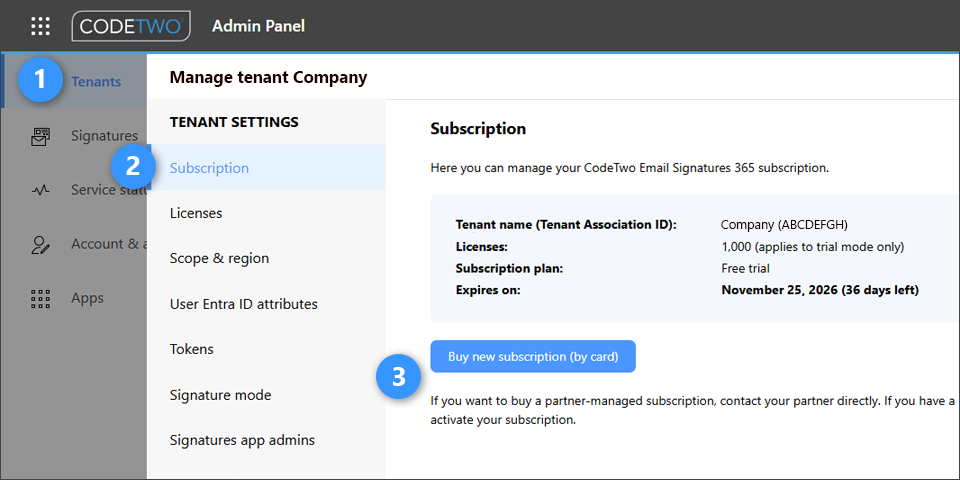
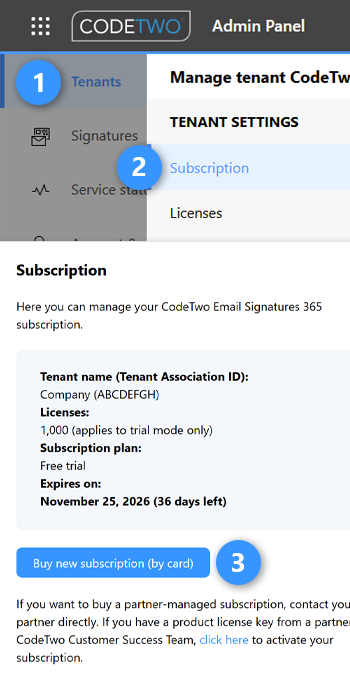
The subscription for the program can be purchased in CodeTwo Admin Panel. To do this, sign in to CodeTwo Admin Panel, go to the Tenants page and click a tenant for which you want to buy a subscription. The settings pane will pop up. Go to Subscription and click Buy new subscription, as shown below. A wizard will guide you through the entire process. To pay for the subscription, you will be asked to define a payment method first. Any user with the Owner or Admin Panel admin access to CodeTwo Admin Panel can purchase the subscription.
Learn more about purchasing the subscription in the user’s manual
Free trial version
The trial period is 14 days. If you need more time for testing, you can extend the trial period yourself from the CodeTwo Admin Panel and test the program for up to 21 days in total.
The trial version is fully functional but limited to 1000 mailboxes. If you would like to test the program with more than 1000 mailboxes, please contact us. The trial version comes with full technical support as well.
Learn more about the trial version of CodeTwo Email Signatures 365
How licenses are counted and assigned
Only users specified in the scope of licensed users can consume licenses.
In Outlook (client-side) mode, a license is consumed by each user who gets signatures from the CodeTwo Outlook add-in. If a user sends an email as or on behalf of another user (including a shared mailbox), no additional license is consumed, even if the add-in adds a signature configured for another user.
If the program operates in cloud (server-side) mode, licenses are assigned to users and shared mailboxes whose emails are routed through the CodeTwo cloud service, even if no rules are set up to add signatures to their emails. You can limit the number of users routed through CodeTwo (and consuming licenses) to a specific group – see how to do that.
In combo mode, which is a combination of cloud and Outlook modes, licenses are assigned in both ways.
No matter which signature mode you use, one user can consume one license only.
Find out more about the licensing in CodeTwo Email Signatures 365 in the user’s manual
Mail-enabled public folders, and mail-enabled distribution groups do not consume licenses. That is because emails sent from those sources are not supported by the signature-adding mechanism.
Autoresponder licensing
CodeTwo Email Signatures 365 comes with the Autoresponder feature that lets you create and centrally manage automatic replies and out of office messages in Microsoft 365.
Autoresponder licenses are counted separately from signature licenses. For example, if you currently have 1,000 licenses for CodeTwo Email Signatures 365:
- you can assign all 1,000 licenses to the same users (so the same 1,000 users get both signatures and automatic replies),
- or you can split your 1,000 licenses between different users (so 1,000 users get signatures and another 1,000 users get automatic replies), allowing up to 2,000 people to benefit from your 1,000-license pool.
Only users specified in the scope of licensed users can consume licenses. Autoresponder licenses are assigned based on rules settings. If you create an autoresponder rule for x users in your organization, x licenses will be instantly consumed when you save the rule. Note that you can reset the license count, e.g. if you have licensed some users incorrectly (see how).
Learn more about Autoresponder licensing in the user’s manual
Changing the number of licenses in your subscription
The number of licenses can be changed in the Admin Panel at any time during your subscription.
If you increase the number of licenses:
- new licenses will be immediately added to your subscription,
- your credit/debit card will be immediately charged, but only to cover the price of the newly added licenses that will be used in the current (ongoing) billing cycle,
- a new invoice will be immediately issued and sent to you, and
- the total subscription price will be changed accordingly at the beginning of the next billing cycle and an invoice will be issued and sent to you.
If you decrease the number of licenses:
- the number of licenses will not be immediately decreased – the original number of licenses will be available until the end of the current (ongoing) billing cycle, and
- the total subscription price will be changed accordingly at the beginning of the next billing cycle and an invoice will be issued and sent to you.
Learn more about changing the number of licenses in the user’s manual
Renewing a subscription
A subscription for CodeTwo Email Signatures 365 renews automatically when your current billing cycle ends.
Canceling a subscription
A subscription for CodeTwo Email Signatures 365 can be canceled at any time via the Admin Panel (no prior notice is necessary). Canceling the subscription means the subscription will not automatically renew when your current billing cycle ends. You can learn more about managing subscriptions in the licensing section of the User’s manual.
One price for all features – no hidden costs or catches
CodeTwo Email Signatures 365 is a SaaS (software as a service) solution that comes with all its features and benefits out of the box. You get access to all new features, add-ins, and updates as soon as we release them. You will also receive full technical support by phone or email when you need it – 24 hours a day, 7 days a week.
We are committed to deliver the best customer experience on the market to every customer. We will never charge any hidden additional fees for our services. Also, no additional notice is required if you decide to cancel your subscription (either monthly or yearly) at any time. The subscription expires at the end of your current billing cycle, and you will not be charged beyond the period of your subscription or with any type of penalty. If you believe that there’s any catch to either the product’s subscription or our Terms and Privacy Policy, be sure to tell this to our CEO.
Ordering details
The default payment method is credit/debit card, with payment handled by PayPal (Braintree). Submitting your credit card information on CodeTwo's website is safe as our order system uses only TLS encrypted and verified connections to process your payment. CodeTwo does not store your credit card information in any form. CodeTwo is PCI compliant.
Once you provide your billing information and complete the order wizard (as described in the How to buy section above), your CodeTwo Email Signatures 365 subscription will be activated automatically. Keep in mind that only the Admin Panel Owner can change your organization’s billing information. Learn more about admin roles in CodeTwo Admin Panel
It is possible to use other payment methods (e.g. wire transfer) to buy the subscription – just contact us.

What does technical support include?
Technical support is included in the price of the subscription. Technical support entitles you to the following benefits:
- Full access to our online knowledge base.
- 24/7 access to our award-winning Customer Success team by email and phone.
- 24-hour response time guarantee. Our technicians will answer all questions concerning our products and will assist in addressing potential technical issues.
- Assistance comprehensively provided by the same specialist (unless they are out of office).
What discounts does CodeTwo offer when purchasing CodeTwo Email Signatures 365?
CodeTwo offers discount prices to:
- non-profit organizations,
- partners who are active in our Partner program,
- CodeTwo Exchange Rules (Pro)* and CodeTwo Email Signatures On-prem users.
* You will be also able to easily migrate all your on-premises signatures, signature adding rules and automatic replies to the new environment. Learn more
We also offer volume discounts – the more licenses you order, the less you pay per user!
See pricing examples
The table below shows per-user monthly prices for CodeTwo Email Signatures 365, based on the number of licenses and the selected subscription period. All features are included in the price.
Number of users (licenses)Price per user/month
(yearly subscription)Price per user/month
(monthly subscription)10$1.22$1.3625$1.22$1.3650$1.21$1.3475$1.17$1.29100$1.11$1.23125$1.02$1.13150$0.99$1.10175$0.97$1.08200$0.95$1.05250$0.91$1.01300$0.87$0.97350$0.83$0.93400$0.80$0.89450$0.76$0.85500$0.73$0.81To calculate the total subscription cost for any number of licenses, use this calculator.