Features
The most trusted email signature software for Exchange Server
CodeTwo
Email Signatures On-prem
- Centrally managed email signatures, disclaimers, marketing banners and email flow control
- Support for all email clients, including Outlook and mobiles
- 100% on-prem solution (installed locally; no cloud agents)
- The only on-prem signature & mail flow manager for Exchange SE

Recover images deleted by iPhone and iPad
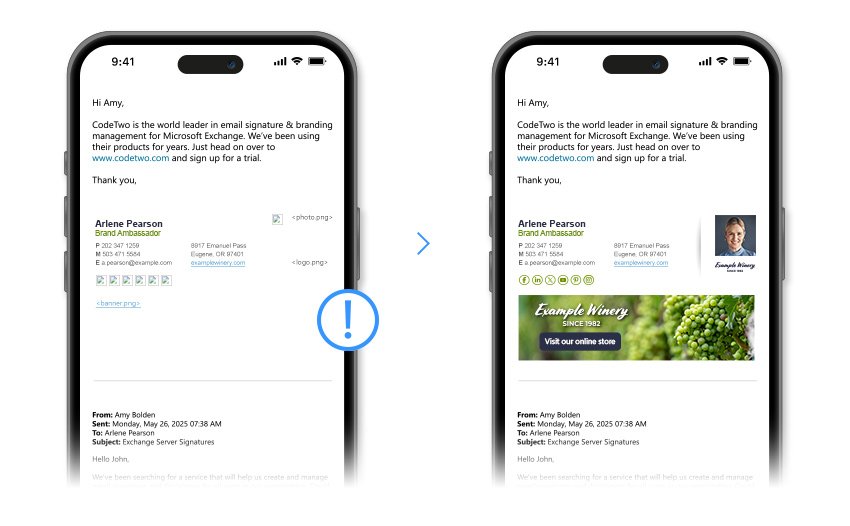
On iOS devices, such as the iPhone and iPad, embedded graphics are removed when a user replies to an email or forwards it. This applies to images found in the email body and email signatures alike. As a result, longer email threads might become skewed and unreadable. If you use images in your email conversations, looking for references and comparing various pictures might become troublesome. Worse still, the whole design might get messy when your logo, user’s photo or marketing banners simply disappear.
When you apply the Restore images removed by iPhone and iPad action in CodeTwo Email Signatures On-prem, all those images are automatically restored. Thanks to that, conversations will be easy to go through, while all emails remain fully branded and professionally designed. This feature works for both incoming and outgoing emails. Therefore, it will come in handy not only when your company uses iPhones to send and receive emails, but also when your clients do.
Key benefits:
- Restore pictures deleted by iPhone and iPad.
- Design an effective HTML email signature which works across different iOS devices.
- Ensure that users’ photos are visible in replies and forwards.
- Subject modifier for forwarded messages.
See this user's manual article to see how this feature works
Download free trial
no credit card required; free support while you test
Download free trial
no credit card required;
free support while you test






