Features
The most trusted email signature software for Exchange Server
CodeTwo
Email Signatures On-prem
- Centrally managed email signatures, disclaimers, marketing banners and email flow control
- Support for all email clients, including Outlook and mobiles
- 100% on-prem solution (installed locally; no cloud agents)
- The only on-prem signature & mail flow manager for Exchange SE

Email address rewriting for Exchange Server
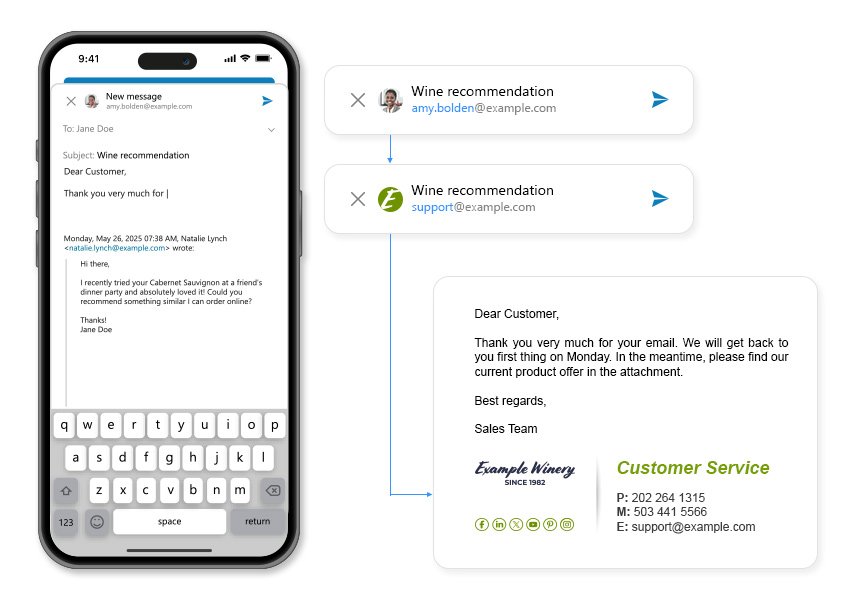
It is not unusual for a company to have a general email address for all external users to contact it, e.g., [email protected]. This applies to departments, too. Addresses such as [email protected] and [email protected] are commonly used to allow clients to reach certain departments in the organization without the need to know the addresses of individual employees. However, if someone from the Marketing team replies to an email that was sent to, e.g., [email protected], this general address will be replaced in the reply with their personal address. As a result, all subsequent replies go to a completely different mailbox.
CodeTwo Email Signatures On-prem gives you an out-of-the-box solution to that issue: the Rewrite sender’s address action. It allows you to change the email address of the sender to any other email address, depending on the rule configuration. For example, you can use a general address instead of personal ones for a single email address, multiple addresses, or even all addresses in incoming or outgoing emails. This way, you can keep your correspondence organized and consistent without the risk of losing any emails, as all replies will be sent to the general email address as intended.
The Rewrite sender's address action works as follows: an email is sent from a personal address, e.g., [email protected]. After being processed by CodeTwo Email Signatures On-prem, the sender’s address is changed to a general address, e.g., [email protected]. When the recipient responds to this email, the reply goes to [email protected].
Key features:
- Change the sender's address to any other email address according to server rules.
- Keep email conversations organized and restricted to designated departments.
- Specify a list of addresses to be rewritten or set up general triggering rules.
- Change addresses of both outgoing and incoming emails.
Download free trial
no credit card required; free support while you test
Download free trial
no credit card required;
free support while you test





