


Back in 2018, organizations all around the world had to implement new procedures, policies, and physical data protection measures to reach compliance with the General Data Protection Regulation (GDPR). But when you fast forward to today, it turns out that many organizations still play down the substantial number of risks generated by email correspondence.
This is where CodeTwo comes in – in this article, we’ll show you how our email signature software for Microsoft 365 and Exchange Server can help you achieve GDPR compliance when it comes to email communication.
CodeTwo Email Signatures 365 (Microsoft 365)
CodeTwo Email Signatures 365 is a Microsoft-certified solution for email signature management that you can use to support GDPR compliance procedures in your Microsoft 365 organization. Read on to find out how to do it.
Automated email disclaimers
You may have already heard that email disclaimers cannot be used to ensure GDPR compliance. That is correct, as there is no single action or mechanism that will ensure complete GDPR compliance in itself. However, there are a few ways to use automatic email disclaimers to your advantage:
- Include links to your Privacy Policy or other documents in which you clearly state how you handle personal data. This way, you will clearly demonstrate that your company processes data in a transparent manner, as required by Article 5 of the GDPR.
- Include a dedicated email address for all GDPR-related inquiries. It makes it super-easy for your clients, for example, to exercise the right to be forgotten. Consumers are likely to appreciate your care for the safety of their personal data.
- Inform customers about your email retention and data erasure policies. As a result, customers will know that their data shared in emails won’t be stored indefinitely without a legitimate reason.
CodeTwo Email Signatures 365 can make sure that the right disclaimer is always added to your business correspondence, regardless of what device or email app is used to send emails. With the tool’s easy-to-use interface and a convenient WYSIWYG editor, it will only take you a few minutes to create and deploy an automatic disclaimer with all the information required by the GDPR for all employees.
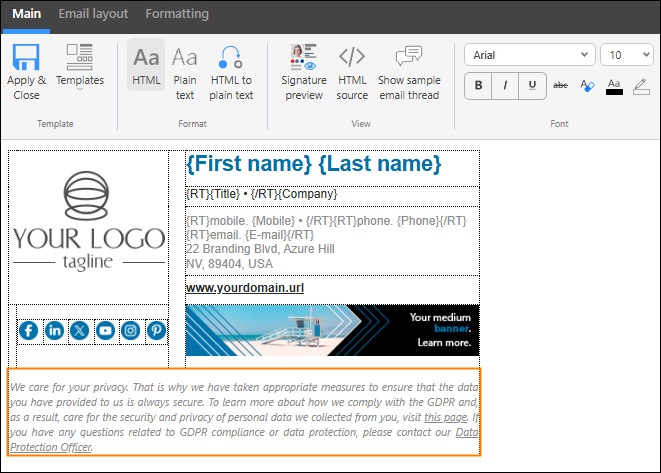
Find out how to use GDPR-compliant disclaimers in Microsoft 365
Unsubscribe link and opt-out instructions
According to the GDPR, if you want to send marketing newsletters and other commercial emails, you need to provide your recipients with an option to opt out of receiving such correspondence – and CodeTwo Email Signatures 365 can help you do so. Here’s how you can use the tool for this purpose:
- Include a link to your unsubscribe mechanism or unsubscribe page in a disclaimer added to commercial emails. This way, your recipients will be able to quickly opt out of a newsletter or update their email preferences.
- Create a disclaimer with simple unsubscribe instructions and add it under each newsletter message, briefly explaining how users can opt out – for instance, by replying “Unsubscribe” to such a message.
Keep in mind that under the GDPR, unsubscribe links or instructions are only required in commercial emails. With CodeTwo Email Signatures 365, you can make sure they are added only to this type of message. Here are a few simple ways to handle it:
- Use sender-based signature rules if you want to add the unsubscribe link or instructions only to emails sent from a specific mailbox (e.g., a shared mailbox used for marketing communication). Learn more
- Use recipient-based signature rules if you want to add the unsubscribe link or instructions only to emails sent to certain people (email addresses) or groups (e.g., mailing lists). Learn more
- Use keyword-based signature rules if you want to add the unsubscribe link or instructions when the email body or subject contains certain keywords or tags, such as #newsletter. The rule-triggering keyword can be automatically removed before the email is delivered. Learn more
Here are more examples on how to configure the software for different use scenarios
Multiple geolocations
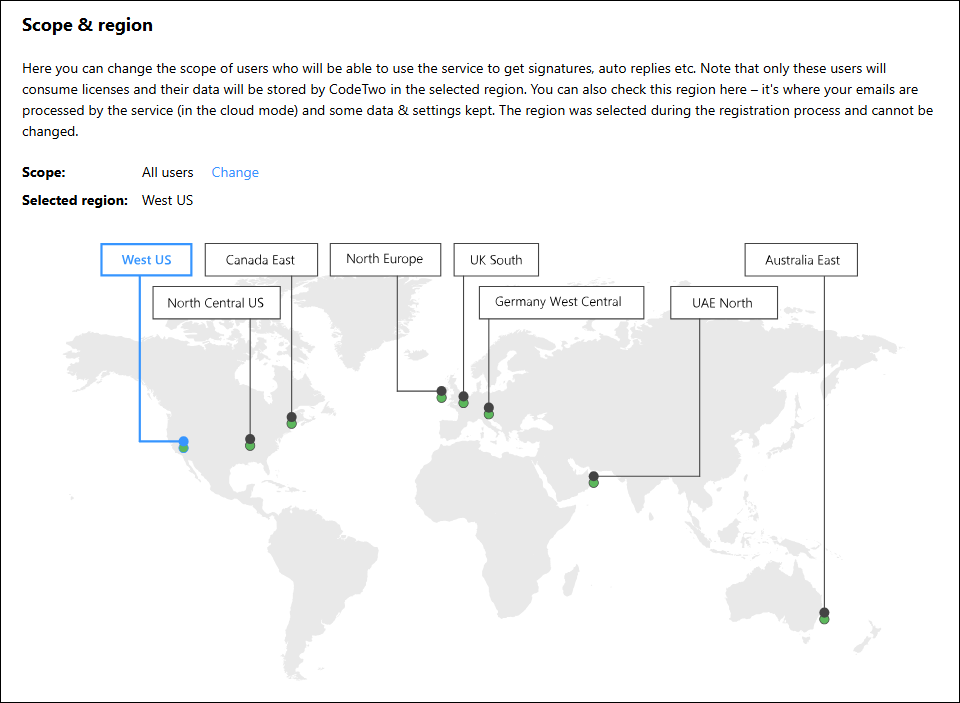
Knowing where data is stored and processed is crucial for achieving GDPR compliance (and ensuring an appropriate level of data protection in general). CodeTwo allows you to choose one of eighteen Azure datacenters across nine Azure regions to make sure your company is GDPR compliant:
- West US
- North Central US
- Canada East
- North Europe
- UK South
- Germany West Central
- West Europe
- Australia East
- UAE North
Each of the regions is protected by CodeTwo’s 4-layer security system and constantly monitored by the Monitoring Team to ensure that personal data in your company’s email correspondence is safe at all times.
Phishing prevention
Perhaps you will find this a bit unconventional, but you can actually use CodeTwo Email Signatures 365 to help reduce phishing risk and prevent potential data breaches in your organization. How? By using the tool’s most basic feature – implementing company-wide email signatures for internal communications.
If your company uses a standardized signature template for all employees in all internal emails that they exchange, it’s easier for the employees to spot impersonation attempts. This makes CEO frauds and similar scams much more difficult, since a fake email signature is often the first thing that stands out in a suspicious email. In most cases, a false signature is much more attention-catching than, say, a look-alike email address.
Of course, email signatures are not a security tool by themselves. What’s more, if a mailbox is compromised, a threat actor can learn how the internal signature looks and use it to their benefit. Still, signatures can be applied as a low-lift solution to save your security officers a lot of headaches. Using them in combination with other email protection measures can surely improve data security and lower GDPR exposure in your company.
CodeTwo Email Signatures On-prem (Exchange Server)
CodeTwo Email Signatures On-prem is an on-premises mail flow manager for Exchange Server Subscription Edition that can help you stay GDPR-compliant. By managing your mail flow, you can greatly reduce the risk of data leaks from email correspondence and make the job of your Data Protection Officer easier. Below, you’ll find a few ways in which you can use CodeTwo’s solution to improve GDPR compliance (and personal data security) in emails processed on your Exchange Server.
Advanced email forwarding
One of the most important requirements of the GDPR is ensuring that personal data you store is safe. For most companies, emails are not only a means of transferring, but also of storing personal data. One way to make this data safer on your Exchange Server is to make use of advanced email forwarding.
How you use email forwarding hugely depends on other data security measures you have implemented. A good method for keeping personal data secure would be to have it all in one location with strict access permissions. Apart from enhancing data safety, this also makes it much easier to access personal data in a timely manner – the less dispersed your email database is, the easier you can find the data you need.
Automatic forwarding can be used to transfer all GDPR-related questions to the right mailbox. It is a great way to simplify workflows and reduce the GDPR-related workload for your employees. Since a single email can lead to a security leak incident, email forwarding, together with the right DLP policies, can save your day.
See how advanced email forwarding can help you stay GDPR-compliant
Smart unsubscribe mechanism
CodeTwo Email Signatures On-prem allows you to use a smart unsubscribe mechanism. This mechanism can be used for all kinds of messages or, for instance, only for marketing newsletters. By providing email recipients with a one-click unsubscribe link, you let them decide which emails they want to get. This way, they can stay informed about your software updates or new products while opting out of marketing campaigns they are not interested in.
The unsubscribe mechanism in CodeTwo Email Signatures On-prem is also convenient from an admin’s perspective. Using this feature, you no longer have to manually remove users from mailing groups – a mail flow rule will do that for you automatically.
With the smart unsubscribe mechanism, your customers are happy they are not spammed, and you can be sure you are not sending any emails without the right consent, as the list of newsletter recipients is updated automatically. Win-win.
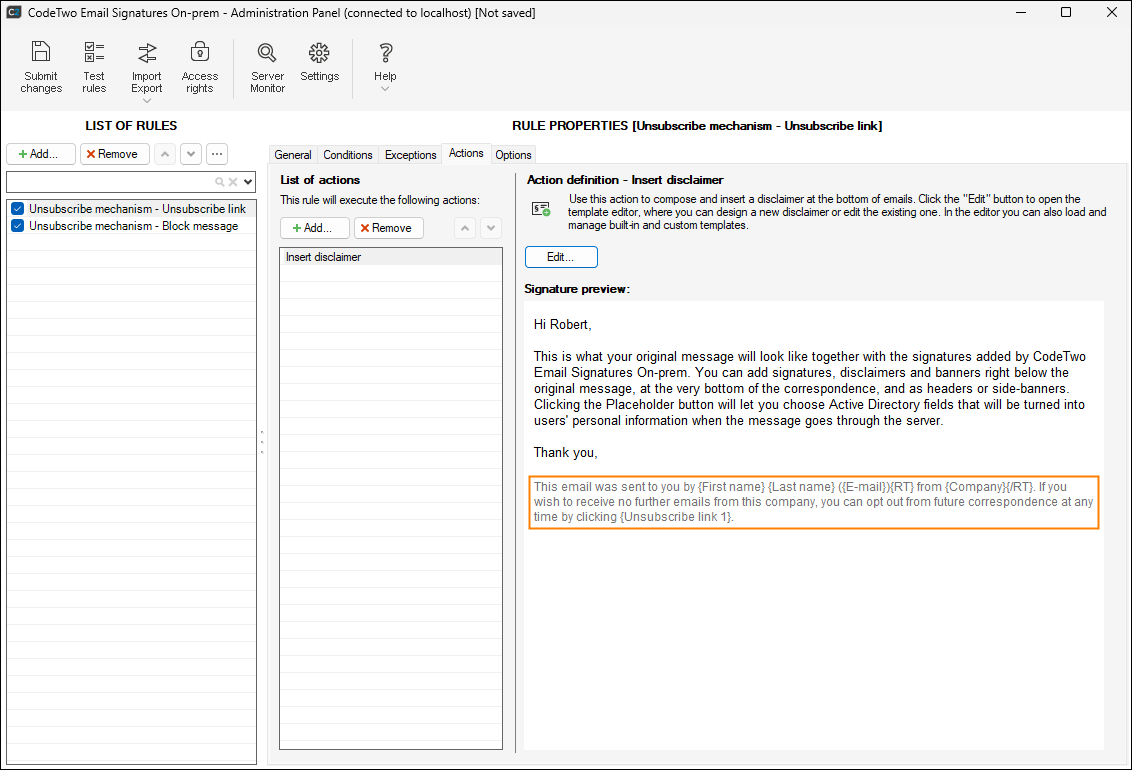
Learn more about how the smart unsubscribe mechanism can help you stay GDPR-compliant
GDPR-compliant disclaimers in Exchange Server SE
In the Automated email disclaimers section concerning CodeTwo Email Signatures 365, we’ve discussed several ways in which you can use email disclaimers to improve GDPR compliance in a cloud-based Microsoft 365 organization. If your company insists on maintaining its own on-premises environment, you can turn to CodeTwo Email Signatures On-prem instead and similarly set up company-wide disclaimers to:
- Include a Privacy Policy link under each email
- Provide your recipients with a dedicated email address for GDPR-related inquiries
- Inform your customers about data retention and erasure policies binding in your company
- Share other information related to the GDPR and email security
CodeTwo Email Signatures On-prem is the only fully on-premises solution for managing email signatures, disclaimers, and company mail flow that supports Exchange Server Subscription Edition. Everything is installed locally with no cloud agents involved (unless you choose to deploy the program in a hybrid environment – that will work, too).
Find out how to use GDPR-compliant disclaimers in Exchange Server
Data Leak Protection
CodeTwo Email Signatures On-prem includes a Data Leak Protection mechanism. You can configure the program to look for certain phrases in sent emails. The program lets you use algorithms, wildcards, phrases and regular expressions to determine if a message contains sensitive content. If it does, you can use certain rule actions to mask sensitive data, or block the message whatsoever and notify your Data Security Officer that a data breach has been prevented.
Apart from having built-in dictionaries, you can freely configure this email compliance tool to ensure it works well with other security measures you have implemented.
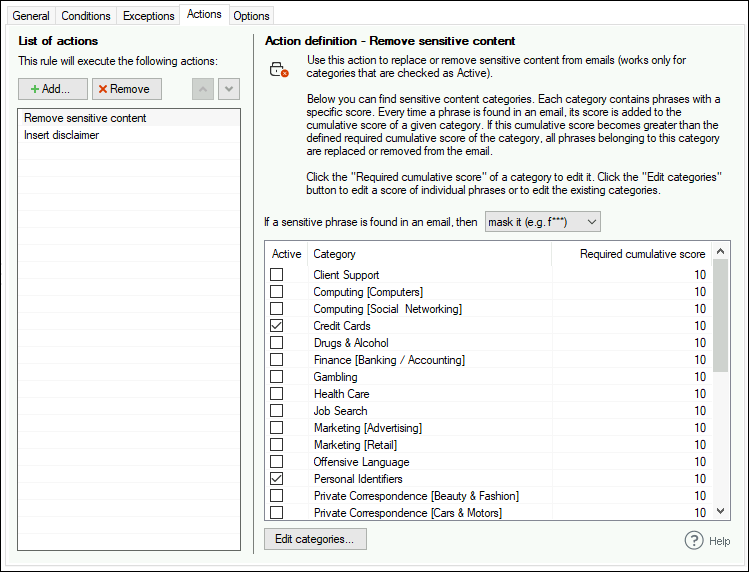
Read more about removing sensitive content
Achieve GDPR compliance with CodeTwo
The features listed in this article are only a short selection of what CodeTwo Email Signatures 365 and CodeTwo Email Signatures On-prem have to offer. For a complete list of the programs’ features, take a look at the links below:
Recommended articles
CodeTwo sp. z o.o. sp. k. is a controller of your personal data.
See our Privacy Policy to learn more.