


We’ve added new CodeTwo attribute types that remove many of the limitations of Microsoft 365 attributes and open the door to a wide range of signature personalization scenarios across your organization. You can start using them right away – watch our short video above to see how this works.
Go beyond Microsoft 365 user properties with CodeTwo custom attributes
The new CodeTwo attributes go beyond simple input fields. With our Single‑select and Multi‑select attributes, users can select predefined values, like their working hours, instead of typing them. This means less manual work for users and more control for you over what actually lands in their signatures.
Here’s the core idea: you define a new attribute and its values in the Attributes manager and include the attribute in your signature templates. Next, users go to the My user info app and simply choose one or more of your attribute values, which are then automatically added to their email signatures.
But that’s not all – if that fits your organization’s approach, you can also let users modify their signature design by simply choosing a specific attribute value. You can then use that value to control which signature elements are shown, or even which signature template is applied to each user – see examples in the video above.
Using the new CodeTwo attribute types, you can allow users to:
- show or hide different signature elements, such as a user photo or disclaimer,
- choose a preferred signature banner,
- change the signature language,
- set a preferred signature template,
- add extra information (not available in Entra ID attributes) to signatures,
- and much more!
On top of the single- and multi-select attributes, we’ve added the Number attribute type to help you ensure consistency across phone numbers and other numeric data that appears in your signatures. You can now also add user-facing attribute descriptions, making it easier for users to manage their attribute values.
Explore how to set up CodeTwo custom attributes for different scenarios
Delegated access to the Attributes manager and new languages in the My user info app
The latest release also introduces:
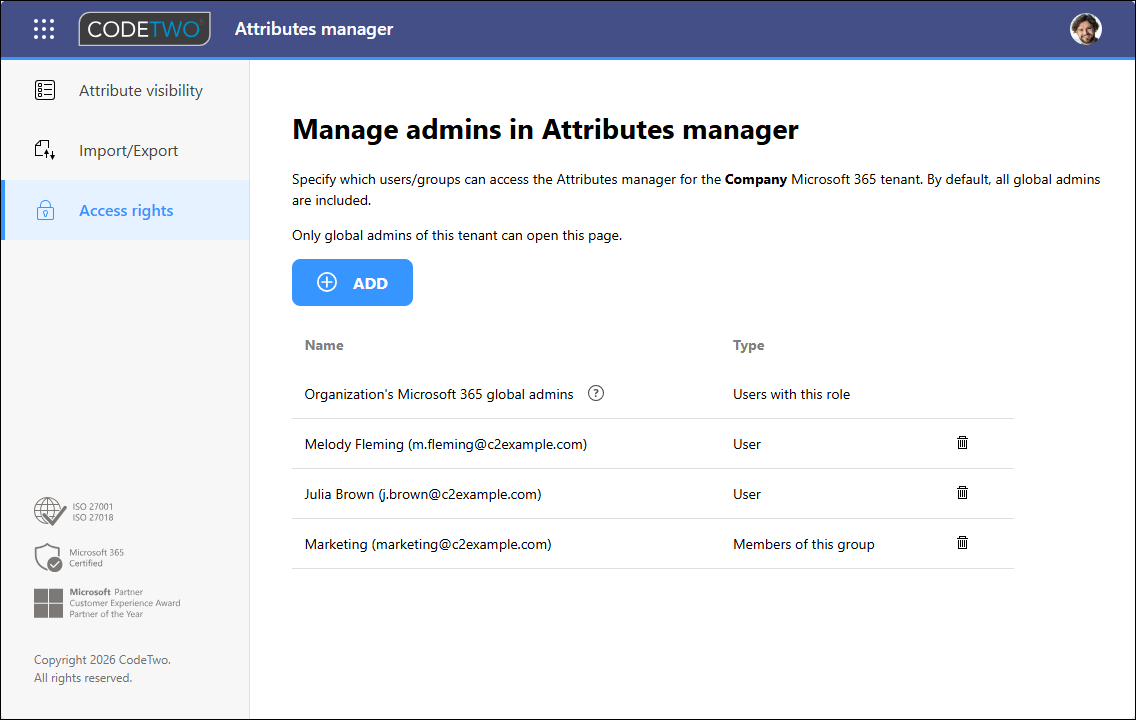
- Delegated access rights – if you’re a Microsoft 365 global admin, you can now use the new Access rights tab in the Attributes manager to invite other users to the app and let them manage Entra ID and CodeTwo attributes used in email signatures.
- New UI languages in My user info – users can now access the My user info app in the following languages, based on their browser settings:
- English
- German
- Spanish
- French
- Dutch
- Polish
See our user’s manual to learn more about the Attributes manager & My user info apps
CodeTwo Email Signatures 365 is the only fully Microsoft 365 Certified email signature solution (the entire infrastructure reviewed & pen-tested by Microsoft). It's an Azure-based cloud service that supports all devices and email apps. Co-engineered and awarded by Microsoft, it also holds the highest user satisfaction ratings. With ISO 27001 & 27018 certification and a proprietary 4-layer security system, it's the most secure signature manager on the market. Watch a short product video
CodeTwo offers solutions for organization-wide email signature management, data backup and migration for Microsoft 365 & Exchange Server, developed since 2007 and used by over 140k organizations worldwide, including Facebook, Samsung and UNICEF.
Recommended articles
CodeTwo sp. z o.o. sp. k. is a controller of your personal data.
See our Privacy Policy to learn more.