How to change the update time for Active Directory values in CodeTwo Email Signatures On-prem
Problem:
The Active Directory data used in placeholders and conditions by CodeTwo Email Signatures On-prem and CodeTwo Exchange Rules (Pro) software (discontinued) is not refreshed automatically after having been modified in AD. You need to wait a while to see the updated values in rules and signatures.
Solution:
By default, AD data is refreshed in CodeTwo software every hour to ensure optimal software and server performance. However, the Administration Panel allows you to force the CodeTwo Mail Processor service (or the CodeTwo Exchange Rules Service) to update AD information on demand. When you change some values in AD and want them to appear in your CodeTwo program immediately, you can simply restart the service in the Administration Panel’s Server Monitor window (Fig. 1.).
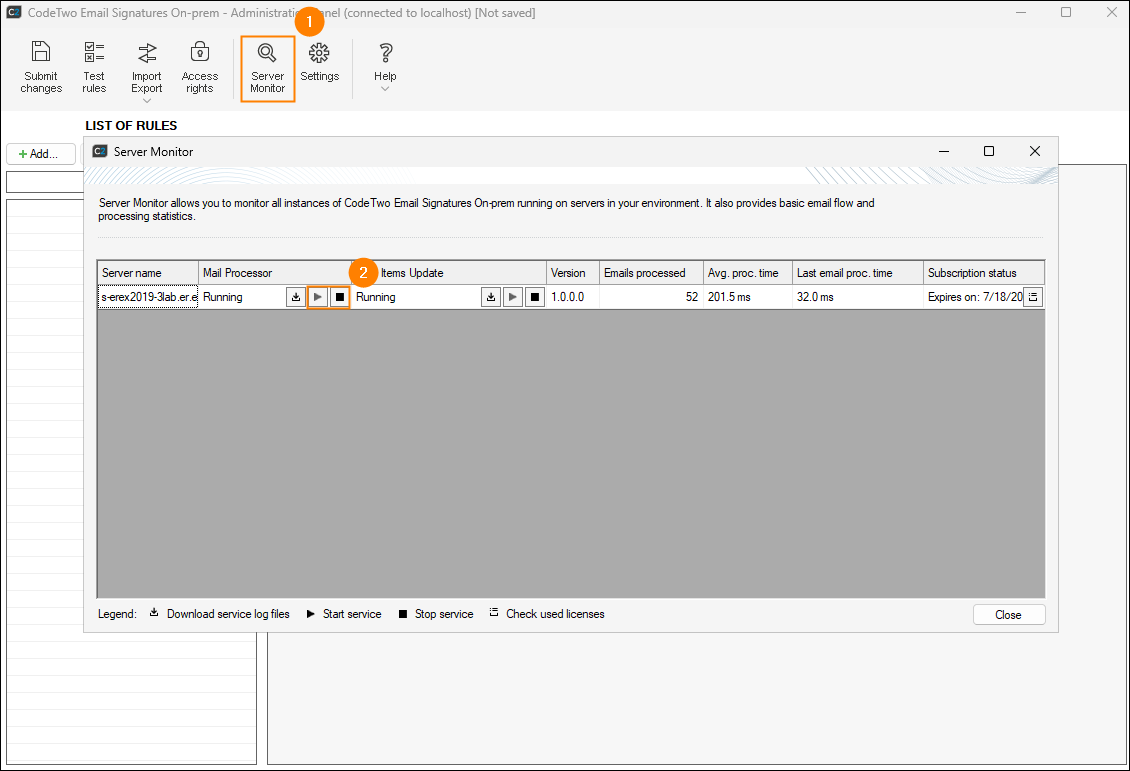
Fig. 1. Restarting the Mail Processor.
If you want your AD data to be refreshed more frequently on a permanent basis, you can change the update interval in one of the program’s configuration files. To do this, follow these steps:
Go to the following folder:
%ProgramData%\CodeTwo Email Signatures On-prem\Config
or%ProgramData%\CodeTwo Exchange Rules\Config
and open the EngineService.xml file.Search the file for these two entries:
<CacheGroupRecordsTTL>3600</CacheGroupRecordsTTL>
<CacheUserAdRecordsTTL>3600</CacheUserAdRecordsTTL>
- Change the default 3600 second values (1 hour) as needed. We strongly recommend that you keep the value above 300 seconds (5 minutes). If the update interval is too short, frequent AD queries may affect the performance of your domain controller(s).
- Save and close the file.
- Restart the Mail Processor (or the Exchange Rules Service) from the Administration Panel, as shown in Fig. 1. above.
| Related products: | CodeTwo Email Signatures On-prem, CodeTwo Exchange Rules 2007 4.x, CodeTwo Exchange Rules 2010 3.x, CodeTwo Exchange Rules 2013 2.x, CodeTwo Exchange Rules 2016 1.x, CodeTwo Exchange Rules 2019 1.x, CodeTwo Exchange Rules Pro 2.x |
| Categories: | How-To |
| Last modified: | August 12, 2026 |
| Created: | June 23, 2015 |
| ID: | 491 |






