It’s essential to keep your customers, business partners and employees abreast of the important stuff. If you’re away due to illness, conference or a business trip with no access to your business email, it goes without saying that you should enable email automatic replies, which will notify all senders that you won’t get back to them as quickly as usually, and suggest an alternative contact person.
Creating auto-replies just for yourself on Exchange Server or Office 365 is pretty easy, but if you are an HR manager, receptionist or team leader, and you want to create such replies for a colleague or for multiple employees, there is no such option. Well, you could log in to each and every mailbox and set auto-replies manually, but that’s a never-ending job and a security breach as you can see people’s email.
Today we stand an exciting moment together, as we have given a full unveiling to a new tool. CodeTwo Out of Office Manager makes it possible to centally manage Office 365 or Exchange Out of Office messages for many users. What’s more, the product is extremely easy to use and the installation process takes literally 60 seconds. Make sure your HR team or the management is equipped with the program.
The program has been designed with non-technical employees in mind to take the burden of setting group auto-replies from administrators’ shoulders.
When you open the program for the first time, you are greeted with the connection dialog box. Just use credentials of a user who has Organization Management rights and you’re ready to go. The employees who will be using the program don’t need those rights and they are also not able to use the entered credentials for any other actions whatsoever.
The main window will launch once you connect to your server. In addition to being able to easily manage auto-reply items, you’ll also get the general overview of all absences in you company, both upcoming and past. It helps you stay better organized and can serve as an absence monitor, planning aid, you name it.
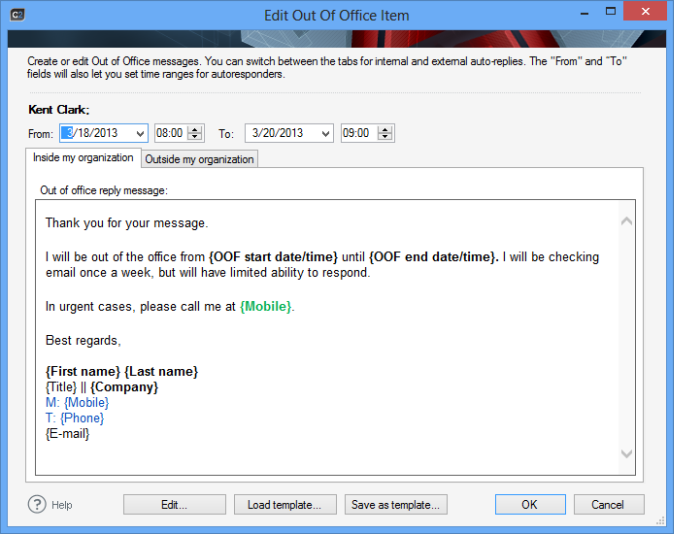
Scheduling multiple Out of Office items for weeks and months to come is also possible with CodeTwo Out of Office Manager. In other words, if someone is off every Thursday or if you know they will be out of office more than once, you can plan it in advance and be sure the program will activate and deactivate Out of Office items automatically.
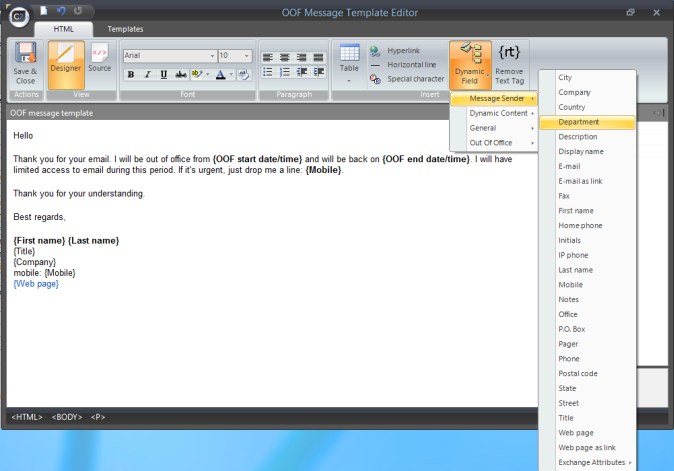
Fine-tune your automatic email replies with a built in editor. It’s really easy to design whatever you want even if you have no experience in HTML. Using the editor view, you don’t have to code anything to add tables, links and even Active Directory placeholders.
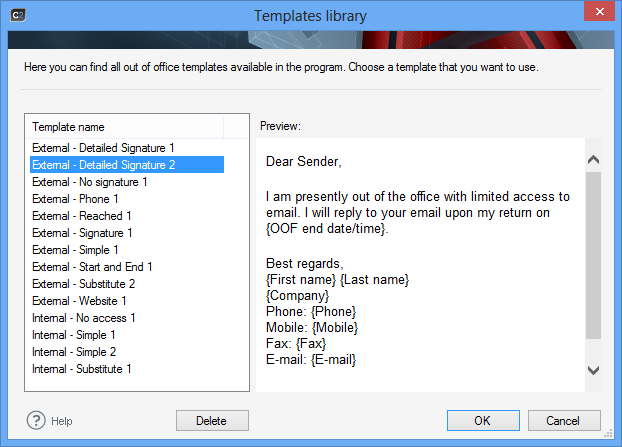
Use smart email templates that can be used for hundreds or thousands of personalized automatic replies. Active Directory attributes used in one template will change into user data when a template is submitted to Exchange or Office 365 user’s settings.
It’s just one minute to be up and running! I mean it. Install the program in a domain environemnt on any machine if you want to connect to Exchange global Out of Office settings. If you’re an Office 365 user, you can use any computer to do it. What is more, the application works on Exchange 2010, 2013 and all Office 365 plans.
Szymon is the CEO of CodeTwo and the driving force behind the company’s consistent growth. He is well known among IT and business professionals worldwide, with 180,000+ followers on LinkedIn.










CodeTwo sp. z o.o. sp. k. is a controller of your personal data.
See our Privacy Policy to learn more.