



To cite Microsoft’s announcement, “cloud.microsoft is the new unified domain for Microsoft 365 apps and services.” It promises greater security and a unified experience. Sounds wonderful. Now, years after the domain was announced, you might need some solid facts, like which services have already migrated to this top-level domain and how cloud.microsoft can affect you. Read on to learn more.
What is cloud.microsoft?
cloud.microsoft is a top-level domain owned by Microsoft. It was provisioned and first announced on the Microsoft 365 Blog in early 2023. When I first published this article, the domain was still relatively new and few services used it.
Some things have changed since that time. Many existing services have migrated to cloud.microsoft, and some new services have been launched under the new namespace right away. Also, it is no longer as surprising to end users to see web addresses without the traditional .com at the end. At the moment, cloud.microsoft on its own redirects to m365.cloud.microsoft, which is Microsoft 365 Copilot – a sort of dashboard for Microsoft 365 users.
That said, note that the old microsoft.com domain is not going away, but cloud.microsoft is gradually taking over as the primary domain for user-facing Microsoft 365 experiences.
What’s moving to cloud.microsoft?
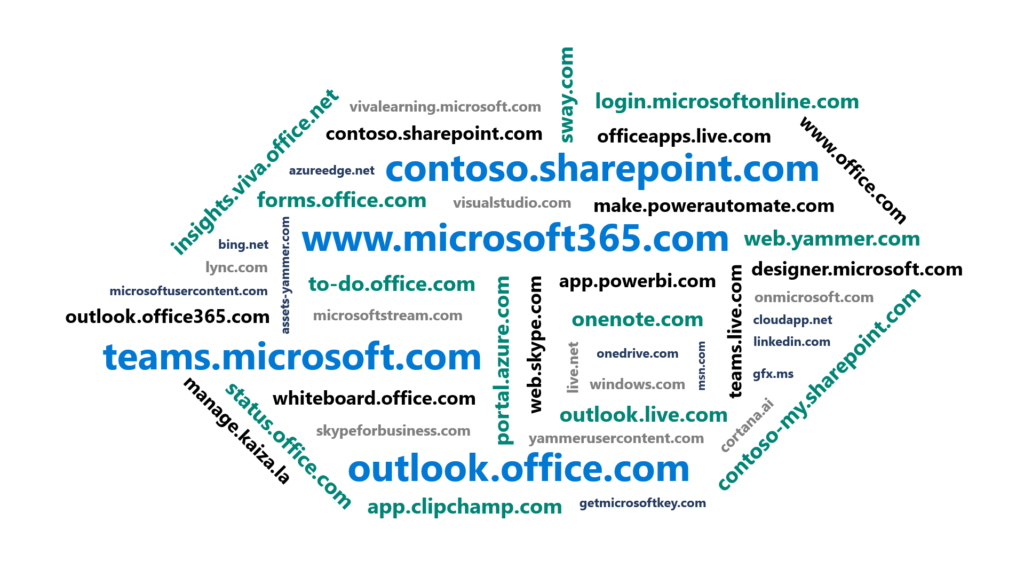
Below, you can see the word cloud added to the initial cloud.microsoft announcement, listing various Microsoft-owned domains that were apparently considered for unification under the new domain.
Source: Microsoft 365 Blog
The list of URLs that could potentially be affected was considerable, to say the least. And can you imagine how many websites and apps would have to be updated if, for example, linkedin.com suddenly became linkedin.cloud.microsoft? Redirects don’t always work, especially when deep URLs are involved.
Fortunately, the word cloud was generated based on quite liberal criteria. Most of the URLs shown there haven’t been migrated to the cloud.microsoft domain – at least not yet. What’s more, some of those links refer to services that no longer exist (for example, cortana.ai).
So, the most important question for now is: what’s already migrated to the cloud.microsoft namespace?
First services to have been hosted under the new domain were brand new services, including some Viva modules that were published under cloud.microsoft right away. The rest have been (and are still being) moved at a slower pace to minimize any potential impact.
Currently, some of the most important Microsoft services that appear under cloud.microsoft are:
- Microsoft 365 admin center
- Exchange admin center
- Web versions of Microsoft 365 apps for business (Word, Excel, PowerPoint, etc.)
- Microsoft 365 Copilot
- Microsoft Forms
Other services operate both under their old domain and cloud.microsoft. These include:
- Outlook on the web
- Microsoft Teams
- Microsoft To Do
For the full list of migrated services, those that operate side-by-side, and other changes, see this section.
Impact of introducing cloud.microsoft
The official statement suggests that no action is required as:
- *.cloud.microsoft has been added to the official list of Microsoft 365 URLs and IP ranges.
- The old service URLs will automatically redirect to new locations.
However, there are some real consequences that do call for action.
- For companies that use smart hosts, firewalls, and heavy Internet traffic control, adding exceptions for *.cloud.microsoft is a must.
- I don’t expect people to read Microsoft’s blogs too often. That’s why it will probably be your (admin’s) task to increase awareness. If you train your users to spot email phishing attempts that link to “microsott.com” or “rnicrosoft.com” instead of microsoft.com (as you should), then expect them to get super nervous when they spot that Outlook opens with a brand-new address shown in the address bar, or that a link in an email directs to a domain that looks different than it did before. To prevent unnecessary tickets and general panic attacks, educate.
- Whether you create Microsoft 365 related content to make admins’ life easier (you know, kind of an admin’s blog, or something like that) or just have a thousand user training documents, you’ll need to update your content. I know there are and will be redirects from the ‘old’ URLs, but:
- There’s no guarantee the redirs will work forever. Call me a glass-half-empty kind of person, but I’m almost certain that at least some of them will stop working at some point. And even if most redirects work fine, this might not work as well in the case of deep links, like Teams deep links.
- You want your content to be or, at least, seem to be up-to-date. Old links suggest that your content might not have been revisited in a while. It’s a bit like still writing ‘Office 365’ instead of ‘Microsoft 365’, or ‘Azure AD’ instead of ‘Entra ID’. Even though most people know what you’re talking about, they might have some doubts.
- Redirects put users (and some tools as well) on their toes. Better to update before it happens.
- Occasional bugs might crop up. For example, I ran into an issue that didn’t let me edit Integrated Apps in the new Microsoft 365 admin center, while the old admin center handled the same task like a charm. That’s why, if something doesn’t work, you can use my list of old and new URLs for troubleshooting in your organization.
So, if you need to know what exactly changes and what’s the progress on introducing the cloud.microsoft domain in production, look below for a list of changes.
List of services on cloud.microsoft
Below, I’m listing all the cloud.microsoft-related updates I’ve found.
Redirects and new services
That’s the list of services that have been successfully migrated to cloud.microsoft + their old URLs that are currently redirected. The question marks mean that the service was deployed to the new namespace right from the start. Or that I haven’t come across the previous URL.
| Service name | Old URL | New URL |
|---|---|---|
| Status Page | status.office365.com | status.cloud.microsoft |
| Sway | sway.office.com | sway.cloud.microsoft |
| Loop | loop.microsoft.com | loop.cloud.microsoft |
| Microsoft Setup | setup.microsoft.com & setup.cloud.microsoft | m365accelerator.microsoft.com |
| Microsoft 365 Copilot app (Microsoft 365 app) | microsoft365.com & office365.com | m365.cloud.microsoft |
| Microsoft 365 admin center | admin.microsoft.com | admin.cloud.microsoft |
| Search & Intelligence (and other sections of the admin center) | admin.microsoft.com/Adminportal/Home#/MicrosoftSearch | admin.cloud.microsoft/#/MicrosoftSearch |
| Exchange admin center | admin.exchange.microsoft.com | admin.cloud.microsoft/exchange#/ |
| Microsoft Places | outlook.office.com/places | places.cloud.microsoft |
| Microsoft Forms | forms.office.com | forms.cloud.microsoft |
| Word for the web | microsoft365.com/launch/word | word.cloud.microsoft |
| Excel for the web | microsoft365.com/launch/excel | excel.cloud.microsoft |
| PowerPoint for the web | microsoft365.com/launch/powerpoint | powerpoint.cloud.microsoft |
| Visio | visio.office.com | m365.cloud.microsoft/launch/visio |
| Whiteboard | app.whiteboard.microsoft.com | whiteboard.cloud.microsoft |
| Bookings | book.ms & outlook.office.com/bookings | bookings.cloud.microsoft |
| Viva Insights | insights.viva.office.com | insights.cloud.microsoft |
| Viva | ? | viva.cloud.microsoft |
| Viva Learning | ? | learning.cloud.microsoft |
| Mesh (retired) | ? | mesh.cloud.microsoft |
| Viva Engage (aka Yammer) | ? | engage.cloud.microsoft |
| Viva Pulse | ? | pulse.cloud.microsoft |
By the way, some solutions from the sizeable Viva suite are no longer available. Viva Topics was retired in early 2025. Viva Goals, a goal-setting and management solution, did not live to see the year 2026. Viva Skills, a solution said to revolutionize HR, seems to have silently disappeared and can’t be reached at the moment.
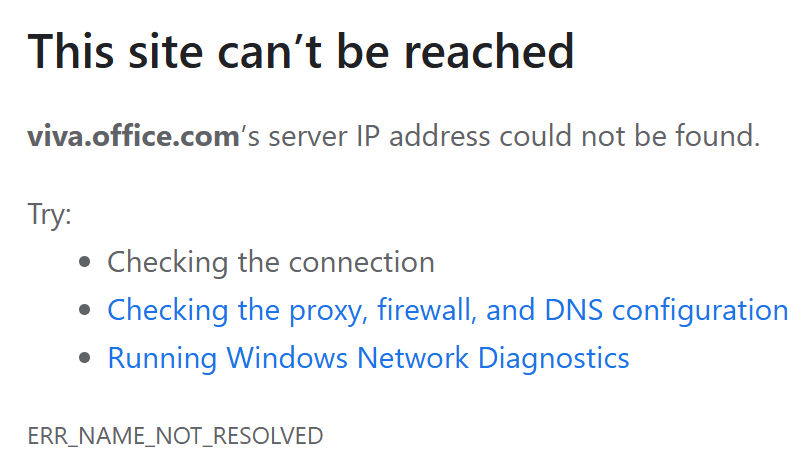
Also, while insights.viva.office.com is successfully redirected to the cloud.microsoft domain, viva.office.com seems suspiciously uninhabited. When I try to visit it, it returns an error:
It’s also worth noting that, currently, the only admin centers available under the new Microsoft top-level domain are the Microsoft 365 admin center and the Exchange admin center (although the second one’s URL format is, in my opinion, a bit awkward). The rest, like the Teams admin center, are still in the microsoft.com namespace.
Side by side
There are services which currently operate side-by-side, both on their old URLs and the new ones. Here’s the list:
| Service name | Old URL | New URL |
|---|---|---|
| Microsoft Copilot | copilot.microsoft.com | copilot.cloud.microsoft |
| Microsoft Teams | teams.microsoft.com | teams.cloud.microsoft |
| Outlook on the web | outlook.office365.com / outlook.office.com | outlook.cloud.microsoft |
| Microsoft Planner | tasks.cloud.microsoft (no longer available) | planner.cloud.microsoft |
| Microsoft To Do | to-do.office.com | todo.cloud.microsoft |
| OneDrive for Business (rolling out) | example-my.sharepoint.com | onedrive.cloud.microsoft |
Last modified on August 5, 2026
I’ll just add that, according to MC1392563, the transition of OneDrive for Business is planned between end of July 2026 and early August 2026. The previous domain and the unified domain will continue to coexist side by side.
Trivia
Now some cloud.microsoft trivia I found unexpected:
- Now for some cloud.microsoft trivia I found unexpected:
- Copilot: copilot.microsoft.com and copilot.cloud.microsoft not only coexist but also represent different resources: Microsoft Copilot (the general-purpose AI assistant by Microsoft) and Microsoft 365 Copilot (the AI assistant for work with Microsoft 365 apps).
- Viva: with Viva, it’s quite different – it’s viva.cloud.microsoft for the user-facing service and viva.microsoft.com is redirected to microsoft.com/microsoft-viva for the marketing part.
- Teams: teams.microsoft is redirected to teams.microsoft.com, instead of the cloud.microsoft domain. Don’t ask me why. According to MC1162275 (updated May 19, 2026), the old URL should start redirecting in the coming months.
- Outlook: According to MC1188995, redirects to outlook.cloud.microsoft are coming. Right now, outlook.microsoft can bounce you to outlook.office.com or to outlook.cloud.microsoft.
What’s the future of brand TLDs?
Microsoft regularly updates the list of services migrated to cloud.microsoft and announces these updates in the Message Center. It seems that all user-facing services will be, at some point, moved to the new domain. In short, we can see that Microsoft continues to actively use its brand top-level domain (TLD). But what about other companies?
Using the brand name as the top-level domain isn’t new (*.google, *.apple and *.amazon are only a few of examples), but still, the majority of Internet users expects ‘dotcom’ rather than ‘dotbrand’ websites.
However, since a tech giant like Microsoft not only applied for, but also started using their own brand TLD, it is possible that the subject will gain a bit more interest.
There are a few things to know about brand TLDs:
- They are a type of generic TLD (gTLD), which is a bit different from standard ‘dotcom’ domain. One of the biggest differences is that you need to apply for a gTLD during a specific timeframe. The current application window opened on April 30, 2026 and will be open until August 12, 2026.
- You need a registered trademark to apply for a brand TLD.
- The process is quite complex and costly.
In other words, you have to jump through some hoops if you want your own brand TLD. But there is an upside – the risk of domain hunting is much lower. And ultimately, a brand TLD used effectively can be good for building trust, which is a universal currency.
See also:
Microsoft 365 Copilot explained by an admin, for other admins

Recommended articles



CodeTwo sp. z o.o. sp. k. is a controller of your personal data.
See our Privacy Policy to learn more.