


Microsoft Exchange Server Subscription Edition (SE) was released on July 1, 2025. It’s supposed to be the latest and final version of on-premises Exchange. After its first announcement back in 2020, when its unofficial codename was simply vNext (the next version), Microsoft continued to microdose news about it. In this article, I’m summing up all the known facts. So, if you want to know what’s new, what Exchange Server SE RTM is, when and how to migrate, and more, read on.
Exchange Server 2016 & 2019 end of life
Exchange Server 2016 & 2019 reached end of support on October 14, 2025. For the following year, customers could receive Critical or Important Security Updates for these versions only if they enrolled in the Extended Security Update (ESU) program, which ran in two phases: the first through April 2026 and the second through October 2026. The ESU program ended in October 2026, officially leaving Exchange Server SE the only supported and vulnerability-tested version.
For a closer look at what the end of support means for Exchange Server 2016 and 2019 users, check out this article.
Coexistence and timeline updates (October 2026)
Microsoft has revised its Exchange Server SE release schedule and coexistence plans several times since the original announcement. Here’s how the roadmap has evolved:
- Exchange Server SE RTM (released in July 2025) allows coexistence with Exchange Server 2016 and Exchange 2019 (which was originally not planned to be supported), but blocks coexistence with Exchange Server 2013.
- Exchange Server SE CU1 was originally planned for release in late 2025, then postponed to the first and subsequently the second half of 2026. Microsoft has since confirmed further delays, without announcing a new release date. CU1 will introduce new features while continuing to allow coexistence with Exchange Server 2016 and 2019.
- Exchange Server SE CU2 was originally planned for release in the second half of 2026, then postponed to the first half of 2027. Microsoft initially planned to block coexistence with Exchange Server 2016 and 2019 starting with CU2, but this restriction was later moved to CU3.
- Exchange Server SE CU3 was added to Microsoft’s roadmap in October 2026. Planned for release in 2027, it will block coexistence with Exchange Server 2016 and 2019, requiring organizations to remove these older versions before installing the update.
Licensing and pricing updates (April‑September 2025)
On April 3, 2025, Microsoft announced some changes to the pricing of on-premises servers. Changes took effect starting from July 2025 (for standalone server licenses), when Exchange Server SE RTM was released. CAL licenses got an increase in August 2025.
- 10% increase in prices for standalone on-premises server products (Exchange Server, Skype for Business Server and SharePoint Server).
- 15% increase in Core CAL Suite.
- 20% increase in Enterprise CAL Suite.
Their cloud counterparts were not impacted, as another gentle shove to the cloud for those who were on the fence about migration.
On July 15, 2025, Microsoft also announced that Core CAL and Enterprise CAL Suites for the United States Indirect Reseller CRP price lists could get a maximum of 10% increase at a time. The first 10% price increase was previewed on August 1, 2025, effective September 1, 2025.
When was Exchange Server Subscription Edition (SE) released?
Exchange Server Subscription Edition (SE) has been globally available since July 1, 2025. But wait, there’s more.
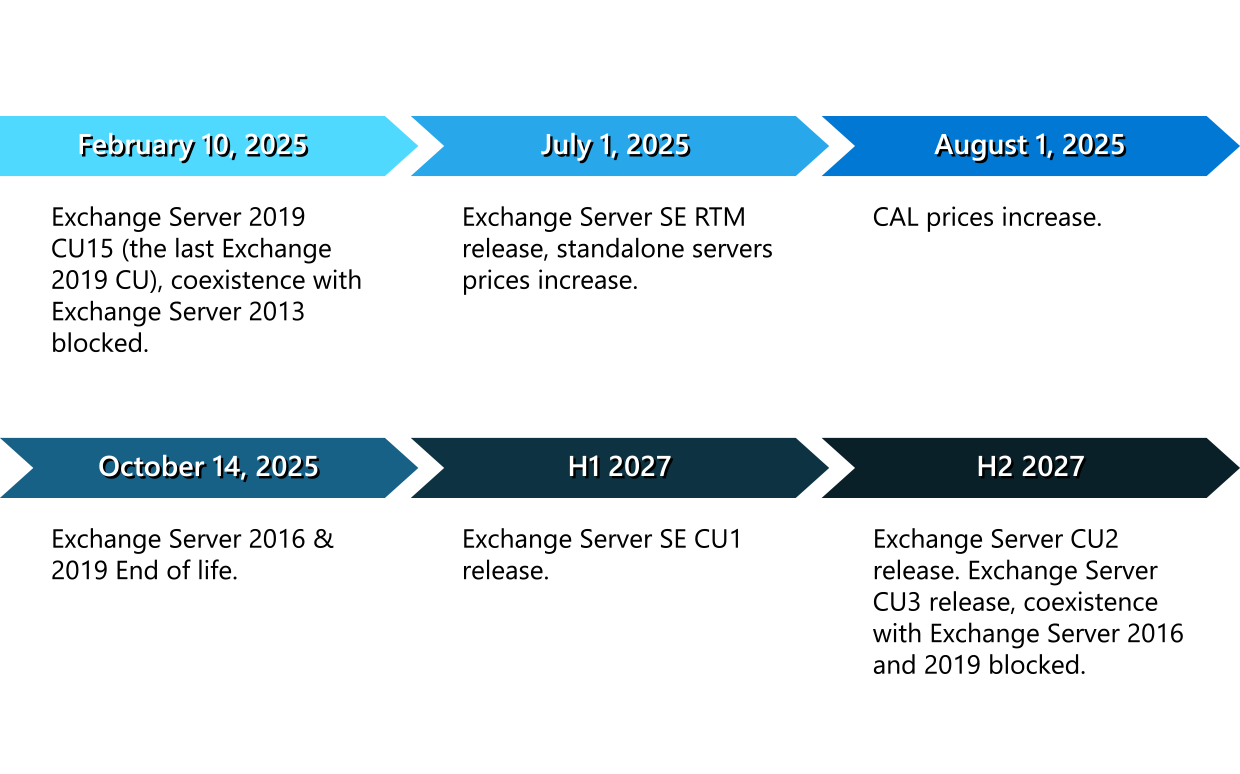
This first version is Exchange Server SE RTM. The next major release, Exchange Server SE CU1, has been delayed several times, and Microsoft has yet to announce a confirmed release date. Here’s a short timeline:
What is Exchange Server SE RTM?
Exchange Server SE RTM is the first release of the “vNext” Server. RTM stands for “Release to Manufacturing”. In common English, it’s the first globally available release. RTM has code parity with Exchange Server 2019 CU15. So, basically, nothing changes between Exchange Server 2019 and Exchange Server SE apart from the name and licensing model.
Some of you might point out that it was quite similar in the case of differences between Exchange Server 2016 and 2019 – there weren’t that many changes when Exchange 2019 was released, either. While technically true, there is one major difference now – the RTM is the advent of a new era, where Exchange upgrades are as easy as installing a new CU. Sounds promising, although the original plan to release two CUs per year has already been disrupted by delays.
The next major release, Exchange Server SE CU1, will introduce new features to SE, although its release date remains unconfirmed. Microsoft has also revised its coexistence plans: Exchange Server 2016 and 2019 will remain compatible with SE through CU2, with coexistence blocked starting with CU3.
In other words, the official plan is to install Exchange Server SE RTM as soon as possible, then install Exchange Server SE CU1 when it becomes available. Finally, decommission older Exchange Server versions before CU3 is released. Personally, I think this approach sounds more reasonable than the previous plan, which expected organizations to decommission all other Exchange editions in less than half a year.
What’s new in Exchange Server SE?
Let’s take a look at all the new things we can expect from the newest Exchange Server, compared to legacy Exchange versions.
Subscription Edition
The main difference, and the one most discussed from day one, is included in the official name. To remind you:
Exchange Server Subscription Edition (SE)
It’s no longer a one-time purchase with a strongly suggested upgrade required every few years when the server version reaches end of life. The only way to have the new Exchange Server with a free license is to use it in a hybrid environment. Then, the free hybrid license will be provided by the Hybrid Configuration Wizard. It’s similar to how hybrids have worked up to now. The upside is that you won’t have to migrate your underlying on-premises server to prevent Exchange Online from “sabotaging” your mail flow.
Licensing changes
The cost increase announced in April 2025 is not everything that changes in terms of pricing and licensing.
If you’re familiar with the Exchange Server’s pricing model, you will know that you had to buy Server licenses and CALs (client access licenses) for every user or device accessing the server. But with the arrival of SE, there’s a slight change here.
You still need to buy Server licenses and CALs, but now you either need a cloud subscription license for every user (preferably E3 or E5), or, if you’re not going hybrid, your licenses need to have “Software Assurance”. In short, Software Assurance is a licensing add-on that increases the price of your licenses and needs to be renewed. In the past, it was in exchange for licenses for version upgrades, now it’s the requirement to have your mailboxes and devices licensed. There’s more to it, but I’ll let you do more research on the dedicated Microsoft page.
No co-existence
Exchange Server SE blocks coexistence with the two previous versions of Exchange Server starting from CU3.
Sysadmins have learnt (sometimes the hard way) that the coexistence of Exchange servers is limited to the last 2 versions. So, you could have Exchange 2013 and 2019 in one environment, but Exchange 2010 and 2019 couldn’t coexist. In other words, migrating from Exchange 2010 to Exchange 2019 required “double-hopping” if using native tools.
Fortunately, you can use migration software like CodeTwo Exchange Migration, which makes such shifts not only possible but also much less stressful, thanks to automation of the whole process, reporting & notifications to keep you posted, easy setup and unlimited delta migrations. CodeTwo Exchange Migration supports migrations straight to Exchange Server Subscription Edition even from Exchange 2013, making the transition as painless as possible.
Microsoft Graph support for hybrid environments (May 2026)
With the May 2026 Hotfix Update, Exchange Server SE gained support for Microsoft Graph in hybrid environments, replacing Exchange Web Services (EWS) for features such as free/busy calendar lookups, MailTips, and profile picture sharing. To use this functionality, administrators need to install the update and configure the Exchange hybrid application, as described in this Microsoft article.
This change is particularly important given Microsoft’s plans to retire EWS in Exchange Online in April 2027. Exchange Server 2016 and 2019 won’t receive this functionality, so organizations relying on hybrid coexistence features need to upgrade to Exchange Server SE before that date.
Note that this change doesn’t affect EWS in on-premises Exchange Server. It only concerns connections from on-premises Exchange to Exchange Online.
No support for Exchange Server 2019, 2016, and 2013

Speaking about legacy Exchange versions, both Exchange 2016 and 2019 reached the “end of life” on the same date: October 14, 2025. This is a common term for the end of extended support for Microsoft products subject to the Fixed Lifecycle Policy. That’s when they stop getting security updates, and it becomes increasingly difficult to keep them secure. Despite their unsupported state, they are allowed to coexist with Exchange Server SE RTM, CU1 and CU2, but they need to be removed before upgrading to Exchange Server SE CU3, which is planned for release in 2027.
Exchange Server 2013 was retired in April 2023 and is now generally considered out-of-date, not secure, and archaic.
So, since you’ll have to migrate eventually, now’s the perfect time to move away from these Exchange versions. Or at least start “packing”. Those public folders you meant to migrate to shared mailboxes years ago, or gigabytes worth of spam will not make the migration any easier.
In-place upgrade
Now this is wonderful news for Exchange Server admins all over the world. Instead of a complex migration project, you can perform an in-place upgrade to Exchange Server SE. The experience is to be similar to installing a Cumulative Update (CU).
However, the catch is that you will be able to perform the in-place upgrade only if you’re already on Exchange 2019 CU14 or CU15, running on a supported version of Windows Server. A legacy migration from Exchange 2016 to Exchange SE is also possible.
Modern Lifecycle Policy – Exchange follows SharePoint’s tracks
In the past, Exchange servers were subject to the Fixed Lifecycle Policy. In other words, they had predetermined support dates:
- Mainstream End Date – when no more Cumulative Updates (CUs) were offered.
- Extended End Date – when Security Updates (SUs) and Hotfix Updates (HUs) stopped, with a few exceptions.
Exchange Server SE follows the Modern Lifecycle Policy (described here). The modern policy doesn’t have support dates set in stone. Instead, it adheres to the rules below:
- Change notification – this policy gives a minimum of 30 days before you are required to take action to avoid significant degradation to the normal use of the product or service.
- Continuity and migration notification – a guarantee that Microsoft will let you know a minimum of 12 months and up to 3 years before they end support for a product. Since Exchange Server SE is supposed to be the last on-premises Exchange, most probably your only migration option at that point would be to move to Exchange Online or try to find an alternative to Microsoft.
Other changes
Other changes introduced in Exchange Server SE include:
- The default authentication protocol will change from NTLMv2 to Kerberos (starting with CU1).
- Remote PowerShell (RPS) protocol will be deprecated starting from CU2 – you will need to switch to the Admin API, which will include a set of REST-based APIs. It’s nothing new for Exchange Online admins, but on-premises PowerShell masters will be required to make significant script updates.
- Outlook Anywhere will be deprecated starting from CU1.
What about new features?
If you look closely at the feature list, you will notice that the pricing shift is the most substantial change.
There are no changes to server roles and no drastic functionality changes. When it comes to new features, I’d expect that Exchange Server SE will get some new(ish) stuff handed down from its “older brother” – Exchange Online.
So, Exchange Server SE serves two most important purposes:
- To support hybrid environments without the need to migrate your mailboxes between on-premises environments.
- To provide an on-premises Exchange solution to those who are most reluctant to migrate to the cloud. As well as those who cannot keep their data in the cloud due to specific laws and regulations.
What options do I have?
If you have any kind of risk management introduced in your organization, using outdated infrastructure is out of the question. So, if you do have on-premises Exchange lurking in your environment, here are your options:
- Migrate to Exchange Online as soon as possible, especially since Exchange 2016 and 2019 have been unsupported since October 14, 2025, as I already mentioned above.
- If you’re already running Exchange Server 2019 CU14 or CU15, perform an in-place upgrade to Exchange Server SE.
- Legacy-migrate from Exchange 2016 to Exchange Server SE.
- Use CodeTwo Exchange Migration to migrate from any Exchange Server version (2013 and later) or from Microsoft 365.
Another push to the cloud
Microsoft has been battling outdated Exchange Servers using various methods. Transport enforcement system is one of them. It’s a method responsible for throttling and blocking emails from persistently vulnerable Exchange Servers.
Exchange Server Subscription Edition removes the need to upgrade servers to the newer versions and makes the update process much easier. At the same time, it’s no mystery that Exchange Online and all the connected services are the first to receive crucial security and feature updates. And since Exchange Server became a subscription-based service, the overall cost of maintaining your on-premises infrastructure has further increased. Which means that there are even fewer reasons not to shift to the cloud.
See how easy it is to migrate to Exchange Online using CodeTwo migration software:
Bonus: How to manage Exchange Server SE email signatures?
Have you ever had the pleasure of managing email signatures for an entire organization using built-in management tools? It’s not a walk in the park, to say the least. That’s why I’ve prepared a detailed walkthrough that shows the entire setup process using mail flow rules:
Manage Exchange Server SE email signatures using mail flow rules

Recommended articles

Do I understand this correctly?
Even if our customer has a CSP Microsoft 365 E3 license, they still need a license for Exchange Server on-premises?
For example, the customer has 10 mailboxes on-premises and 40 in Exchange Online. All 10 on-premises users have a CSP Microsoft 365 E3 license.
Do we still need a license for the on-premises Exchange Server?
Or should we migrate those mailboxes to the cloud and then use a Hybrid License?
I’m asking because there are so many sources, and none of them clearly explain what needs to be done.
According to this post on the Exchange Team Blog, besides the required Server licenses and CALs, customers must also maintain an active subscription. Since the customer has mailboxes both in the cloud and on-prem, I assume there is some sort of hybrid, right? In hybrid environments, SE licenses are complimentary, but I believe you would need to run the Hybrid Configuration Wizard on those mailboxes for it to kick in. Anyway, your customer should be able to use their E3 license to satisfy the “active subscription” requirement, anyway.
That said, I would recommend contacting Microsoft directly to get official confirmation. The Subscription Edition’s licensing details are still a bit of a mystery.
It will be interesting to see if the Subscription Edition (SE) of Exchange Server will allow on-premises environments to use technical accounts for legacy systems that cannot support OAuth 2.0. This could provide a solution enabling these systems to send emails via Exchange SE while utilizing Exchange Online for delivery.
What is the yearly cost? A lot of people need to know for budget next year
There is no indication on when Microsoft will release the Subscription Edition pricing. We are monitoring this closely and will give an update as soon as Microsoft announces specifics.