


The General Data Protection Regulation (GDPR) introduced many changes in the way companies handle data. And although the regulations are the same for every company, the way each organization handles their data security is hardly similar. In this article, I will show you how you can get closer to complete GDPR compliance by blocking possible data leaks in your Exchange Server.
Emails are one of the most potent channels for data leaks – sometimes, an honest mistake can cause an email with personal data to leave an organization and end up in an unauthorized mailbox. Such a data breach is unacceptable and a disclaimer asking to “delete the email if it is not intended for this email address” is not enough under the regulations introduced by the GDPR. Thankfully, you can ensure a much higher data security level of your Exchange Server using CodeTwo Email Signatures On-prem.
Preventing accidental data leaks with DLP
Data Leak Protection (DLP) is a must for all companies who handle personal data at any point. Say, your company has introduced new procedures to handle clients’ personal data. You do not gather more personal data than you need, employees have access only to what they need to know. Thanks to those changes, only selected people ever come in contact with personal data.
There is one slight problem, though.
No matter how many procedures you deploy, there is always a human factor in every company. Mistakes happen and even the most experienced and cautious employees are not an exception. Especially when in a hurry, one might add the wrong person as a CC recipient of an email which contains personal data. Apart from causing potential data breaches, it might cause to spread classified information throughout the organization and out of control. As a result, you might not be able to comply with the right to be forgotten, introduced by the GDPR.
Luckily, you can use CodeTwo Email Signatures On-prem for advanced mail flow management.
CodeTwo Email Signatures On-prem is an email flow manager for the on-premises Exchange Server and a successor to the award-winning CodeTwo Exchange Rules Pro software. It can be used to control the content sent in emails, prevent data breaches, add automatic server-side email signatures, comply with corporate policies, law regulations and more. The scenario below shows how to use CodeTwo Email Signatures On-prem to prevent accidental data breaches.
How to prevent data leaks with CodeTwo Email Signatures On-prem
First, create a new rule which applies to messages by all employees and checks whether emails contain sensitive content. The program can use algorithms, wildcards, phrases, and regular expressions to determine whether the message contains sensitive data or not.
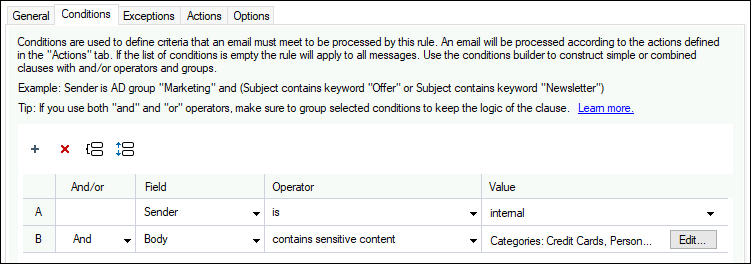
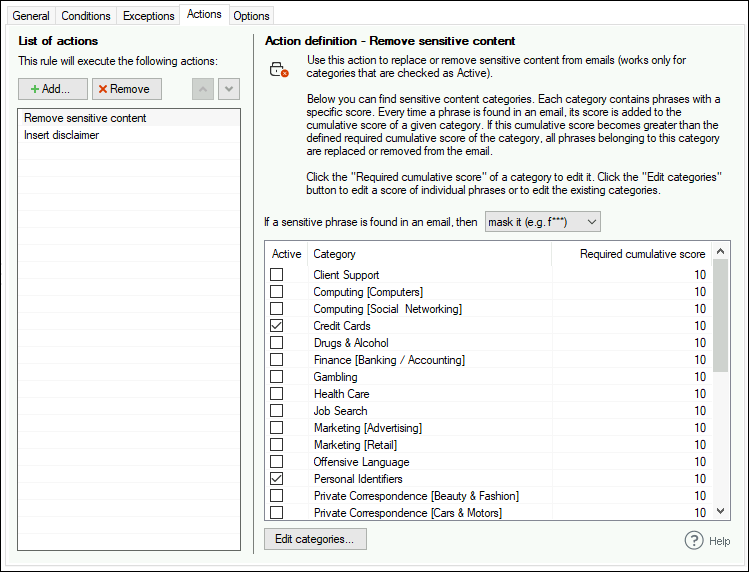
Then, define what the rule should do when it finds personal information in an email. For example, you can mask the data which matches the filters you specify. As an additional step, you can add a disclaimer to those emails. With this disclaimer, you can inform your recipients that some data has been masked as a data-leak precaution.
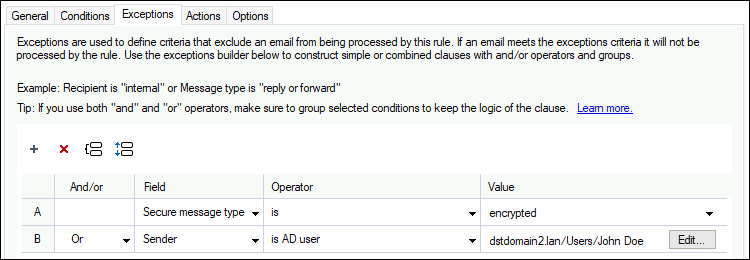
The GDPR is a way to force companies to secure the way they handle personal data. However, it is important not to block your mail flow at the same time. That is where exceptions come into place. You can include all acceptable scenarios so that the program allows sending personal data if the message meets specific criteria.
In the scenario above, the program simply masks sensitive content. However, in some cases, you might need to take more serious measures.
How to block a message with sensitive information and notify a security officer
In case of an accidentally-sent message, marking the sensitive content might be enough. However, data leaks might turn out to be not intentional but well-planned. If, in addition to that, your company deals with sensitive personal data, such data leaks might harm your company even more. That is why you should deal with any unauthorized attempts of sending personal data outside the company, immediately.
After choosing the criteria for the messages which pose a high data leak risk, tell the service to forward the message and block the email:
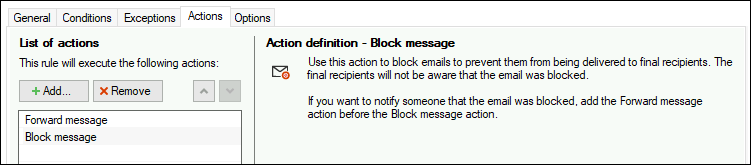
This way, your Data Privacy Officer is instantaneously notified of all data breach attempts and can react accordingly. From the sender’s perspective – the email is normally sent. Data Privacy Officer can forward the email if the message was intercepted or take any necessary steps to prevent an employee from causing data breaches.
What is more, you can allow remote access to rules, so that Data Privacy Officers can fine-tune the rules. This way the rules will apply only to those emails which pose a real threat.
Achieve a fully GDPR-compliant Exchange Server
Using DLP policies can greatly reduce the risk of a security breach in your company. CodeTwo Email Signatures On-prem can help your users switch to the secure and privacy-protecting ways of handling data thanks to advanced attachment management, a smart unsubscribe system and more.
Helping with achieving GDPR compliance is only a fraction of what CodeTwo Email Signatures On-prem can do. The program can also be used to promote your branding, unify your email signatures, and much more. For a full list of the program’s functionalities, visit its main page.
Recommended articles
CodeTwo sp. z o.o. sp. k. is a controller of your personal data.
See our Privacy Policy to learn more.