Sent Items Update needs to be reconfigured
Problem:
You are asked to reconfigure the Sent Items Update (SIU) feature in CodeTwo Email Signatures 365. You see the following status for your Microsoft 365 tenant in CodeTwo Admin Panel (Fig. 1.):
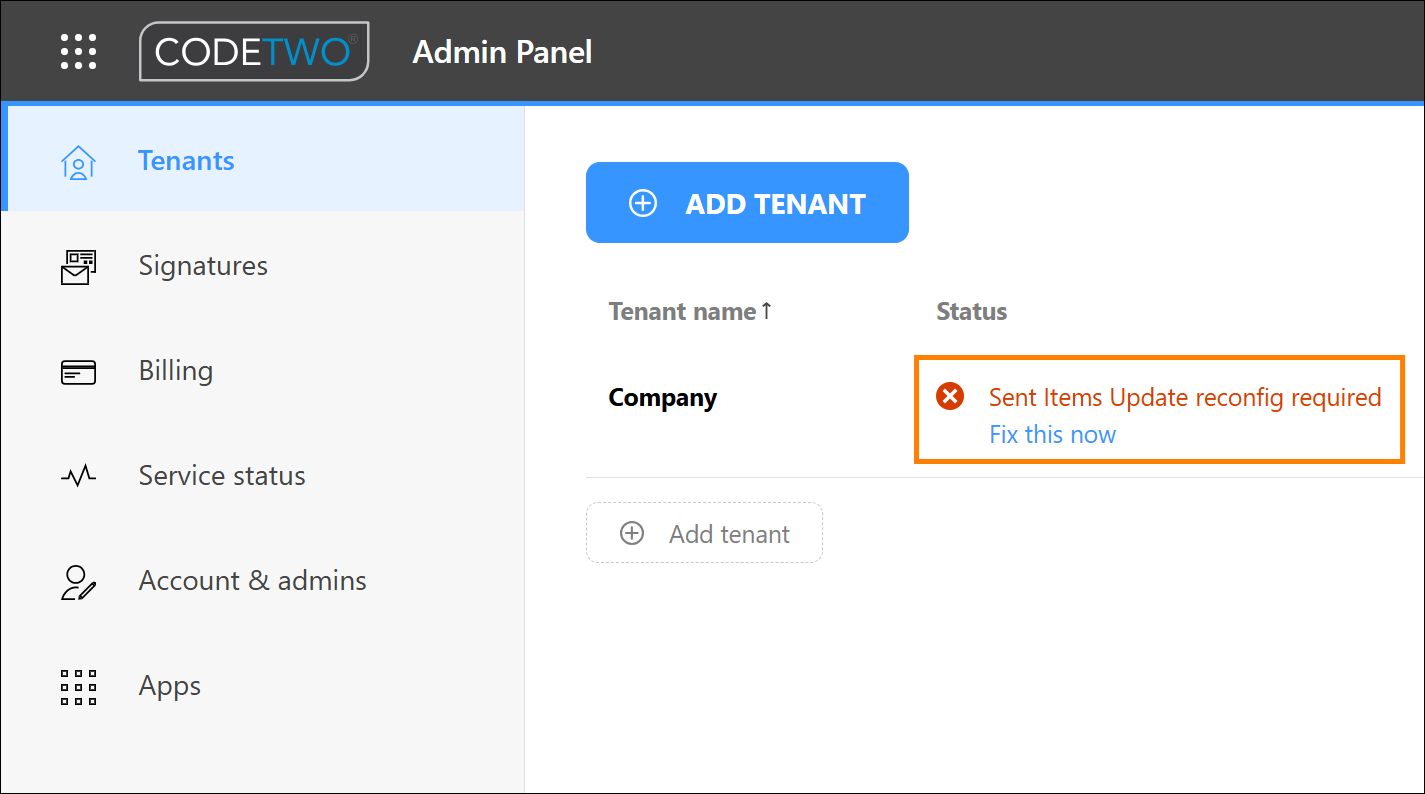
Fig. 1. Notification in CodeTwo Admin Panel asking to reconfigure SIU.
What is Sent Items Update?
The Sent Items Update feature adds cloud signatures to emails in the Sent Items folder. This allows end users to see their signatures, as cloud signatures are added only after an email is sent (and routed through CodeTwo). Find out more about this feature in the manual
Solution:
The status shown in Fig. 1. indicates that:
- The Sent Items Update app needs to be updated – the previous version of the app relied on Exchange Web Services (EWS) to update emails in Sent Items. To make sure SIU will continue to work once EWS is retired in Exchange Online (starting October 2026), we migrated the app to Microsoft Graph. You are asked to reconfigure the app to use the new version.
- Our telemetry found an issue with the Sent Items Update app, for example it has been removed from Entra ID or some permissions are missing. Reconfiguring the app will solve the issue.
If you’ve been asked to reconfigure the SIU feature but can’t see the status shown in Fig. 1., go to this section.
How to reconfigure (restart) Sent Item Update?
The steps are pretty straightforward, but you will need to use your tenant’s Microsoft 365 global admin or privileged role admin credentials to proceed.
- In CodeTwo Admin Panel, on the Tenants page, click Fix this now (see Fig. 1.) next to your tenant (or go to Tenants > <your tenant> > Sent Items Update).
- Use the toggle (Fig. 2.) to turn SIU off and then on again. Accept our Terms, when prompted, then sign in with your Microsoft 365 admin account and accept the required permissions.
Important
If the Microsoft sign-in window doesn’t appear, your web browser may be blocking pop-ups. Allow pop-ups for this site and try turning SIU on again.
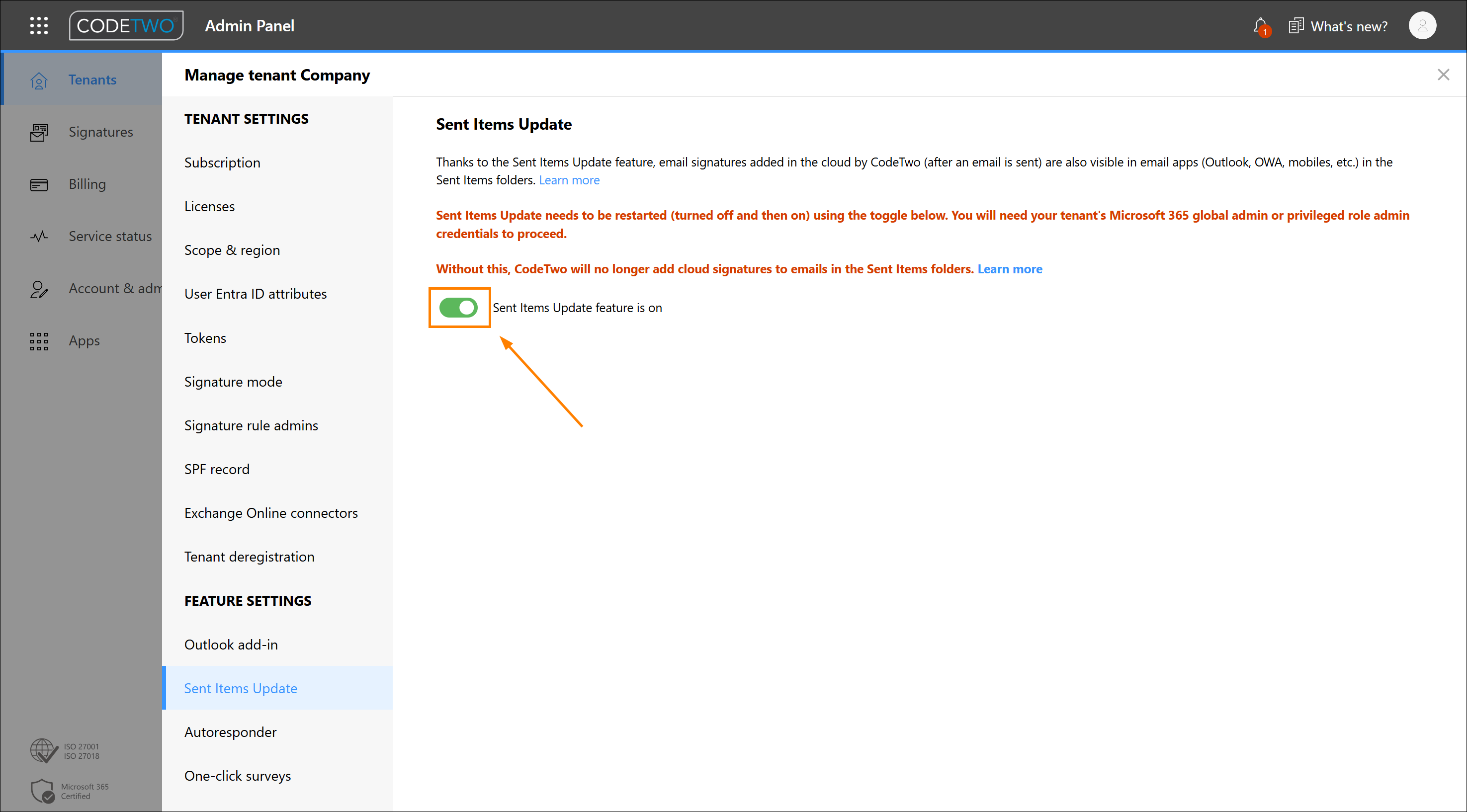
Fig. 2. Turn this toggle off and on again to restart SIU.
- Repeat steps 1 and 2 for each tenant added to your CodeTwo Admin Panel account that has the Sent Items Update reconfig required status, as shown in Fig. 1.
After the reconfiguration is complete, it may take some time (usually up to an hour) for the Sent Items Update feature to start updating emails with signatures in the Sent Items folder.
Additionally, the CodeTwo Email Signatures 365 - Sent Items Update Graph Edition app will be created in your organization's Microsoft Entra admin center (under Enterprise apps). To ensure SIU works correctly, don’t remove or modify the settings or permissions of this app.
Tip
If you used the previous (EWS) version of the Sent Items Update app, you can now remove the following app from your Microsoft Entra admin center: CodeTwo Email Signatures 365 - Sent Items Update (App ID: 3153c72b-35a8-465b-84d8-dfb56651836a).
I can’t see the reconfig option. What should I do?
If you can’t see the Sent Items Update reconfig required status with the Fix this now option (as shown in Fig. 1.), sign out of CodeTwo Admin Panel, clear your browser’s cache and cookies, and sign in again. Alternatively, sign in to your CodeTwo Admin Panel using private browsing (incognito) mode.
If you still can’t see the reconfig option, another admin may have completed the reconfiguration, and your company may already be using the Graph edition of Sent Items Update. To verify this, follow the instructions in the next section.
How do I know which version of Sent Item Update is used in my tenant (Graph vs. EWS)?
You can check this by looking at the CodeTwo apps listed under Enterprise applications in your tenant’s Microsoft Entra admin center, as described here.
- If you see the following app: CodeTwo Email Signatures 365 - Sent Items Update Graph Edition (App ID: 770f02a7-c1e7-400d-a3aa-4902c4992c84), you have the new version of the app that uses Microsoft Graph.
- If you see the following app: CodeTwo Email Signatures 365 - Sent Items Update (App ID: 3153c72b-35a8-465b-84d8-dfb56651836a), you have the previous version of the app that uses Exchange Web Services (EWS).
- If you see both apps, your tenant uses the new Graph Edition, and you can delete the previous EWS version from your Microsoft Entra admin center.
If your tenant still uses the EWS version of Sent Items Update, perform these steps to migrate to the Graph version.
| Related products: | CodeTwo Email Signatures for Office 365 |
| Categories: | Troubleshooting |
| Last modified: | August 13, 2026 |
| Created: | May 26, 2026 |
| ID: | 1160 |






