Thanks to the advanced settings of CodeTwo Exchange Rules, you can create an ‘intelligent’ signature that will change its form depending on circumstances. For instance, in the first mail that you send, your signature might be highly complex and include as much information as you wish, whereas in the further correspondence your disclaimer might be automatically slimmed down and contain just the necessary information about the sender.
In order to do this you just need to create two rules in CodeTwo Exchange Rules administration panel; The first rule will contain just some basic information about you i.e. your name, surname and office telephone number. The second rule might include any remaining info that you think is important – that is: the address of your company, legal disclaimer, fax numbers, email addresses etc.
Now it’s time to play with the settings. All you have to do is to check Do not insert the disclaimer if it is already found in the message for the detailed rule and uncheck the same option for the simplified signature (first rule). Make sure that Stop processing more rules if the current one has been applied is also unchecked for the simplified signature.
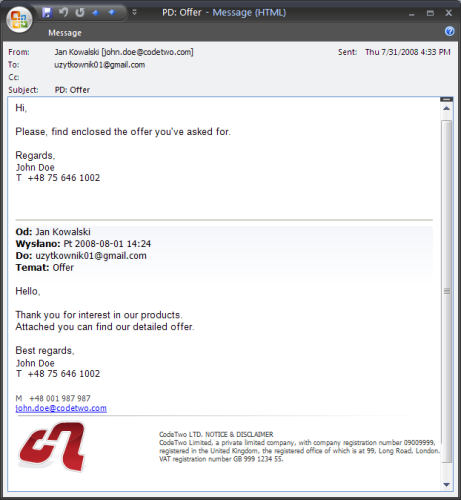
Now your correspondence should look like the one below. First mail comes with the detailed signature but another replies will contain just the data from the simplified signature.
Detailed instructions about this trick can be found in our knowledge base.



Recommended articles



CodeTwo sp. z o.o. sp. k. is a controller of your personal data.
See our Privacy Policy to learn more.