CodeTwo Signatures Web Add-in for Outlook endpoints
This article lists all endpoint addresses used by the CodeTwo Signatures Web Add-in for Outlook (the modern Web Add-in). If your organization uses endpoint security mechanisms (such as endpoint filtering) that block or allow specific endpoints (URLs, IP addresses, port numbers, etc.) make sure to allow traffic to all relevant endpoints listed below.
To ensure the add-in functions correctly, you must allow outbound traffic on:
- Port 443 – required for HTTPS traffic.
- (Optional) Port 80 – for HTTP traffic, if used by your configuration.
Warning
If any required endpoints are blocked, the add-in will not work.
General add-in endpoint address
The following endpoint address is used by CodeTwo Signatures Web Add-in for Outlook irrespective of the Azure region in which the add-in resides. You need to whitelist this address in your system's firewall, or any endpoint security tool used in your organization.
https://emailsignatures365-outlookaddin.codetwo.com
Add-in endpoint addresses for specific regions
The add-in also uses all of the following endpoint addresses. You don’t need to whitelist all of them, but only the one(s) used for the Azure region you selected when registering your Microsoft 365 tenant in CodeTwo Admin Panel.
Australia East
https://au-api.outlookaddin.codetwo.cloud
Canada East
https://ca-api.outlookaddin.codetwo.cloud
Germany West Central
https://de-api.outlookaddin.codetwo.cloud
North Central US
https://us1-api.outlookaddin.codetwo.cloud
North Europe (you need to whitelist both addresses shown below)
https://eu2-api.outlookaddin.codetwo.cloud

https://eu5-api.outlookaddin.codetwo.cloud
UAE North
https://uae-api.outlookaddin.codetwo.cloud
UK South
https://uk-api.outlookaddin.codetwo.cloud
West Europe
https://westeu-api.outlookaddin.codetwo.cloud
West US
https://westus-api.outlookaddin.codetwo.cloud
Azure region information in CodeTwo Email Signatures 365
To check the region of the CodeTwo service responsible for adding email signatures in your organization and storing your tenant's settings, sign in to CodeTwo Admin Panel and click the Service status page. The region information is visible in the Service status section, as shown in Fig. 1. Note that if you have added more than one tenant to CodeTwo Admin Panel, the section will list Azure region information for all your tenants.
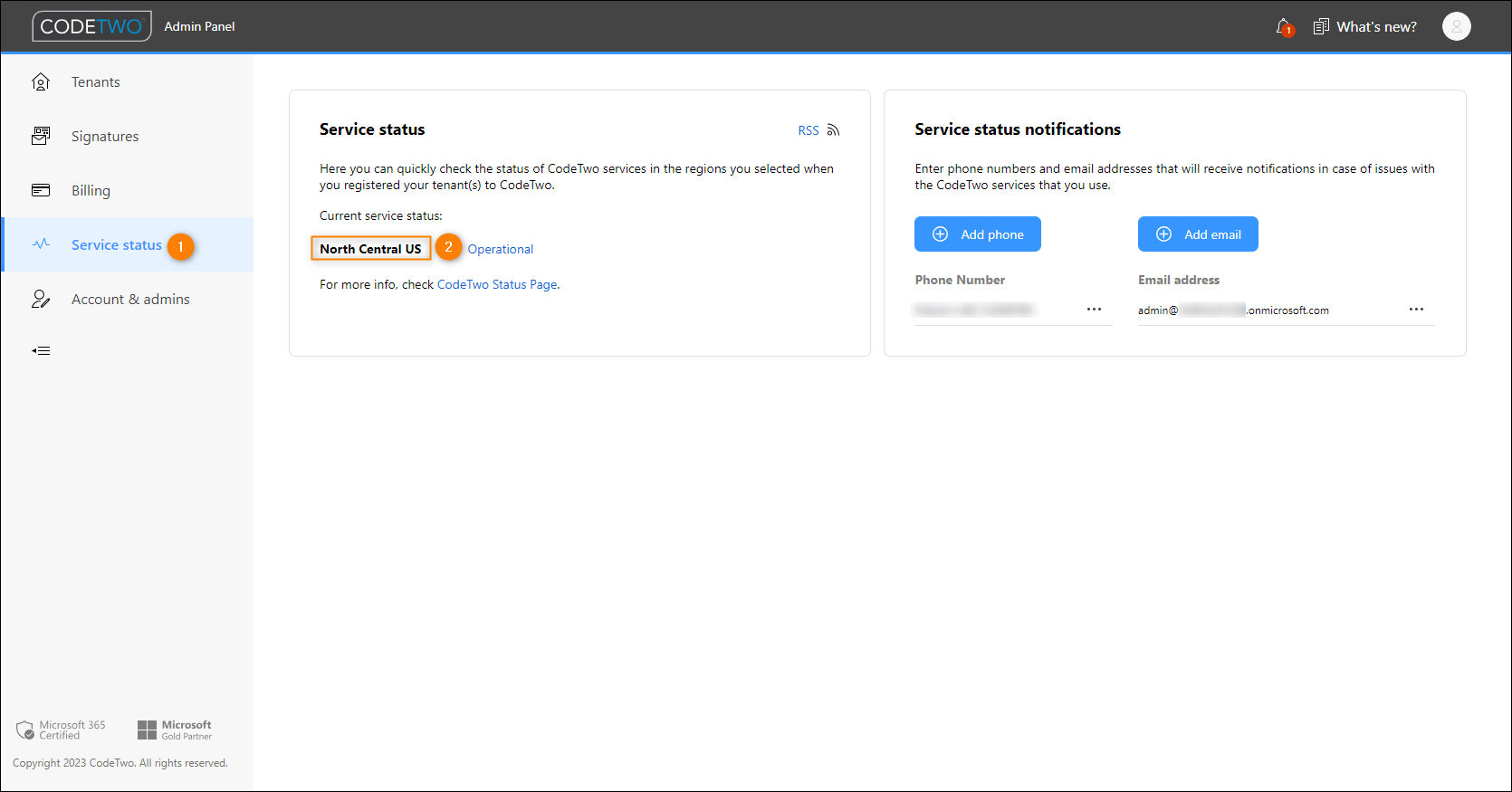
Fig. 1. Region information is shown on the Service status page in CodeTwo Admin Panel.
Troubleshooting
If you have already whitelisted the general and region-specific add-in endpoints but still encounter issues with the add-in, e.g., you see the following message in Outlook:
Your organisation blocked this. Contact your IT admin for more info.
try whitelisting the entire codetwo.com domain by using wildcard whitelisting:
*.codetwo.com*
| Related products: | CodeTwo Email Signatures for Office 365 |
| Categories: | FAQ, Troubleshooting |
| Last modified: | September 30, 2025 |
| Created: | January 10, 2022 |
| ID: | 970 |






