Reject Direct Send setting vs CodeTwo Email Signatures 365
Reject Direct Send is a mechanism that helps Microsoft 365 organizations prevent spoofing and, for example, some phishing attacks. This article explains how it relates to CodeTwo software.
For more general info about Direct Send, Reject Direct Send and their impact on your email security in Exchange Online, see this article.
Direct Send vs Reject Direct Send
These two terms are often confused or used interchangeably. Here’s what they mean:
- Direct Send – a built-in Microsoft 365 mechanism that allows email spoofing in Microsoft 365 environments.
- Reject Direct Send – a protection mechanism that blocks Direct Send in Exchange Online.
How does Direct Send work?
In short, Direct Send is a mechanism that lets you or anyone on the Internet spoof your email domain. It’s been developed to allow devices and apps to send emails while impersonating your domain. The problem is that in 2025 Direct Send has been extensively used by threat actors as an attack vector in phishing campaigns, usually mimicking internal emails.
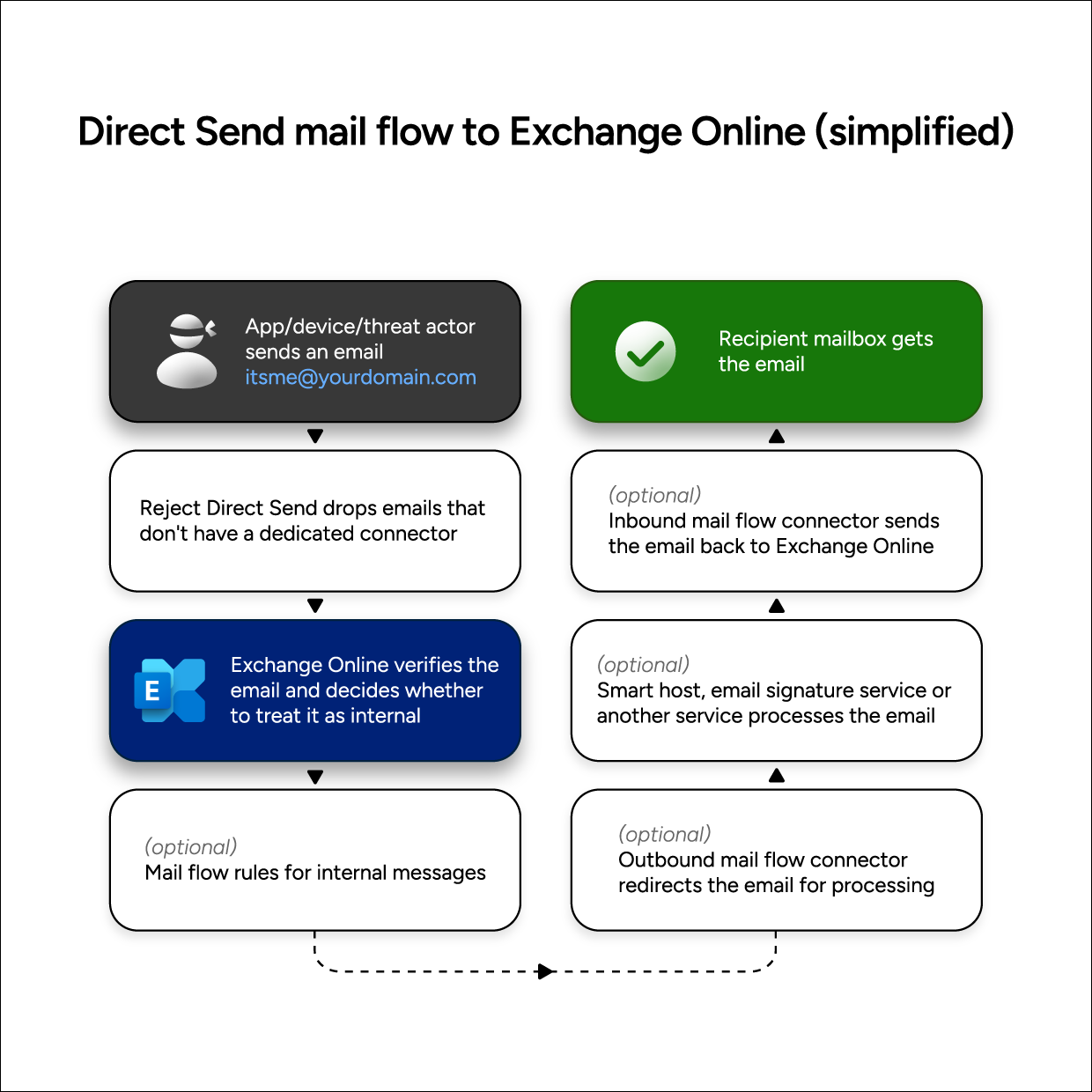
Fig. 1. Simplified Direct Send mail flow to Exchange Online.
How does Reject Direct Send work?
Reject Direct Send is a mechanism that blocks most Direct Send uses. After enabling the Reject mechanism, Direct Send requires you to set up a partner mail flow connector. Otherwise, all attempts to send Direct Send emails to your organization will be blocked.
The difference between Direct Send and CodeTwo signatures
Both Direct Send and CodeTwo cloud signatures have an influence on your mail flow. However, those two mechanisms run independently of each other.
The crucial difference between Direct Send and CodeTwo services is that Direct Send sends messages anonymously using SMTP relay without authentication. With the right SPF, DKIM and DMARC authentication in place, those emails should never reach your Microsoft 365 organization. With Reject Direct Send enabled, you need to use a partner mail flow connector to allow legitimate Direct Send emails.
CodeTwo service, on the other hand, uses authenticated mail flow via Exchange Online OnPremises connectors and dedicated certificates. Unlike Direct Send, the CodeTwo service cannot be used for spoofing.
Learn more about security of CodeTwo Email Signatures 365
What does it mean for CodeTwo customers?
Direct Send and CodeTwo work independently of each other.
What’s more, the Direct Send mechanism bypasses your standard mail flow, which means that those potentially harmful emails will not have CodeTwo email signatures added automatically.
In other words, it means that:
- Rejecting Direct Send should not have any influence on CodeTwo services.
- The only scenario in which Reject Direct Send could block emails processed by CodeTwo Email Signatures 365 is if you use the cloud signature mode and your CodeTwo connectors are misconfigured.
- Emails sent with Direct Send will never have email signatures added by CodeTwo signatures add-in for Outlook.
Direct Send vs CodeTwo cloud signature mode
It is possible to get a Direct-Send-sent email to get a CodeTwo cloud email signature. Here’s how it works:
- When a Direct Send email is sent to your organization, it’s analyzed by Exchange Online protection mechanisms.
- These mechanisms decide whether to allow the message into your systems and whether to treat it as internal or external.
- Based on this analysis, Exchange Online may submit the email to the CodeTwo signature service to have the right signature added.
Using the correct SPF, DKIM and DMARC configuration and enabling Reject Direct Send will prevent unauthorized Direct Send emails from reaching your organization.
How to detect Direct Sent emails?
Microsoft is currently working on a report that checks all Direct Send traffic. While the report is still in development, you can analyze email headers to determine if an email was sent using Direct Send or not. The following header entries suggest that Direct Send was used:
- X-MS-Exchange-Organization-AuthAs: Anonymous (whereas proper internal emails have the value Internal)
- X-MS-Exchange-CrossTenant-AuthAs: Anonymous (whereas proper internal emails have the value Internal)
Closer header analysis will likely uncover more red flags, like suspicious IPs or DNS timeouts. See this article to learn how to view email headers in Outlook.
| Related products: | CodeTwo Email Signatures for Office 365 |
| Categories: | Troubleshooting |
| Last modified: | November 24, 2025 |
| Created: | July 28, 2025 |
| ID: | 1135 |






