How to reclaim lost administrator's rights in CodeTwo Public Folders Syncing Master (server module)
This article is meant for users of CodeTwo Public Folders. This software has been discontinued. You can check the list of currently available CodeTwo products here.
Problem:
You have lost your administrator's rights in CodeTwo Public Folders Syncing Master.
Solution:
The instruction you will find below will help you remedy a situation in which you are denied administrator's rights on the Syncing Master (server) machine in the Administration console of CodeTwo Public Folders even though you are logged in as Administrator. This is signalled by the console with the message box as in Fig. 1.
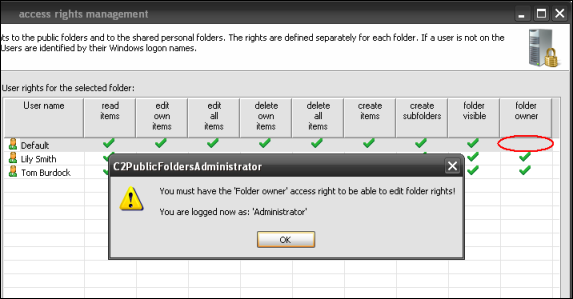
Fig. 1. Access rights management console with the access denied message box.
This is because we have accidentally removed 'folder owner' access right for yourself. This will also occur when you denied this right to the Default user and had not taken enough care to add your own, i.e. Administrator's, Windows logon name to the the list of users and grant maximum access rights.
To receive the right to grant permissions to folders the following steps must be taken on the Syncing Master (server module):
Find the location of the Syncing Master folder and the Administration console. By default, this will be
C:\Program Files\CodeTwo\CodeTwo PublicFolders Serverwhile the file we are looking for is C2PublicFoldersAdministrator.exe
- Run the command line. Choose Start, Run. Type cmd into the filed and press Enter.
- Run the Administration console with super parameter. Drag and drop the C2PublicFoldersAdministrator.exe file from the C2PublicFolders Server folder into the command line screen. Press SPACE and add - super parameter Fig. 2. Confirm by pressing Enter.
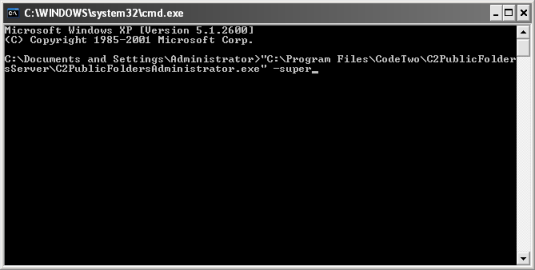
Fig. 2. Command line screen with the command activating the Administration console with super parameter.
Now we have activated the Administration console enjoying maximum permissions. We can make changes; therefore we give back to ourselves the folder owner right, or if we do not have a separate entry for the Administrator, we can now add Administrator (or whatever logon name is used by the person logging in as Administrator) and give ourselves maximum access rights. Finally click Apply.
From now on the Administration console can now be accessed in a conventional way by choosing Start, Programs, CodeTwo, PublicFolders - Syncing Master, Administration.
| Related products: | CodeTwo Public Folders 4.0, 4.5 |
| Categories: | Troubleshooting |
| Last modified: | March 20, 2019 |
| Created: | August 22, 2008 |
| ID: | 34 |





