How to insert a detailed signature in the first email, and only simplified in later correspondence
This article is obsolete and may relate only to older versions of our software.
Problem:
Personalized disclaimers can be divided into detailed and simplified. You can set rules so that the first time a message is sent, it receives a large and detailed disclaimer including first name, last name, position, phone no., postal address, and e-mail address, company logo, while in later replies within the same correspondence a simplified disclaimer is used including just the first and last name.
Solution:
- CodeTwo Exchange Rules software versions: PRO 2.x, 2007 4.x, 2010 3.x, 2013 2.x, 2016 1.x, 2019 1.x and newer please refer to appropriate user's manual article that covers this topic: CodeTwo Exchange Rules PRO 2.x manual, CodeTwo Exchange Rules family manual.
- CodeTwo Exchange Rules PRO 1.x - the principal is identical as in version 2.x, see CodeTwo Exchange Rules PRO 2.x manual for the solution steps and check version 1.x user's manual for options placement in the user interface of version 1.x if in doubt.
- CodeTwo Exchange Rules: 2007 3.x, 2010 2.x or 2013 1.x read the solution idea here and after that see screenshots.
- CodeTwo Exchange Rules: 2003, 2007 1.x and 2.x, 2010 1.x read the solution idea here and after that see screenshots.
General idea of the solution
Note: This solution is only intended for the older program versions listed in the section above.
You need to create two separate rules and tweak some of their settings. The first rule for the the simple signature that will be always added to your mail and the second one that would be an extension of the first one containing some extra data that you want to be added to your mail only for the first time.
- Go to your CodeTwo Exchange Rules administration panel and create two rules;
- Set the first, simplified personal signature as described below:
- The rule containing the simplified signature must be located higher in the list of rules than the detailed signature.
- Edit the signature in the signature editor and add the details (as placeholders) you want to be inserted into each message/reply/forward you send e.g. first and last name only.
- Check the box Insert disclaimer below the response text.
- Uncheck Do not insert the disclaimer if it is already found in the message.
- Uncheck Stop processing more rules if the current one has been applied.
- Set the second, detailed signature as described below:
- This rule must be lower in hierarchy of rules than the simplified signature.
- Enter all details that you want to be present in the signature added the first time a message or reply/forward is sent. Note! The detailed signature must not include the details that have been provided in the simplified signature as this data would appear doubled in the message.
- Check Insert disclaimer directly below the response text.
- Check Do not insert the disclaimer if it is already found in the message.
With these settings in action, the first time you send a message or reply/forward it will contain both signatures, the simplified one followed by the detailed one. Since the information about the sender is not doubled in these signatures, the recipient will see them as one big signature. For the next messages in the series, only the simplified signature will be inserted.
Check out screenshots for particular version of the software to properly apply the solution:
- CodeTwo Exchange Rules: 2007 3.x, 2010 2.x or 2013 1.x see screenshots right below.
- CodeTwo Exchange Rules: 2003, 2007 1.x and 2.x, 2010 1.x see screenshots at the bottom of this article.
Screenshots for CodeTwo Exchange Rules software 2007 3.x, 2010 2.x or 2013 1.x
You will find the above settings in Signature/disclaimer template and Subsequent rules sections of the rules' properties:
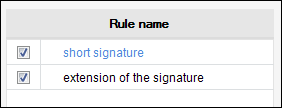
Fig. 1. A proper order of the signatures on the list of rules.
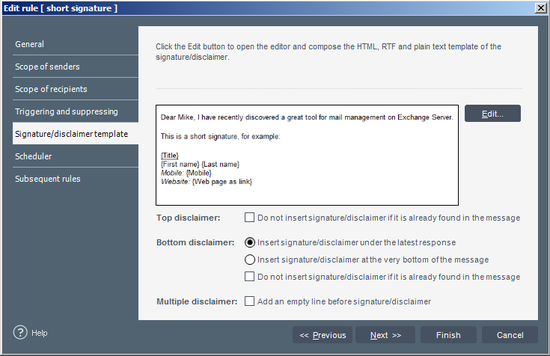
Fig. 2. A properly configured Signature/disclaimer template section of the first rule.
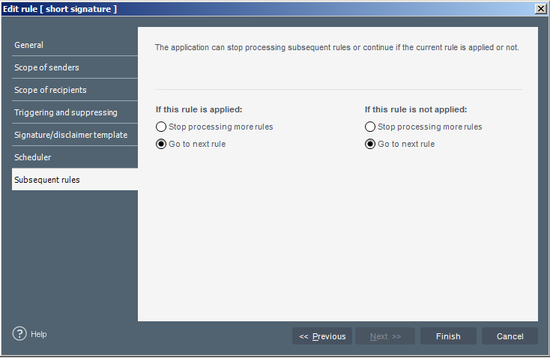
Fig. 3. A properly configured Subsequent rules section of the first rule.
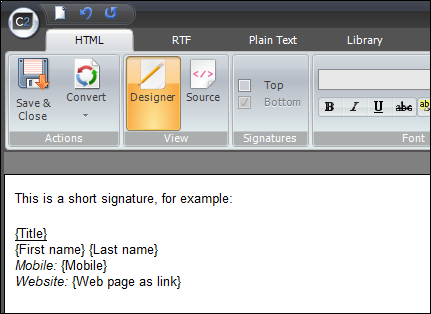
Fig. 4. An example of a short signature.

Fig. 5. A properly configured Signature/disclaimer template section of the second rule.
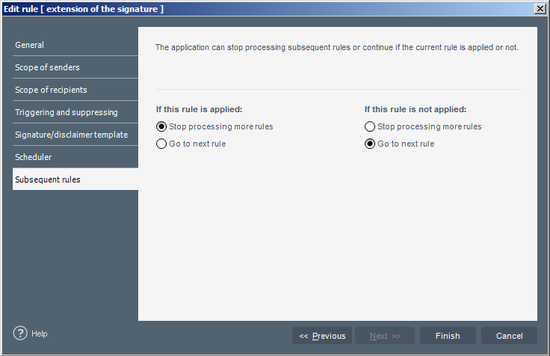
Fig. 6. A properly configured Subsequent rules section of the second rule.
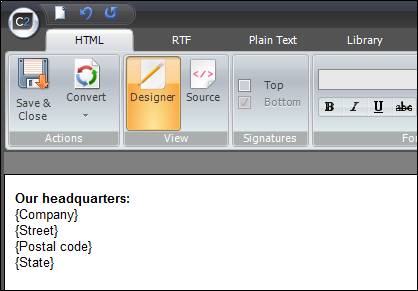
Fig. 7. An example of an extension of the signature.
There is an exemplary settings file available to download here for your convenience. Please backup your existing rules by exporting them first.
Screenshots for CodeTwo Exchange Rules software 2003, 2007 1.x and 2.x, 2010 1.x
You need to configure appropriately the Replying and Forwarding options (Fig. 9) in Advanced Options (Fig. 8).
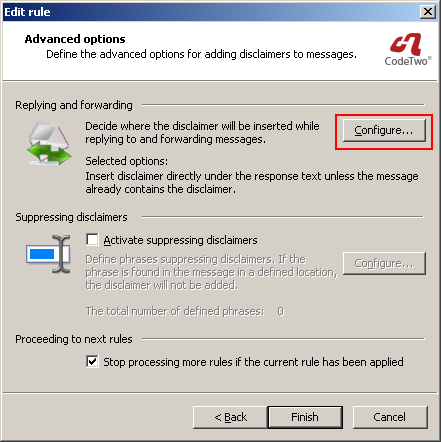
Fig. 8. Accessing configuration of replying and forwarding.

Fig. 9. Replying and forwarding options.
See also:
| Related products: | CodeTwo Exchange Rules 2.x, 3.x, CodeTwo Exchange Rules 2007 1.x, 2.x, 3.x, CodeTwo Exchange Rules 2010 1.x, 2.x, CodeTwo Exchange Rules 2013 1.x, CodeTwo Exchange Rules Pro 1.x |
| Categories: | How-To |
| Last modified: | September 15, 2023 |
| Created: | July 31, 2008 |
| ID: | 14 |





