Licensing
Below you will find answers to the most common questions related to the CodeTwo Email Signatures On-prem licensing model:
- How many licenses do I need?
- Do I need to buy licenses for all mailboxes in my organization?
- How can I buy the subscription?
- Where can I check my subscription status and the number of used licenses?
- How can I buy additional licenses?
- How to remove an assigned license from a user who no longer needs it?
- Do I have to renew the subscription annually?
- How do I manually reactivate the product after purchasing additional licenses or extending the subscription?
- Do I need to buy additional subscriptions to use the program on several servers processing mail (multi-server environment)?
- How do I activate the program to the full version?
- Can I extend the trial period?
- I have a product from the CodeTwo Exchange Rules family. Can I migrate to CodeTwo Email Signatures On-prem?
Tip
See the product's website for pricing and ordering details.
How many licenses do I need?
CodeTwo Email Signatures On-prem is offered in a yearly subscription model. You need to purchase as many licenses as there are mailboxes in your organization that you want to benefit from the program – for example, mailboxes whose emails receive signatures, disclaimers, or automatic replies, are forwarded, or are otherwise processed by the program (e.g. subject or sender modification, attachment removal, sensitive content filtering, etc.).
Important
The number of Exchange servers that handle your mail flow does not affect pricing. See this section for more information about licensing in multi-server and multi-forest environments.
Do I need to buy licenses for all mailboxes in my organization?
No, you don’t. You only need to purchase licenses for the mailboxes that will benefit from the program.
How can I buy the subscription?
You can buy a subscription to CodeTwo Email Signatures On-prem by using this order form.
Where can I check my subscription status and the number of used licenses?
You can check the subscription expiry date and the number of currently used licenses (along with the list of licensed mailboxes) by clicking the Server Monitor button (Fig. 1.).
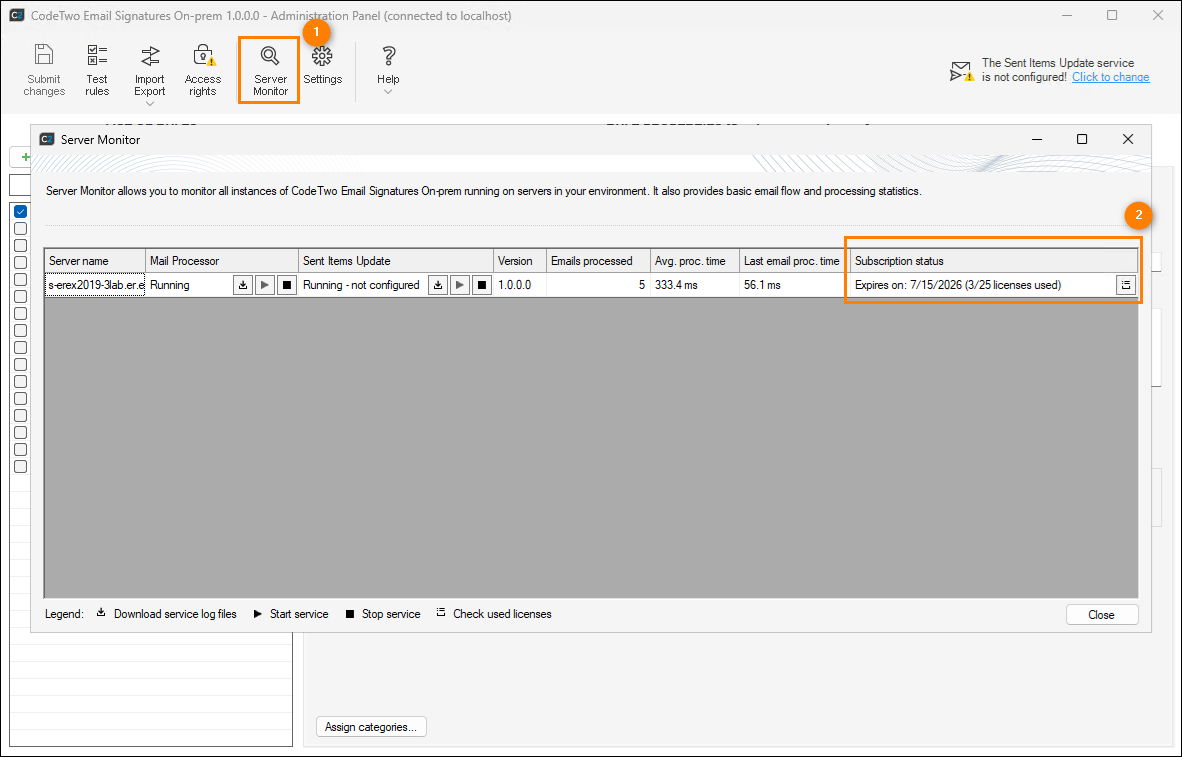
Fig. 1. Checking the number of used and available licenses.
The Subscription status is shown in the upper-right corner of the window (see Fig. 1.). Here, you can check the subscription’s expiry date and how many licenses are currently in use (licenses in use / total number of licenses) on a specific server.
To check which mailboxes the licenses are assigned to, click the Check used licenses ( ) button in the Subscription status column. The list of users (mailboxes) will appear (Fig. 2.).
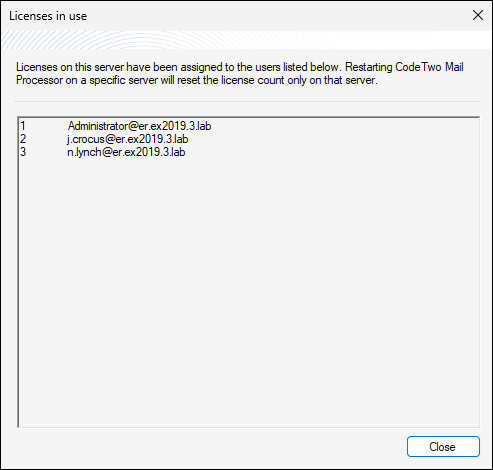
Fig. 2. The list of users (mailboxes) that are using CodeTwo Email Signatures On-prem licenses.
How can I buy additional licenses?
If the number of licenses is insufficient for your needs, you can purchase more licenses at any time during your subscrition period. Just go to the order form and select Additional licenses.
After buying additional licenses, the license count will be updated automatically in the program within up to 24 hours. If you want to speed up the update, follow the steps described in this section.
Important
Adding licenses does not extend your current subscription period. The price for additional licenses is reduced proportionally to the remaining period of your current subscription.
To extend the subscription, you need to renew it.
How to remove an assigned license from a user who no longer needs it?
Removing an individual email address from the list of licensed addresses requires clearing the entire list of licensed users. New licenses will then be assigned automatically when the program performs an action for a given mailbox, such as adding a signature or forwarding an email.
To clear the list of licensed users, follow the instructions below:
- If you want to make sure that a specific email address is licensed, click the Server Monitor button located on the Administrator Panel’s toolbar and select the Check used licenses button in the Subscription status column. Learn more
- To clear the list of licensed email addresses, restart the CodeTwo Mail Processor on each server. You can use the
 buttons located in the Server Monitor window (Fig. 3.), or the Windows Services menu (services.msc).
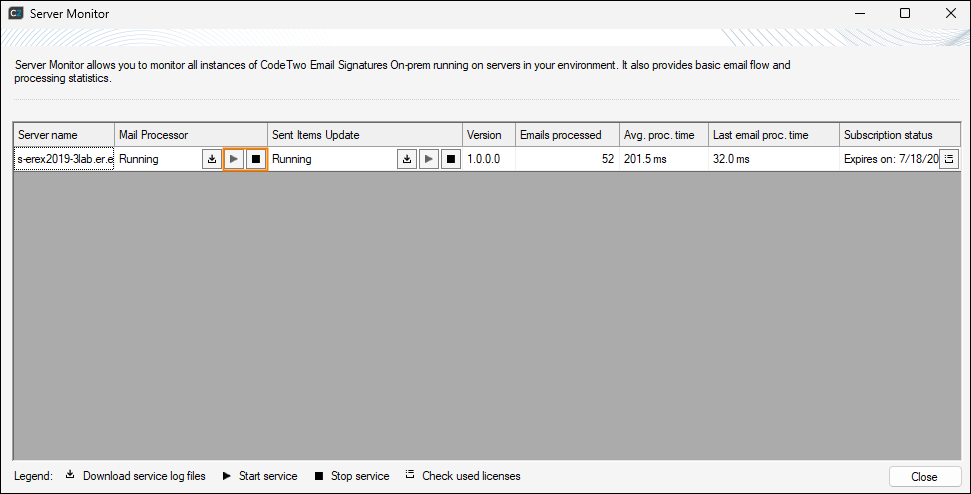
Fig. 3. Restarting the CodeTwo Mail Processor from the Server Monitor window.
Do I have to renew the subscription annually?
Yes. A CodeTwo Email Signatures On-prem subscription is valid for 12 months from the date of its activation. If you want to continue using the program in your organization, you need to renew the subscription before it expires. Otherwise, all rules configured in the program will stop working. This means the program will no longer add signatures or control mail flow in your organization (however, your emails will not be blocked in any way).
To renew the subscription, go to the order form and select License renewal (yearly subscription).
How do I manually reactivate the product after purchasing additional licenses or extending the subscription?
Additional licenses or subscription renewals are applied automatically within 24 hours. To speed up the process, you can reactivate the license manually.
To do this, run Email Signatures On-prem Licensing from the Start menu in Windows (or click Help > Licensing in the program’s Administration Panel). In the Licensing window that opens, check whether the license key matches the one for which you purchased additional licenses or renewed the subscription (you can find the license key in the order confirmation email). Then click Activate (Fig. 4.).
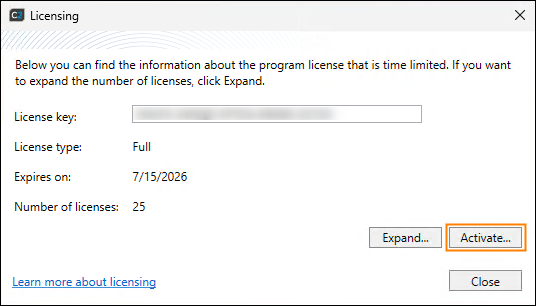
Fig. 4. Reactivating CodeTwo Email Signatures On-prem.
Do I need to buy additional subscriptions to use the program on several servers processing mail (multi-server environment)?
No, you don’t. The licensing model of CodeTwo Email Signatures On-prem is based on the number of mailboxes that benefit from the program. This means a single subscription covers all servers within the same Active Directory forest. However, if you want to use the program in multiple forests, contact us to receive a separate license key for each domain forest.
Note that the Email Signatures On-prem Services (the component responsible for processing mail) must be installed and activated on every server with the Mailbox role. Instructions on how to install the program in a multi-server environment are available here.
How do I activate the program to the full version?
Once your order is completed, you will receive a license key that will upgrade the program from the trial version to the full version. Learn more about the activation process
Can I extend the trial period?
If you want to test the program for longer than 14 days before purchasing, contact our Technical Support.
I have a product from the CodeTwo Exchange Rules family. Can I migrate to CodeTwo Email Signatures On-prem?
Yes, you can. The migration process is as simple as performing an in-place upgrade. Just download CodeTwo Email Signatures On-prem and install it over your existing CodeTwo Exchange Rules (Pro) installation. All rules and settings will be migrated automatically, allowing you to start using the new software immediately. Learn more about the migration process
After the migration, CodeTwo Email Signatures On-prem will run as a fully functional 14-day trial, as it is a separate product with a different licensing model. To continue using the software after the trial, you’ll need to purchase a yearly subscription and activate the program before the trial period ends. Otherwise, the software will stop working. See the product’s website for pricing and ordering details.
If you have a valid support contract for CodeTwo Exchange Rules 2016/2019/Pro, you are eligible for a free 1-year subscription to CodeTwo Email Signatures On-prem. If your support contract has expired, you can still migrate your license at a discounted rate. Learn more on the pricing page
Important
Note that your CodeTwo Exchange Rules (Pro) license key will stop working 90 days after you receive new license keys for CodeTwo Email Signatures On-prem.
See next
Trial version - this article describes how the trial version works
See also
License Agreement - this article contains the terms and conditions of using CodeTwo software.
Activation - this article describes the activation procedure of the program.
In this article