CodeTwo Sync for iCloud
Sync Outlook folders with iCloud folders automatically

This tool is deprecated, which means it’s no longer available for download, and we no longer develop, maintain, test, or support it. Because of that, we can’t guarantee it will work properly in your environment. You can see our current software products here.
Sync Outlook calendars, contacts and tasks with iCloud folders automatically and get all your data propagated between Outlook and iOS devices in real time.

Please note! This is NOT a mobile app so please do not install it on your mobile device. Download the program and install it on your PC with Microsoft Outlook.
Features
Sync Outlook folders with iCloud folders
This Microsoft Outlook addin will let you automatically synchronize your Outlook contacts, calendars and tasks with your iCloud data file in Outlook, which will then sync those folders with iCloud and across your iPhone, iPad and other Apple® devices.
No need to save or move items to iCloud tree in Outlook anymore
Once you install iCloud Control Panel for Windows, a new tree of folders is added to Outlook, but your existing Outlook folders are somewhere else. CodeTwo Sync for iCloud will let you keep these folders in sync, so you can finally forget about jumping between the folders and manually copying items to iCloud and back.
One-way and two-way sync
Pick up one of the three sync methods for each of your folders. Sync from Outlook to iCloud, from iCloud to Outlook, or in both directions.
Automatically sync up your folders in real time
Outlook folders are synced automatically and immediately in the background. Note! iCloud synchronization with your handhelds depends on iCloud performance and your internet connection speed.
Easy to install and use
The addin is seamless. Just install it on your PC and follow the wizard. You'll see how easy and quick it is.





How it works
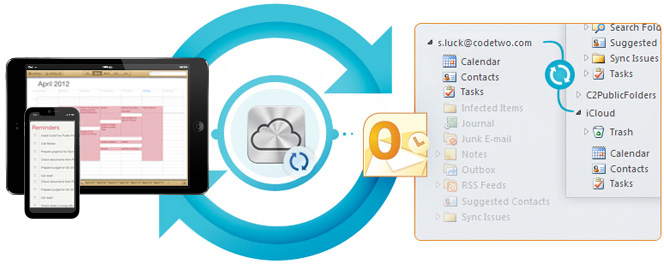
Apple's iCloud feature lets you share your calendars, contacts and tasks across your devices and Outlook. The iCloud addin for Outlook and Windows, called iCloud Control Panel, adds an additional tree of folders to Outlook, which requires you either to move all your folders to the iCloud tree or to manually copy new or edited items to iCloud whenever you need it.
This is where CodeTwo Sync for iCloud comes in. This easy to use Outlook addin will let you automatically synchronize your personal folders in Outlook with iCloud folders.
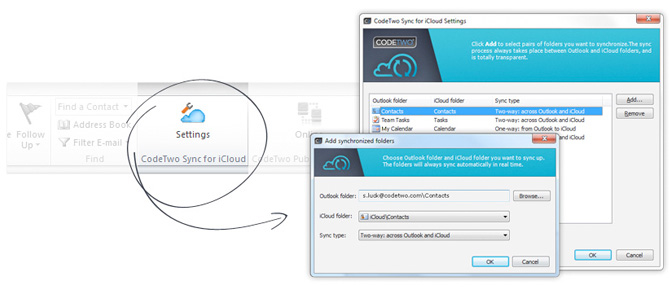
CodeTwo Sync for iCloud installs as an Outlook add-in and can be accessed from the ribbon. Simply click on its icon to select Outlook folders you want to sync with iCloud folders.
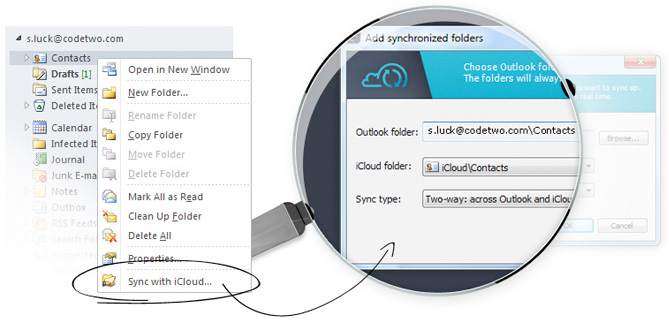
Alternatively, you can also right-click on the desired folder in Outlook and select Sync with iCloud from the context menu. It will let you choose folders for synchronization and select one of the sync types.
Once your pairs of folders are in sync, you can finally view and edit them on any of your Apple® devices and sync them back to your Outlook wirelessly no matter where you are.

Installation and configuration
Here's what you have to do to sync Outlook calendars, tasks, and contacts with iCloud and your iPhone, iPad or Mac.
- Make sure you have iCloud Control Panel for Windows installed on your PC equipped with Outlook.
- Make sure your Apple® devices are configured to work with iCloud. Learn more...
- Download and install CodeTwo Sync for iCloud on your PC equipped with Outlook.
- Take a look at the Quick Tour that pops up right after the installation.
- Launch Outlook and start syncing your folders with iCloud!






