Setting global encoding for outgoing messages at the server level
Problem:
You need to enforce the same encoding in every Outlook client.
Solution:
The correct choice of encoding for outgoing messages is necessary for the faultless display of language-specific characters found in languages such as Swedish, Greek, Spanish, Danish, etc.
There’s an option to change encoding directly in Outlook. However, this requires every user to modify the Outlook settings themselves. If that is not feasible, you can set the global encoding policy for Outlook users at the server level. To do so in Windows Server 2008 and newer:
If you do not have the ADM file for the Outlook version used by your users, download it from the Microsoft Download website:
- Open the Group Policy Editor. To do so, open the Run command box, type gpedit.msc and click OK.
- Now, add the ADM file: expand User Configuration and right-click the Administrative Templates. From the drop-down menu, choose Add/Remove Templates (Fig. 1.). In the window that opens, click Add and point to the location of the ADM file downloaded in step 1.

Fig. 1. Adding the ADM file to the available templates.
- Once the ADM file is added, the Administrative Templates list will include Microsoft Outlook. Go to Outlook Options > Mail Format > International Options and double-click Encoding for outgoing messages (Fig. 2.).
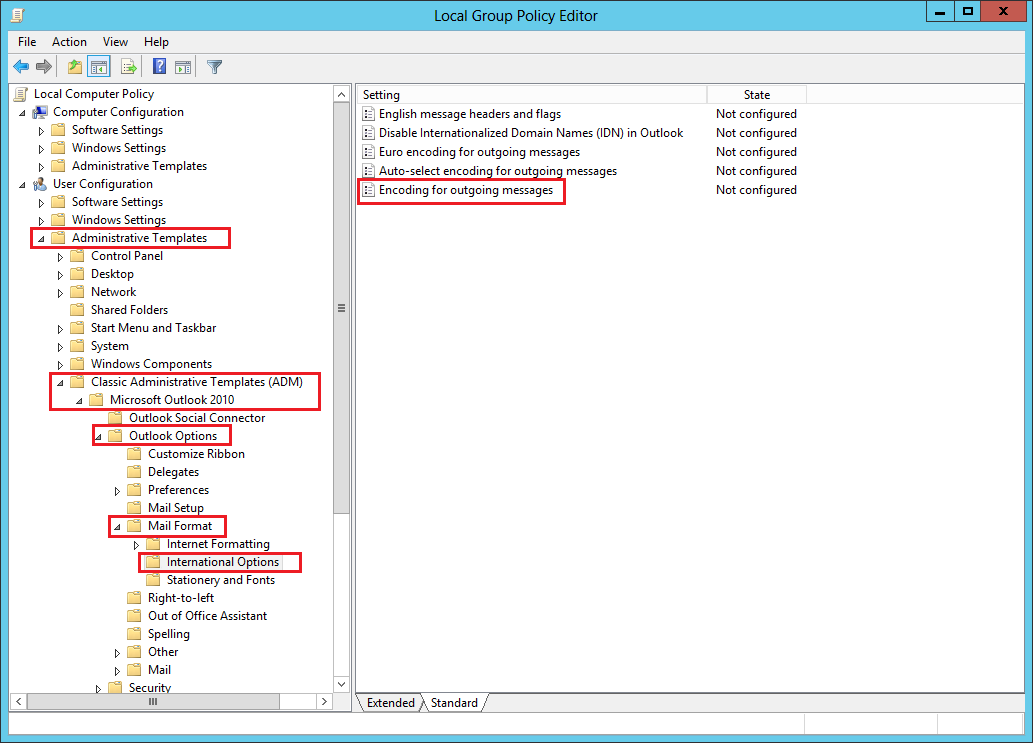
Fig. 2. The location of the template responsible for Outlook settings
- In the window that opens, set Encoding for outgoing messages to Enabled. Now, choose the default global encoding for outgoing messages. The recommended choice is Unicode (UTF-8) (Fig. 3.).
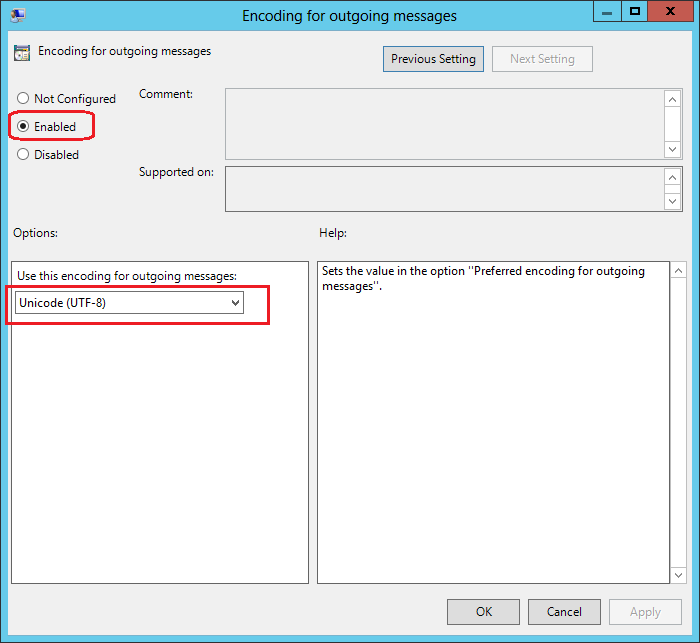
Fig. 3. The recommended encoding configuration for the outgoing messages.
See also:
| Related products: | CodeTwo Email Signatures for Email Clients, CodeTwo Exchange Rules 2.x, 3.x, CodeTwo Exchange Rules 2010 1.x, 2.x, CodeTwo Exchange Rules 2013 1.x, CodeTwo Exchange Rules 2016 1.x, CodeTwo Exchange Rules 2019 1.x, CodeTwo Exchange Rules Pro 1.x, 2.x |
| Categories: | How-To |
| Last modified: | February 2, 2026 |
| Created: | January 30, 2009 |
| ID: | 77 |





