This manual refers to an old version of CodeTwo Exchange Sync. Go here if you use the latest version.
Program's architecture
CodeTwo Exchange Sync is a tool that enables synchronization of Exchange folders (including Public Folders) not only between mailboxes but also across mobile devices. The program's architecture is based on three components that are installed once the setup is completed:
Synchronization Service
It is a Windows type of service directly responsible for processing synchronization tasks defined within the Administration Panel. The service cooperates with the Exchange server in terms of processing tasks and monitoring folders defined in those tasks in search for any changes on their content. After the initial synchronization qualifies folders for syncing, the service remains operational at all times and is being notified by the Exchange Server about any change introduced to the content of folders. If such are found, the Exchange Server sends notification to Sync Service which triggers the sync process. Such cooperation assures the real-time synchronization between the content of the chosen folders.
Administration Panel
It is a management console of the program where all synchronization tasks / settings are defined. Once created, the tasks are handled over to Synchronization Service for processing. Additionally, if the program deviates from its standard behaviour, you can easilly make use of the diagnostic files to review the problem.
Attendant
It is a Windows type of service working only for the automatic type of connection to Exchange. This service is responsible for monitoring the Synchronization Service in terms of its proper operation and any access parameters changes to Exchange. If the service deviates from its standard behaviour or the access parameters change, it uses autodiscover to detect another available server and automatically switches to that server to sustain synchronization process.
The diagram below shows the example on how the program's components cooperate with one another to execute one-way synchronization of tasks between two different mailboxes (Fig. 1.):
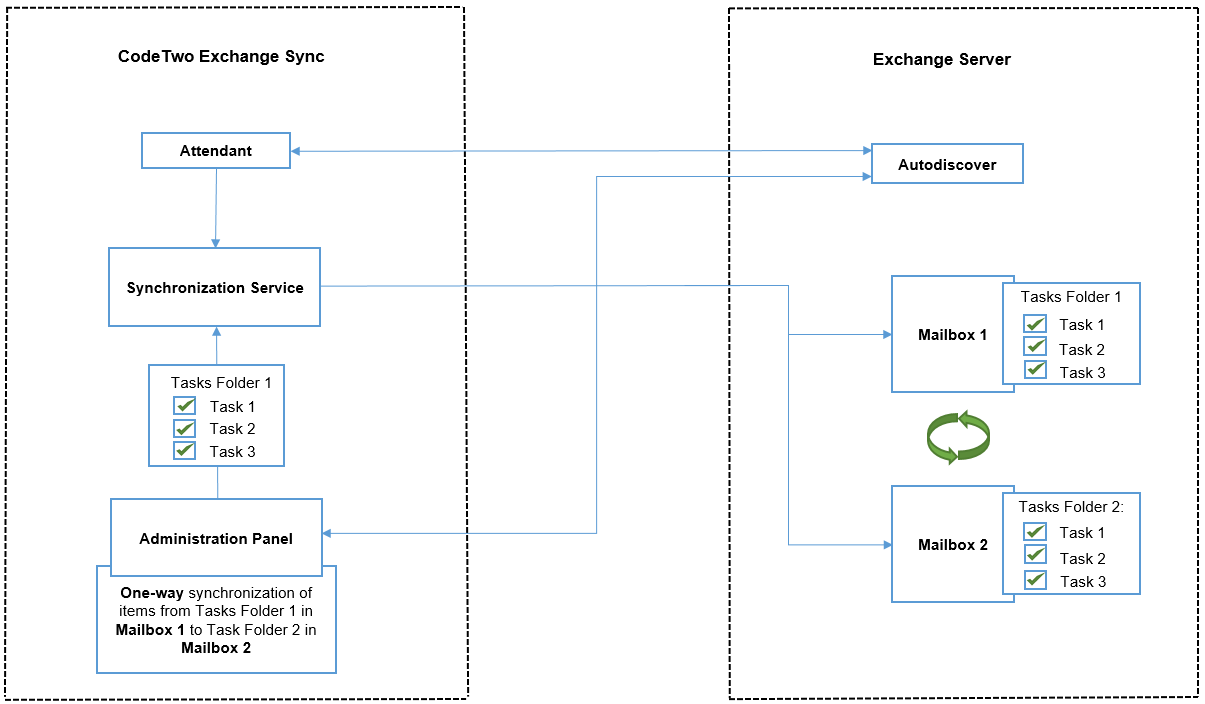 |
| Fig. 1. Diagram showing how the program's components work. |
Learn more about system requirements
Learn more about the installation process
Learn more about connecting to Exchange server
Learn more about reconfiguration of Synchronization Service and Admin's Panel