Paragraph
From within the Paragraph group (Fig. 1.) you can decide about the layout of your signature or disclaimer, for example add bullet points, justify the text, decide about spacing, etc.
 |
| Fig. 1. The Paragraph group on the ribbon. |
To change more advanced aspects, right-click on the paragraph you are working on and select Paragraph properties from the shortcut menu. This opens a new window where you can set the alignment, indentation, and spacing of your paragraph (Fig. 2.).
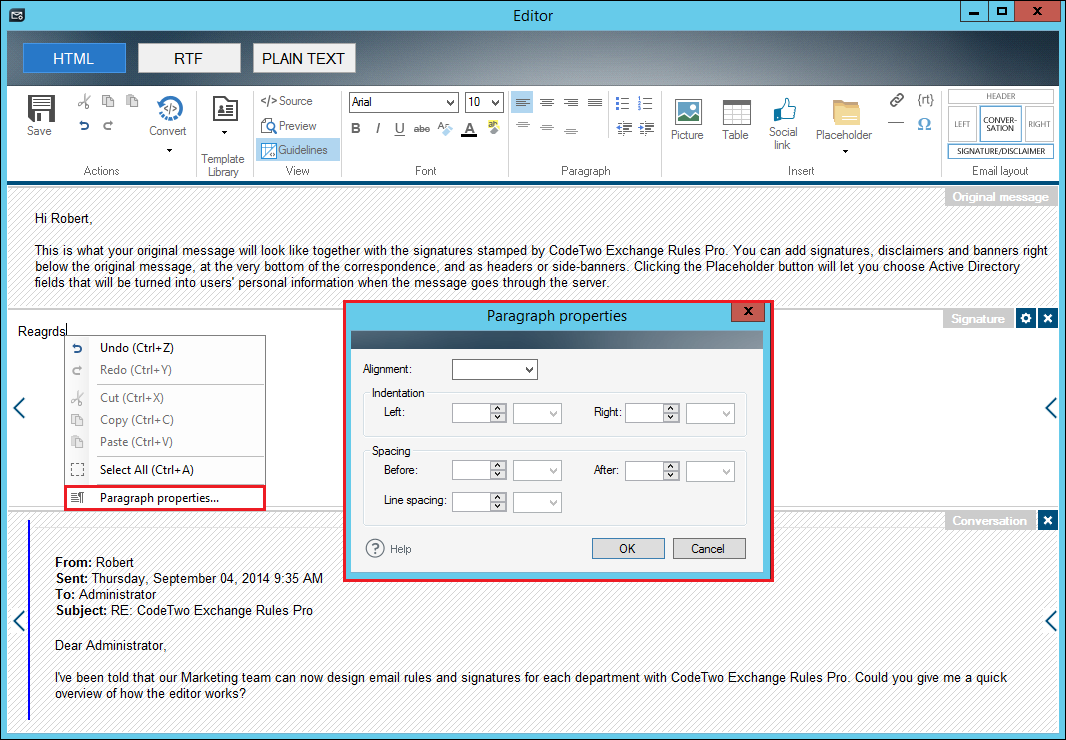 |
| Fig. 2. The Paragraph properties window. |
Tip
It is a good practice to always set the spacing for all paragraphs. Without this setting, depending on which particular email application is used, the paragraphs may be displayed with different spacing (e.g. in Microsoft Outlook) or even without any spacing (e.g. Outlook on the web / OWA).
In this article