Most issues related to communication between CodeTwo NetCalendars applications can be solved by following the clues below:
Make sure CodeTwo NetCalendars is running on the remote machine and is the same version
Make sure CodeTwo NetCalendars is running on the remote machine hosting the calendar you want to connect to. Also, check the versions of the programs - they must be the same on both machines. To check the version, choose Help menu, About, and see the version in the Version field.
Make sure network connection is established between the machines
To make sure there is a network connection between the machines, use 'ping' command.
| 1. | Click Start in the lower left corner of the screen, Run and type cmd. | ||
| 2. |
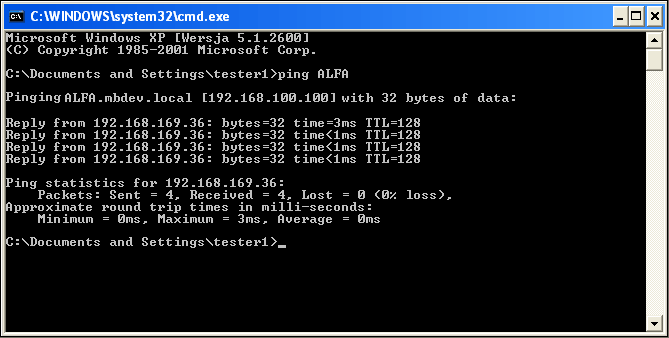
Command line console will open. Type: ping<remote_computer_name> where <remote_computer_name> is the name of the computer hosting the calendar you want to connect to. For example, to check connectivity to Computer A, type ping A. If the connection is established, the screen should look like in Fig.1. Otherwise, an error message appears e.g. 'Request timed out' or 'Ping request could not find host A. Please check the name and try again'.
If the connection with a remote machine cannot be established using the ping command, first you need to correctly configure your network and recheck CodeTwo NetCalendars. |
Make sure the same TCP/IP communication ports are configured in both applications
The communication between CodeTwo NetCalendars applications is carried out via TCP/IP protocol using port numbers defined in the program (by default 5015). All applications need to listen on the same port number in order to connect.
To change the TCP/IP port in the program, choose Options, Program settings. In the Program Settings dialog box in Use this port to communicate with other computers field, type the port number that will be used to communicate with other machines by CodeTwo NetCalendars.
Make sure the TCP/IP ports are not being blocked by a firewall and/or antivirus software
If the computer where CodeTwo NetCalendars is installed is equipped with antivirus software and/or firewall (e.g. Norton Internet Security), check if it is not set to block TCP port configured in CodeTwo NetCalendars (by default 5015). For test purposes, try disabling firewall and/or antivirus applications temporarily.
If TCP port used by CodeTwo NetCalendars is blocked, the calendars located there will not be accessible from other machines.
While connecting to the remote machine, provide its IP address instead of its name
While connecting to the remote machine, provide its IP address instead of its name. Details on connecting to a remote machine can be found in Defining calendars displayed in the current view.
To get the IP address of a computer, follow the instructions below:
| 1. | In Control Panel choose Network Connections. |
| 2. | Click the right mouse button on Local Area Connection and choose Properties. |
| 3. | Choose the Internet protocol (TCP/IP) and click Properties. |
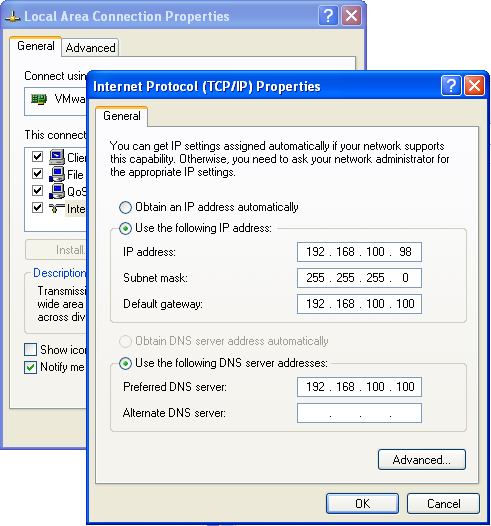
| 4. | In the Properties screen, read the IP address of the computer from the IP address field (Fig.2). |
|
| Fig.2. Reading IP address. |
Change the TCP/IP port if it is in use by other applications
If while opening CodeTwo NetCalendars the following error appears,
(Only one usage of each socket address (protocol/network address/port) is normally permitted (0x2740))
this may mean the port used by CodeTwo NetCalendars (by default 5015) is also used by another application on this machine. This will require choosing an alternate TCP port for all CodeTwo NetCalendars installed.
 If port numbers are changed on one machine, the same change must be made on all
other machines to ensure compatibility. See:
If port numbers are changed on one machine, the same change must be made on all
other machines to ensure compatibility. See:
Make sure the same TCP/IP communication ports are configured in both applications