| 1. | In Microsoft Outlook menu choose Tools | Options | Mail Format | International Options. |
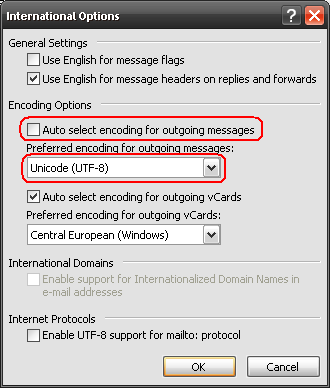
| 2. | The dialog such as in Fig.1 will display. Clear the Auto select encoding for outgoing messages option. |
| 3. | In the Preferred encoding for outgoing messages box select the encoding for outgoing messages, appropriate for your country. You should select the ISO encoding rather than the Windows encoding. |
|
| Fig.1. Correct encoding configuration in Microsoft Outlook. |