How to find hidden files and folders
Problem:
How to find hidden files and folders.
Solution:
The below configuration enables displaying hidden files and folders in Windows.
- Open My Computer.
- From the top menu choose Tools, Folder Options.

Fig. 1. Open search options. - In the View tab select Show hidden files and folders.
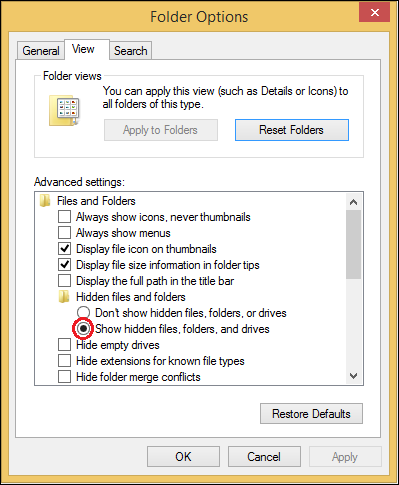
Fig. 2. Mark "Show hidden files, folders, and drives". - Click Apply and OK.
Now all hidden files and folders will be visible in the system.
| Related products: | General (Microsoft 365, Exchange & more) |
| Categories: | How-To |
| Last modified: | September 19, 2014 |
| Created: | January 16, 2009 |
| ID: | 60 |





