


Back up SharePoint and OneDrive for Business
CodeTwo Backup tools let you now secure your company data stored in SharePoint Online and SharePoint on-premises sites, as well as team sites and personal OneDrive sites of Office 365 users. In the program’s Jobs tab, you will find a new option when creating a new backup job – a dedicated job wizard for SharePoint backup.
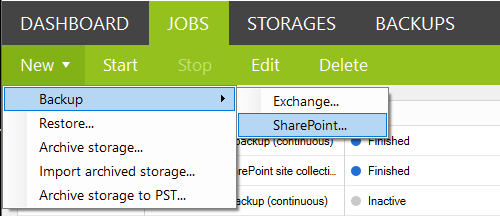
The Exchange backup job configuration remains the same. The SharePoint backup job has a few different options to set up like e.g. choosing SharePoint sites, teams sites or OneDrive sites of Office 365 users for backup. Here you can get more information about creating SharePoint backup job.
Also, you will see some new options when restoring SharePoint and OneDrive for Business data. The restore job lets you recover entire SharePoint site collections, individual sites, libraries, folders or single items as well as team sites and user’s personal files stored on OneDrive for Business sites. For more details on creating SharePoint restore jobs, click here.
New licensing model
Version 2.0 also introduces a new licensing model. We believe you will find this new model more flexible and user-friendly. The most important thing about it is that this model allows you to freely activate multiple instanced of the software on different workstations. This is possible thanks to a central cloud-based service that counts your licenses usage. In other words, you can use one license to activate many instances of the software on many different PCs.
You will also notice subtle changes to the way the programs consumes licenses depending on backed up data. The new licensing model takes one license for each user mailbox (no change here), each 2 GB of public folders data (here we have increased the limit from 0.5 GB to 2 GB meaning you can back up more for less money) and each 10 GB of SharePoint data on the source server. For more details on licensing, go to the Pricing page of CodeTwo Backup for Office 365 or CodeTwo Backup for Exchange. If you have more technical questions regarding this new licensing model, visit this User’s Manual.
Upgrade to version 2.0
To get the SharePoint/OneDrive for Business backup functionality, you need version 2.0 of the program. If you are new to CodeTwo Backup solutions, simply download the newest version of CodeTwo Backup for Office 365 or CodeTwo Backup for Exchange using the links below and install it on your environment. Here you can get more information about supported platforms and system requirements.
- Download CodeTwo Backup for Office 365 – ver. 2.0.0.125
- Download CodeTwo Backup for Exchange – ver. 2.0.0.125
If you are a current user of CodeTwo backup tool, you need to upgrade it to version 2.0.0.125. The upgrade is free of charge for all licensed users. To get more details on how to upgrade from version 1.x to version 2.0, go to this user’s manual. To download the latest version of the program, use the links above.
If you have any questions about this new version or the upgrade procedure, feel free to contact us. We are available 24/5, Monday through Friday.
Recommended articles
CodeTwo sp. z o.o. sp. k. is a controller of your personal data.
See our Privacy Policy to learn more.