 Since the launch of CodeTwo Active Directory Photos we have received a lot of positive feedback from you. It is really motivating to hear that our tool is so widely used and that it helps you perform your admin job better. At the same time some of you mentioned some improvement suggestions that would make the program even more useful. We took a closer look at them and decided to include some of the remarks in the new release. And here it is. The new version of CodeTwo Directory Photos includes new fields in filters and import/export mechanisms you requested during the past weeks. Feel free to download it at no cost from our website!
Download CodeTwo Active Directory Photos 1.1.2
What’s new in version 1.1.2?
It is now possible to import, export and filter users based on the following fields:
- Employee ID;
- Employee number;
- Logon name (sAMAccountName);
- Logon name (userPrincipalName).
How to update the program?
Just in case of any doubts… We don’t provide automatic updates for this tool. To update your program, the new version needs to be downloaded and installed on top of the existing installation manually.
How perform updates of CodeTwo software
What is CodeTwo Active Directory Photos?
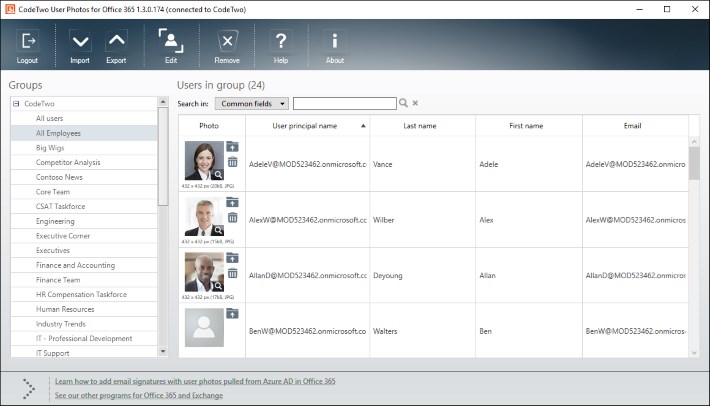
CodeTwo Active Directory Photos is a free tool for system administrators that makes it extremely easy to upload users’ photographs to Active Ditrectory. It saves a lot of time and effort, since the import is performed by means of an intuitive GUI. It also supports bulk imports and has some basic built-in photo editing features. See the video below to find out more:
Should you have any further suggestions on how to improve our software, let us know. We always read your messages and appreciate your help!
Learn more about CodeTwo Active Directory Photos
See how to combine the program with CodeTwo Exchange Rules Pro
See other tools for Exchange Server administrators
Recommended articles


Was the employee ID attribute removed in the newest version? I am not able to export photos with the employeeID.
The most recent version of CodeTwo Active Directory Photos doesn’t have the employee ID attribute available. Currently, it’s possible to define names of exported photos basing on users’ AD attributes only.
Hi,
This program is great. Works very well. Is it possible to import by sAMAccountName in the photo name? For examplo jcosta.jpg?
Another question, is it possible to schedule de import? for exampl everyday at 11:00PM?
Thank you
Hi Joaquim,
Unfortunately, SAMAccountName is not available in the AD field picker. However, you can use PowerShell to mass rename the files (add the @yourdomain.com) and automatch the photos using the UPN attribute.
Scheduling is not available.
Hi,
I just patched my exchange server 2010 with update rollup 16. Since this patch adphotos no longer works. I get an error that states an error occurred. nothing else. I have tried verison 121 with elevated admin priv’s.
any ideas?
Hi Rick, Please try completely uninstalling CodeTwo Active Directory Photos from your system (as per these instructions: https://www.codetwo.com/userguide/active-directory-photos/uninstalling.htm?sts=2181) and installing the latest version available on our site again from scratch.
When removing a picture, is the picture being replaced with binary code? We’ve run across an issue with SharePoint importing AD profiles where their picture contains a binary URL.
Hi Peter,
When you remove a picture using the Remove button in CodeTwo Active Directory Photos, the binary code for the deleted picture is removed as well. In other words, the ThumbnailPhoto field in AD is left empty (no binary code remains).
Thank you Pawel. I appreciate your time.
Hey Paweł,
I ran it as Administrator and I’m getting the same error message. I’ve ran it on different computers and with different user accounts and i seem to still get the same error message. I really like this program it made my life so much easier importing pictures into AD. I hope i can get it working again. Thank you again for your time. Do you know of anyone else at CodeTwo I can reach out to?
Hi Tim, Looks like we may have to take a deeper look at this. Please contact CodeTwo Support (https://www.codetwo.com/company/contact?sts=2181) and mention this comment thread as reference.
Hey Paweł,
So I was able to use PowerShell to import the pictures into AD. Any other ideas?
And I really appreciate you taking the time out to help me with this issue. Thank you!
Tim, Please try one more thing – running CodeTwo AD Photos as an Administrator (right-click the program’s icon and select Run as administrator).
hey Paweł Krzemiński. I didn’t see your comment before i posted mine. I didn’t see my comment showing up before.
But yes, I am running AD higher than 2008. I believe its 2012. but its odd I was able to run the program fine from my desktop computer a couple of weeks ago. I talked to my networking and server guys and they said nothing has change. is there anyway to point CodeTwo to a certain domain controller of my choosing? we have about 4-5 different ones. they all do have the same info.
Hi Tim,
It could be a permissions issue. Please check if you are able to upload a single photo via PowerShell using the below scripts:
$photo = [byte[]](Get-Content Path to photo -Encoding byte)Set-ADUser Name -Replace @{thumbnailPhoto=$photo}Try these scripts for your account and one other and let me know the result.
Hello all.
I am getting this same error message. Is there a fix for it by chance? thank you very much for your help!
[Message]
The server is not operational.
[Stack Trace]
at System.DirectoryServices.DirectoryEntry.Bind(Boolean throwIfFail)
at System.DirectoryServices.DirectoryEntry.Bind()
at System.DirectoryServices.DirectoryEntry.get_AdsObject()
at System.DirectoryServices.DirectorySearcher.FindAll(Boolean findMoreThanOne)
at System.DirectoryServices.DirectorySearcher.FindAll()
at #8vd.#pwd.#Kzd.MoveNext()
at #8vd.#pwd.#jwd()
at #8vd.#Hyd..ctor()
at #kfd.#Shd.#v5b(Object sender, EventArgs e)
Hi All.
Was there any resolution for this error?
[Message]
The server is not operational.
[Stack Trace]
at System.DirectoryServices.DirectoryEntry.Bind(Boolean throwIfFail)
at System.DirectoryServices.DirectoryEntry.Bind()
at System.DirectoryServices.DirectoryEntry.get_AdsObject()
at System.DirectoryServices.DirectorySearcher.FindAll(Boolean findMoreThanOne)
at #0dp.#Vfp.#lhp.MoveNext()
at #0dp.#Vfp.#Mfp()
at #0dp.#1fp..ctor()
at #jTo.#3Pb.#1k(Object #ZGf, EventArgs #fHf)
Hi Tim, When using the program are you logged in to a Windows Server domain with AD Schema 2008 or higher? If so, are you accessing the machine that runs CodeTwo AD Photos directly or e.g. via Remote Desktop?
The photos uploaded in CodeTwo Active directory Not syn with userProfiles may i know how to Sync . please help me
Is it possible to save default settings for program startup?
I’d like to have “show users from subcontainers” active by default and switch the selected default AD Container from “Users” to the Domains root.
Hi Kelly
From what I found out, the cases we experienced regarding the issue were related to problems with trusts in AD forests. Please check if it might be the problem in your case.
You may also try completely uninstall and reinstall the program first:
1. Unistall the porgram in Control Panel
2. Delete the “C:\ProgramData\CodeTwo Active Directory Photos” folder
3. Install and run the program again.
Hi,
We have had the photos app running, but now, when we go to connect we get the error below. we have removed and made a clean install. Can you advise.
Thanks!
[Message]
The server is not operational.
[Stack Trace]
at System.DirectoryServices.DirectoryEntry.Bind(Boolean throwIfFail)
at System.DirectoryServices.DirectoryEntry.Bind()
at System.DirectoryServices.DirectoryEntry.get_AdsObject()
at System.DirectoryServices.DirectorySearcher.FindAll(Boolean findMoreThanOne)
at System.DirectoryServices.DirectorySearcher.FindAll()
at #8vd.#pwd.#Kzd.MoveNext()
at #8vd.#pwd.#jwd()
at #8vd.#Hyd..ctor()
at #kfd.#Shd.#v5b(Object sender, EventArgs e)
Hi Andrew!
I have checked your scenario and it should work with no problem.
Make sure that the email address in the image is exactly the same as in AD.
Additionally you can try to import your images using {First name}{Last name} pattern.
This is a great tool, however, I am trying to work on importing photos by user attribute (mail) or {Email} as the software would have it because samaccount or UPNs can have numeric characters at the end that may be unknown to the HR department at the early stage of onboarding.
When I select the {Email} file name pattern, it is not recongizing any of the photos. Our email structure is pretty standard, but has a hiphen.
EX – “[email protected]”
Question is, are there limitations or issues with certain characters here?
Thank you,
Andrew
Hello Francis,
Try a clean installation of the software.
First uninstall CodeTwo Active Directory Photos via Windows Control Panel.
Next delete any program’s leftover files and folders in Program Data and Program Files folders.
Lastly – install Active Directory Photos again.
Please let me know if that helped.
mine it was working fine but now it is not displaying active directory containers and its users, so i cannot add new photos, but the old photos which I uploaded earlier are displying fine. it gives error, 1. server is not operational or failure to load settings. please help
Where you able to find a solution for your problem? I’m facing the same problem here!
Please start by trying a clean installation of the software, like Tomasz suggested in the comment above. It should solve your problem.
Thanks aiphone4u! We are glad you like the program :)
Great software to add on to the Active Directory. It works great with my Microsoft Windows Server 2003 Enterprise and it makes the job to insert the photo so easy. I like the automatic photo resize feature of the program.
Great software. But how do I search for a particular record, say by email or other field if I have thousands of entries?
Thanks Ejiro! You can use the Filters placed in the top menu.