Here in Poland people are used to say that if something is for free, it definitely has to be junk. Sometimes it’s hard to disagree but in my opinion there are some exceptions, especially as far as software is concerned. The Web is chock-full of various freeware for any purpose. All you have to do is to type the word “free” in the search engine in front of the solution you are looking for and pick the one that’s the most suitable for you. Which one to choose?
Picking up a solution from a reliable source is always crucial in such cases. Since designing Outlook add-ins became CodeTwo’s second nature, if you are looking for a smart free Outlook extension, you should definitely check out CodeTwo’s freeware offer, it won’t cost you anything except time:)
After you check our smart solutions and install them on your hard drive, don’t forget to visit CodeTwo Squad Blog regularly – there’s still more CodeTwo freeware to come in the nearest future!
Many of you already know and use our freeware CodeTwo Active Directory Photos – a smart tool designed to ease user photo management in Active Directory.
Starting October 31, 2018, the support for Transport Layer Security (TLS) versions 1.0 and 1.1 is discontinued in Office 365. This means that TLS 1.0 and 1.1 will still work, but Microsoft will not provide support in case of connection/compatibility issues. For this reason, we have updated all our software that connects to or otherwise interacts with Office 365. To avoid possible issues in the future, we recommend that you update your software to the latest version.
It is time for new Outlook freeware from CodeTwo! We have already been giving away smart apps that remind about missing attachments, export PST files to Excel, unblock files such as .exe or .reg, sync Outlook mails, tasks, calendars or categories between computers or even automatically configure your e-mail account in Outlook, and many more... Now we are pleased to announce that yet another totally new, practical Outlook add-on has been released and offered to all of you for free. Its concept has appeared in our office based on our own every-day experience when sending bunch of e-mails to other staff members, supervisors or clients. This time the idea concerns group messages, when we have many recipients specified in the To: or Cc: field. It was happening to many of us to hastily press the Reply instead of the Reply to All button while responding to such e-mails. It is sometimes very troublesome and embarrassing and we definitely do not want this to happen when exchanging a business group correspondence. Fortunately, the new tool called CodeTwo Outlook Reply All Reminder helps Outlook users to prevent such situations. It is a user-friendly application which does not require any configuration. After you install it, you can be sure that next time you click Reply, when replying to a group correspondence, the plugin will trigger a notification window informing that your message will be received by one person only (the original sender of the e-mail that you are replying to). The program will ask you if you want to send the Reply to All instead, what you can confirm by clicking an appropriate button, as shown below: Want it already? Nothing easier, just go to CodeTwo Outlook Reply All Reminder's website and download it for free. :) CodeTwo Outlook Reply All Reminder - download page
All Outlook add-ons from CodeTwo
Comments
daniel says:
Brad, we will contact you on your email in order to add the address.
Yesterday I had to prepare a contact list for a survey containing 500 contacts and save it in an external XLS file. Those contacts had to be arranged in a table containing specified fields arranged in pre-defined order. Using Outlook Export I did it with just a few clicks, otherwise I would have to spend two days on copying and pasting the list into the Excel sheet. This app is a true life-saver…
And do you know what I use Outlook Export most often for? For checking the number of messages currently selected in a folder. This is one of the functionalities missing in Outlook, which for me personally is very very useful.
 Here in Poland people are used to say that if something is for free, it definitely has to be junk. Sometimes it’s hard to disagree but in my opinion there are some exceptions, especially as far as software is concerned. The Web is chock-full of various freeware for any purpose. All you have to do is to type the word “free” in the search engine in front of the solution you are looking for and pick the one that’s the most suitable for you. Which one to choose?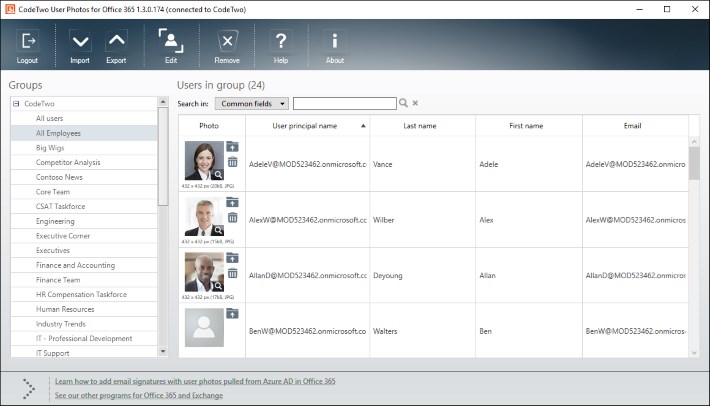

Brad, we will contact you on your email in order to add the address.
Won;t configure the address I forwarded to you. Can you get it to work.
Yesterday I had to prepare a contact list for a survey containing 500 contacts and save it in an external XLS file. Those contacts had to be arranged in a table containing specified fields arranged in pre-defined order. Using Outlook Export I did it with just a few clicks, otherwise I would have to spend two days on copying and pasting the list into the Excel sheet. This app is a true life-saver…
And do you know what I use Outlook Export most often for? For checking the number of messages currently selected in a folder. This is one of the functionalities missing in Outlook, which for me personally is very very useful.
I like CodeTwo Outlook Export – I don’t know why Outlook is not capable of doing it natively…
Thanks Danny. CatMan is really useful but I personally like Attach Unblocker the most. I think it’s the most ‘tricky’ one…:)
Can’t wait to tell you about other free tools that we are preparing for you, so stay tuned for more!
Those addins are a real help for Microsoft Outlook users. CatMan is my favorite. It deals so well we with sharing categories. Thanks a lot.