How to restart the Microsoft Exchange Transport service
Problem:
You need to restart the Microsoft Exchange Transport service, for example, to refresh the counting of CodeTwo Exchange Rules licenses.
Solution:
There are two ways to restart the Microsoft Exchange Transport service:
Restarting the service via the Exchange Management Shell
To restart the Microsoft Exchange Transport service in Exchange Management Shell, you need to open  Exchange Management Shell and execute this cmdlet:
Restart-Service MSExchangeTransport
Restarting the service manually
To restart the Microsoft Exchange Transport service manually:
First, open the Services window. To do it:
- type in services.msc in Run command and click OK (Fig. 1.), or

Fig. 1. Opening the Services window using Run.- open the Control Panel, choose Administrative Tools, locate Services on the list (Fig. 2.) and double-click it.


Fig. 2. Opening the Services window from the Control Panel.
In the Services window, find Microsoft Exchange Transport on the list and stop the service by using one of the following options (Fig. 3.):
- the toolbar buttons, or
- the links in the upper-left corner of the window, or
- the drop-down menu that opens when you right-click the service.
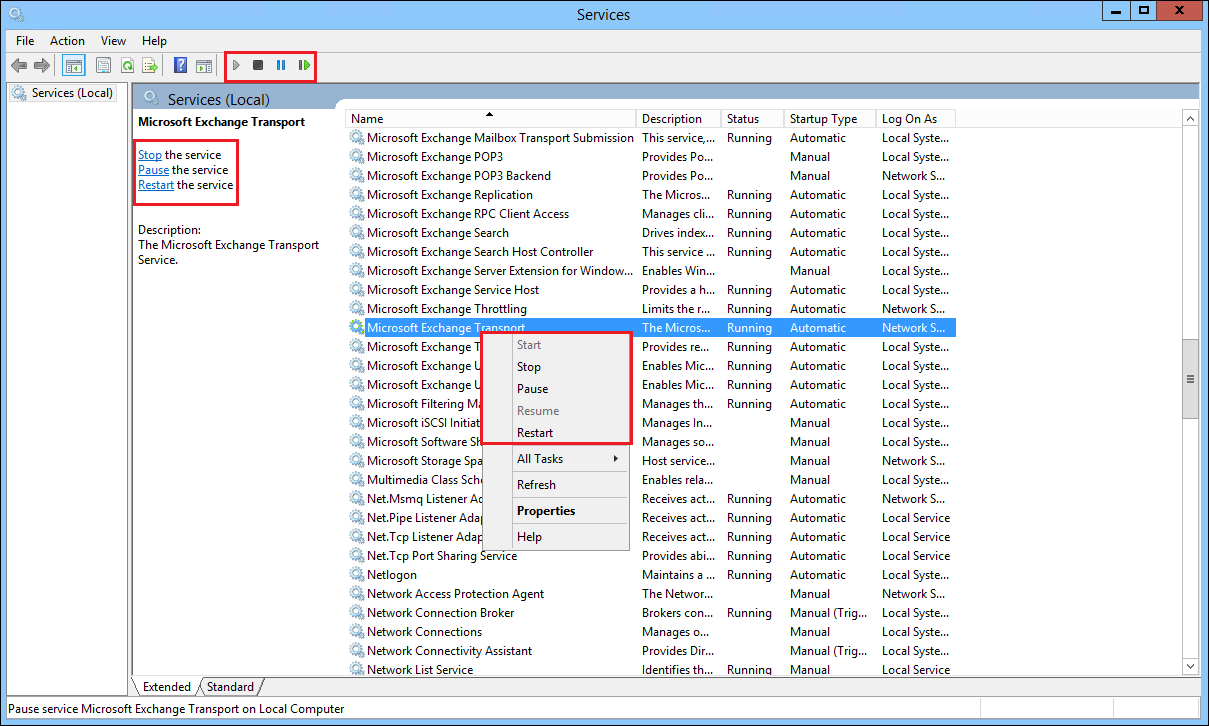
Fig. 3. Three ways of stopping a service.
- Wait for the service to fully stop and then click Start by using one of the three methods listed above.
| Related products: | CodeTwo Exchange Rules 2007 1.x, 2.x, CodeTwo Exchange Rules 2010 1.x, 2.x, CodeTwo Exchange Rules Pro 1.x |
| Categories: | How-To |
| Last modified: | April 20, 2018 |
| Created: | July 29, 2010 |
| ID: | 153 |





