How to uninstall a CodeTwo product if it is not possible from the Control Panel
Problem:
You are not able to uninstall a CodeTwo product following the standard removal procedure.
Solution:
There may be multiple reasons to that, for example the installation files are corrupted, Windows registry is broken, etc. To solve the problem, please use the troubleshooter app from Microsoft. Users with older systems (prior to Windows 7) can alternatively download and run old Microsoft tool named Windows Installer Clean Up.
Warning
Be aware, that Clean Up tool is considered obsolete and the above mentioned troubleshooter app is advised by Microsoft.
If you want to go for the Windows Installer Clean Up solution, you can download it from here. After you open the application from the Start menu, the dialog box listing all installed applications will appear. Choose the program you want to uninstall and click Remove (Fig. 1.).
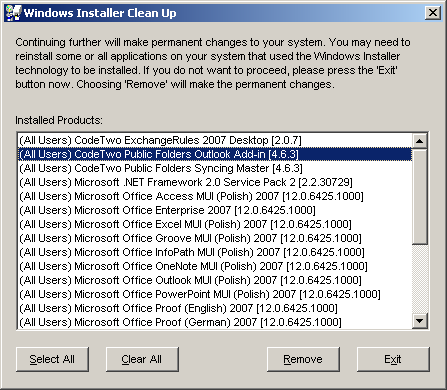
Fig. 1. Windows Installer Clean Up dialog box.
The program will uninstall and you will be able to reinstall it.
Info
In the case of any problems you can contact CodeTwo Customer Support.
| Related products: | General (Microsoft 365, Exchange & more) |
| Categories: | Troubleshooting |
| Last modified: | November 3, 2023 |
| Created: | August 19, 2011 |
| ID: | 193 |





