How to disable adding signatures created in OWA for Exchange users
This article applies to Exchange Server 2007 and 2010, and is meant for users of CodeTwo Exchange Rules 2007 and 2010 (both of which are now deprecated).
For newer versions of Exchange Server and Exchange Online (Office 365) see this article.
Problem:
How to disable adding signatures created in OWA for Exchange users.
Solution:
After installing a program from CodeTwo Exchange Rules family you may need to disable stamping messages with personal signatures, created in OWA. If you are not able to control all users to manually remove their OWA's signatures, it may happen that some users will have two different signatures: one from OWA and another added by CodeTwo Exchange Rules 2007 or CodeTwo Exchange Rules 2010.
To avoid this problem, you can use the Segmentation tool:
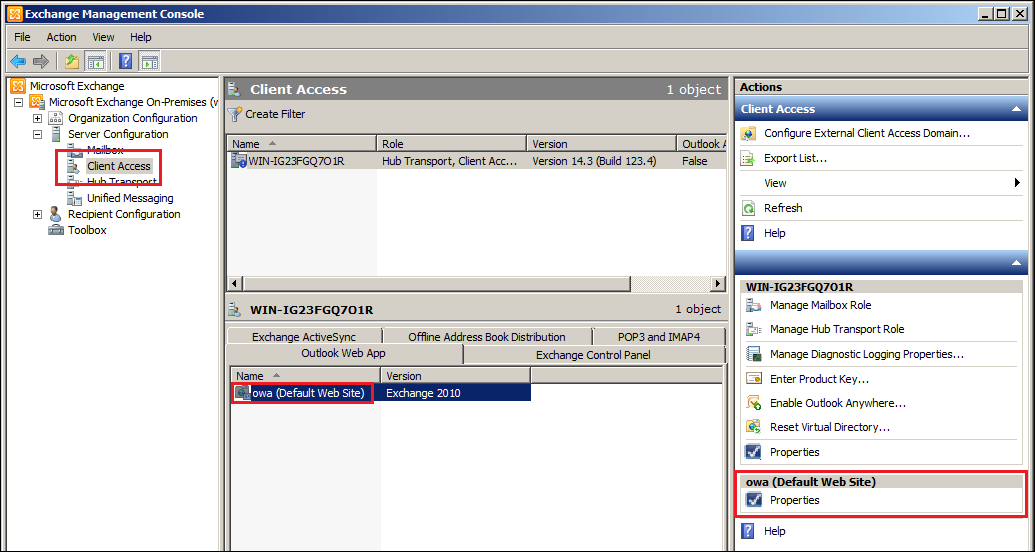
- Open Exchange Management Console, choose Server Configuration, then Client Access.
- Highlight the proper server, and then right click on OWA (Default Web Site) in a bottom field, choose Properties (Fig. 1).

Fig. 1. How to open Segmentation tool for OWA in Exchange 2007 or 2010 server. - Go to Segmentation tab.
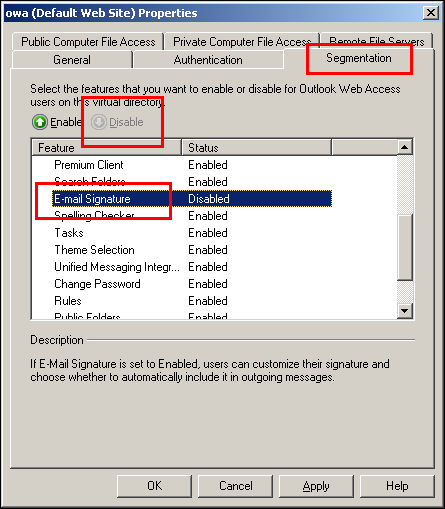
- Highlight Email Signature on the list and click Disable button (Fig. 2). Then click OK.
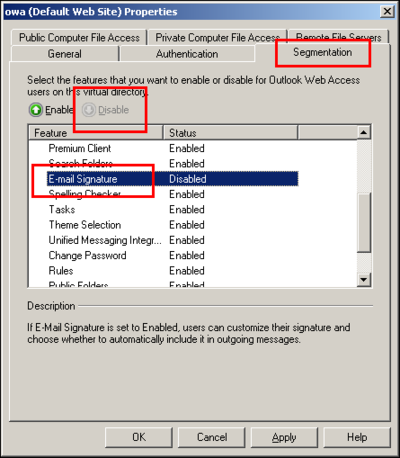
Fig. 2. Disabling signatures from OWA on exchange server. - You need to restart Internet Information Services (IIS) service to enable the changes.
Also see:
| Related products: | CodeTwo Email Signatures for Email Clients, CodeTwo Exchange Rules 2007 1.x, 2.x, 3.x, 4.x, CodeTwo Exchange Rules 2010 1.x, 2.x, 3.x, CodeTwo Exchange Rules Pro 1.x, 2.x |
| Categories: | How-To |
| Last modified: | November 28, 2022 |
| Created: | December 2, 2008 |
| ID: | 65 |





