How to insert a company disclaimer and a personal signature into one message
This article is obsolete and may relate only to older versions of our software.
Problem:
You want to use older versions of CodeTwo Exchange Rules to insert multiple signatures into one email. For example, you want to insert a company disclaimer, containing information such as a postal address, VAT ID no., company registration number, etc., and a personal signature that includes user's personal details retrieved from Active Directory. The personal signature should be added to each new email or reply/forward message, while the company disclaimer should be inserted at the very bottom of the message thread and included only once in a series of replies.
Solution:
Info
This article applies only to the older versions of CodeTwo Exchange Rules software (versions earlier than Pro 2.x, 2007 4.x, 2010 3.x, 2013 2.x, 2016 1.x and 2019 1.x). If you're searching for a solution that applies to the newer versions of these programs, consult the articles on usage scenarios in the user's manual for CodeTwo Exchange Rules Pro or CodeTwo Exchange Rules Family (discontinued).
To set the program to follow this scenario, create two separate rules: one for the personal signature and another for the company disclaimer. The first rule will insert a signature that contains personal data to every email, directly under the latest message. The second rule will stamp the signature only once, at the very bottom of the email conversation. To configure the newly created rules (Fig. 1.), follow the steps below:
- Settings for the personal signature:
- select Insert signature/disclaimer under the latest response,
- clear the Do not insert signature/disclaimer if it is already found in the message checkbox.
- Settings for the company disclaimer:
- select Insert signature/disclaimer at the very bottom of the message,
- select the Do not insert signature/disclaimer if it is already found in the message checkbox.
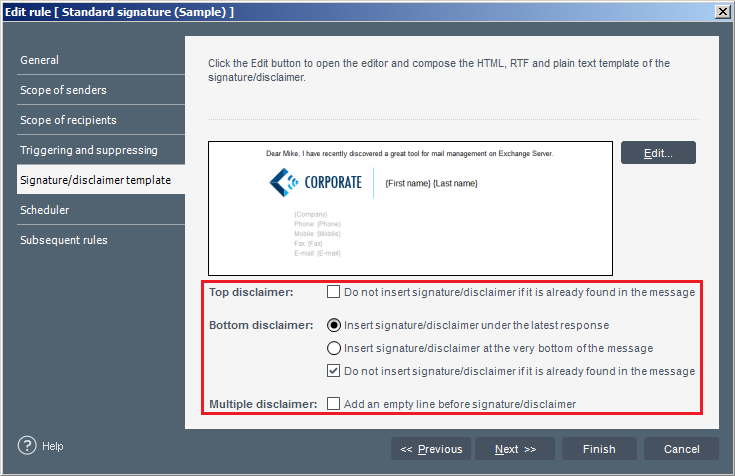
Fig. 1. Configuring signatures in the older version of CodeTwo Exchange Rules family.
In CodeTwo Exchange Rules 2003 3.x, 2007 2.x and 2010 1.x, these settings can be found in the Advanced options step of the New/Edit rule wizard. Click Configure in the Replying and forwarding section (Fig. 2).
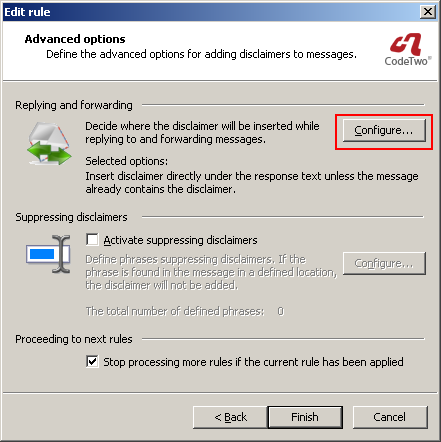
Fig. 2. Advanced Options dialog box.
In CodeTwo Exchange Rules Pro 1.x, such settings are also available. Select the Insert disclaimer/signature action and click the Options button.
After you apply these settings, each new message will be stamped with a personal signature and a company disclaimer beneath it. In a reply or forward message containing the text of the original email, the personal signature will be inserted again, below the response text, while the company disclaimer will not be added at all.
See also:
| Related products: | CodeTwo Exchange Rules 2007 1.x, 2.x, 3.x, CodeTwo Exchange Rules 2010 1.x, 2.x, 3.x, CodeTwo Exchange Rules 2013 1.x, 2.x, CodeTwo Exchange Rules 3.x, CodeTwo Exchange Rules Pro 1.x |
| Categories: | How-To |
| Last modified: | June 9, 2025 |
| Created: | July 31, 2008 |
| ID: | 15 |





