Overview
The most trusted email signature software for Exchange Server
CodeTwo
Email Signatures On-prem
- Centrally managed email signatures, disclaimers, marketing banners and email flow control
- Support for all email clients, including Outlook and mobiles
- 100% on-prem solution (installed locally; no cloud agents)
- The only on-prem signature & mail flow manager for Exchange SE
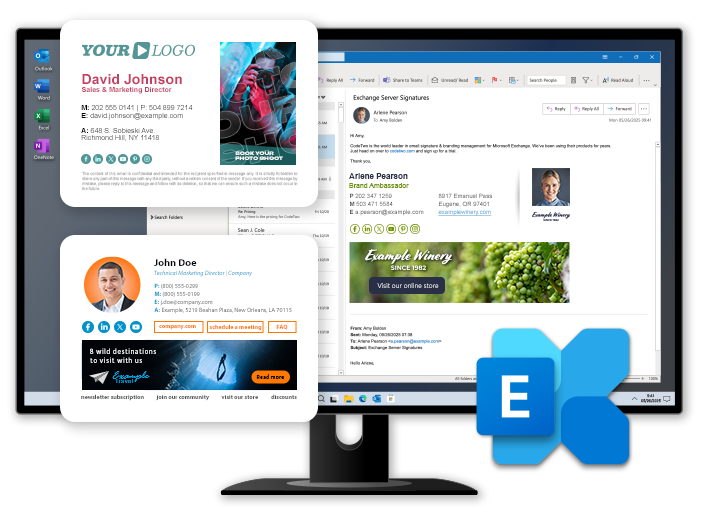
CodeTwo email signatures & mail flow control for Exchange Server
CodeTwo Email Signatures On-prem is an email signature and mail flow manager for Microsoft Exchange. This easy-to-use server application will help you create advanced rules to centrally manage brand identity and unify your corporate email correspondence. It supports Exchange Server Subscription Edition (SE) as well as hybrid deployments, and works with all email apps, including Outlook and mobiles.
Email signatures
& branding
Email address/subject
rewriting
Email attachment
control
Active Directory
information
Email forwarding
and rerouting

Design unified email signatures and disclaimers for the entire company in less than 5 minutes.

Change senders’ addresses on the fly, for example, from [email protected] to [email protected], or modify the email subject to maintain consistency in email correspondence. More...

Compress, archive or remove attachments from incoming emails to save space. Help your Sales team by automatically attaching PDF files with product offers. Define which outgoing messages should get attachments. More...

Automatically add personalized signatures that include sender’s photo and data pulled from your Active Directory.

Forward incoming, outgoing, and internal messages to any email address. Automatically reroute all or selected emails depending on their content, properties, sender, recipient, etc. More...

Meet legal requirements, protect the confidentiality of correspondence, and announce important information to your recipients – all that thanks to centrally added email disclaimers. More...

Add marketing banners and other images inline (not as attachments) to any email. Insert signatures and banners right under the latest email, at the very top or bottom of a conversation, or as side banners.

Set up auto replies for users and groups, and send them as replies to original emails. Use conditional placeholders to replace data in emails and signatures.

Scan emails for sensitive content and forward incident reports to managers. More...

Use in organizations of any scale – support for multi-server and multi-tenant environments. Access your signature rules and settings from any machine, even outside the domain. More...
Disclaimers in all
company emails
Signatures and banners
where you want them
Autoresponders, conditional
placeholders
DLP and anti-spam
protection
Remote access
& scalability
Our customers:


19 YEARS OF EXPERIENCE
Trusted by thousands of companies worldwide
CodeTwo Email Signatures On-prem is built on technology developed and refined since 2007. Over 140,000 companies in 170+ countries around the world – from SMBs to international corporations – use this and other CodeTwo software in their organizations.

Central management based on rules
Configure the flow of all incoming and outgoing emails and control their content via an intuitive and user-friendly Administration Panel. Configure a set of rules and then sit back and let the software automatically add signatures, archive attachments, send auto-replies, and more. Learn more…
Company-wide email signatures
With CodeTwo Email Signatures On-prem, it takes less than 5 minutes to compose and deploy uniform email signatures for all employees. Create signatures with users’ data and photos stored in Active Directory, inline graphics, disclaimers, and more. Learn more…

Powerful and intuitive HTML signature template editor
Create signatures in the built-in what-you-see-is-what-you-get (WYSIWYG) editor. Simply select one of dozens of predefined templates, customize it to your needs, and easily apply to your company email. No HTML knowledge required. Learn more…

Active Directory photos in email signatures
Use employee pictures in business email signatures. Our program automatically pulls user photos from Active Directory and inserts them into signatures on the fly. No PowerShell scripting required. Learn more…
Fully detailed or compact email signatures
Add different email signatures depending on the message type. Set up the program to insert an email signature that includes all company details and graphics to new email messages, and its simplified version to replies and forwards. Learn more…

Marketing banners and images always visible to recipients
Don’t worry about images being blocked by email clients. Our innovative technology makes sure graphics are embedded directly in your messages as hidden attachments, so there’s no need to click "Download pictures" to see them). Learn more…

Server-level automatic replies
Create and centrally manage fully branded auto replies for individual users or groups of users. Include an original message in the message body, modify CC and BCC recipients, and even attach files. Learn more…


Legal email compliance
Make sure your company email complies with legal regulations. The program helps you meet the standards of many common legal acts, for example, GDPR, HIPAA, SOX, eDiscovery, UE Directive 2003/58/EC and SEC Rules. Learn more…
Email unsubscribe mechanism (compliance with anti-spam regulations)
Stay compliant with global anti-spam regulations such as CASL, CAN-SPAM, the ePrivacy Directive, and similar laws that require you to add an unsubscribe link to your commercial correspondence. The program provides you with a built-in email unsubscribe mechanism that you can implement into your company email. Learn more…

Privacy and security by design
Rest assured that the best information security measures to protect your personal data processed by the program are in place. The development and supply of our software is heavily dependent on CodeTwo’s ISO/IEC 27001 and ISO/IEC 27018-certified Information Security Management System (ISMS), and all new technologies are incorporated with privacy by design and privacy by default in mind. Learn more about our ISMS and how our programs benefit from it…
Customizable filtering and DLP policies
Protect your company’s sensitive data from leaking. Apply data loss prevention policies, and block, reroute or modify incoming and outgoing emails and attachments based on customizable regular expressions and content dictionaries. Learn more…
More features:

Removing or masking sensitive content
Removing or masking sensitive content
Ensure your sensitive data is not disclosed to unauthorized recipients. CodeTwo Email Signatures On-prem detects sensitive phrases (like a credit card number) or predefined keywords in a message and automatically removes or masks them. Learn more…

Notifications and email content control
Notifications and email content control
Set up the program to send automatic notifications when an outgoing email contains sensitive content, offensive language or anything else that compromises your privacy regulations. Automatically block such emails or forward them to any email address, even outside your Active Directory contact list. Learn more…

Expanding your marketing opportunities
Expanding your marketing opportunities
Make the most of every marketing opportunity your professional email correspondence provides. Add promotional content to your signatures to promote your brand and boost your marketing campaigns. Learn more…

Advanced access rights management
Advanced access rights management
Deploy the program on any machine (even outside your domain) and use the built-in access rights to delegate email signature and banner management to other teams, like Sales or Marketing. This way, your administrators can focus on more critical tasks without compromising your Exchange server’s security. Learn more…

Tracking email marketing performance
Tracking email marketing performance
Tag links in your email signatures with special URL parameters to effortlessly analyze the web traffic generated from emails. CodeTwo Email Signatures On-prem integrates seamlessly with popular web analytics tools like Google Analytics, letting you analyze user behavior more effectively. Learn more…

Restoring images removed by iPhone and iPad
Restoring images removed by iPhone and iPad
Recover images removed by iOS devices when forwarding or replying to an email. The program allows you to avoid undesirable changes in your email layout by restoring the missing content. Thanks to this, your signature design or branding always stays intact. Learn more…

Scalability, multi-tenant and multi-server environments support
Scalability, multi-tenant and multi-server environments support
Automatically replicate program settings across multiple servers and delegate rule configuration duties to multiple tenants (Exchange hosts). The program ensures stability under heavy network traffic, letting you easily manage email signatures and mail flow in either a single-server or a thousand-server environment. Learn more…

Support for hybrid environments
Support for hybrid environments
Take advantage of all the features of CodeTwo Email Signatures On-prem in a hybrid deployment of Microsoft 365 and on-premises Exchange with centralized mail transport enabled. Learn more…
What is the best signature manager for Exchange Server?
CodeTwo Email Signatures On-prem is the successor to CodeTwo Exchange Rules Pro – widely recognized by Microsoft MVPs and users as the top on-premises signature and mail flow manager for Microsoft Exchange Server. Backed by 19 years of continuous development, the new product is actively supported, feature-rich, and doesn’t require routing email through the cloud – everything stays securely within the same server environment as your email infrastructure.






