update
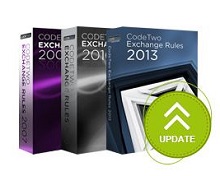
Our central signature management products for Exchange Server - CodeTwo Exchange Rules - have recently been updated. The updates contain 3 fixes for minor issues reported by users - thank you for your feedback! The 3 issues were: Editor: Copy/cut/paste options did not work for the selected text in RTF format.
Fixes in the image conversion mechanism between HTML and RTF formats.
Update of disclaimers/signatures in messages not containing TNEF part in the Sent Items folder. We recommend that users update their respective Exchange Rules versions by downloading the latest free setup file and re-installing the program on the server. All settings and licensing information will remain intact. The setup files are available on the below pages: CodeTwo Exchange Rules 2010
CodeTwo Exchange Rules 2013 The update is free for all owners of licenses for CodeTwo Exchange Rules 2007 3.x, CodeTwo Exchange Rules 2010 2.x and CodeTwo Exchange Rules 2013 1.x. For more info on updating CodeTwo products make sure to visit this page. If you have any additional questions, give our Support team a call or send them an email - we are open 24 hours Monday through Friday (more working hours details here). Learn how to update CodeTwo products
Contact CodeTwo Support
Other CodeTwo products
We have just released new updates for products from the Exchange Rules family (email signature managers for Exchange 2007, 2010 and 2013). The updates are identical for all products from the family and contain 2 new features and 3 fixes, all of which were suggested or reported by our users - thank you and keep those emails coming!
New versions of CodeTwo Office 365 Migration and CodeTwo Exchange Migration are now available. They add important new capabilities: support for hosted Exchange migration to Microsoft 365 & Office 365 or on-premises Exchange server via Exchange Web Services (EWS),automatic scheduling of delta migrations, and more. We’ve also introduced a number of fixes that improve the UX and overall performance of our migration software.

The end of the year 2012 has been extremely busy for our software developers. Over the past weeks they have been working on several major updates to our programs and the effect of their effort can now be seen on our download site. This time, updates to our two Outlook-dedicated products have been released. If you happen to use CodeTwo Public Folders 5.x or CodeTwo Email Signatures, feel free to update your applications to the latest version at no cost.
CodeTwo Public Folders 5.0.5
From the very first release of the new version of CodeTwo Public Folders we have been constantly working on improving the program. Since then our programmers have added several bug fixes and new features to it. Take a look at the full list of changes applied to CodeTwo Public Folders at version history page. And here's just a selection of the most important ones: Support for Outlook 2013 and Windows 8.
Improved Syncing Master connection stability.
Several bug fixes and programmatic improvements. To successfully perform the update on your CodeTwo Public Folders network, the Syncing Master and all Client Apps need to be re-installed. After you download the new installer, launch it on every machine and the old version will be replaced with the new one. All licensing info and user settings will remain unchanged - provided that you own the 5.0 version or higher. The update is free of charge for all CodeTwo Public Folders 5.x owners. Download CodeTwo Public Folders 5.0.5
CodeTwo Email Signatures 1.0.12
CodeTwo Email Signatures is the youngest tool in our product family. It was designed for managing signatures and disclaimers in Microsoft Outlook, Office 365 and OWA (Learn more here). The recent release includes 2 minor changes that have been requested by users recently: New: The Set permissions button allows the user to set the impersonation permissions for the administrator of Office 365. Fixed: The Signatures folder where the signatures of MS Outlook are stored was not correctly detected by the program in several language versions. To update CodeTwo Email Signatures download the new installer and run it. After the installation is completed all your previous settings and licenses will remain unchanged. Download CodeTwo Email Signatures 1.0.12 Should you have any doubts or questions, our technical support team is always willing to help you. Thank you for all your bug reports and feature requests. We wish you all the best in 2013!

Just before the weekend another minor update to CodeTwo Public Folders was released. It fixes some of the issues users have reported recently. The update is free of charge for all CodeTwo Public Folders 5.x license owners. Version 5.0.6 includes the following changes: Fixed: Subfolders of the same folder shared via the File Sharing App (with names starting with lower and upper case letters e.g. “aaaa” and “BBB”) where not recognized by a subscribing User after losing and regaining a connection with the Syncing Master.
Fixed: When a large file was being downloaded by a subscribing User via the File Sharing App and the User lost and regained a connection with the Syncing Master, a copy of that file was created and shared back both ways causing duplicates.
Fixed: When one of the users shared a private inbox with a previously set Outlook rule, duplicated inbox items where created. During the update, all your network components, including the Syncing Master and all the Client Apps, need to be re-installed. Simply download and run the installer on each synchronized machine. All your previous settings will remain unchanged. For more information feel free to contact CodeTwo Customer Service directly.
Version 2.3.x of CodeTwo Backup (CodeTwo Backup for Office 365 and CodeTwo Backup for Exchange) is now available. Together with the usual improvements in performance and stability (you can expect less throttling), the new release also includes some great new features: support for Modern Authentication (OAuth 2.0),backup and restore of archive mailboxes,shared mailboxes no longer require licenses.
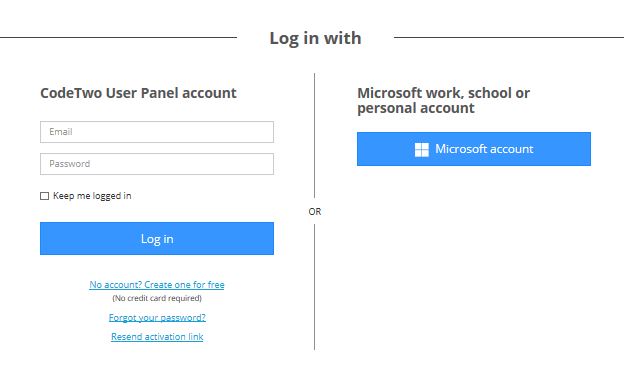
We are glad to let you know that our solution for Office 365 email signature management - CodeTwo Email Signatures for Office 365 - has gained a bunch of useful and long-awaited features. The 3 most important ones will let you: log in to the User Panel with a Microsoft account, configure rules using custom attributes, and have different signatures for new emails and different for replies/forwards. Log in with Microsoft account Now you can choose the way you log in to the User Panel of CodeTwo Email Signatures for Office 365. The first option allows you to log in to the program’s console with the User Panel account. This is possible after creating a dedicated account in the User Panel. The second option now is to log in with a Microsoft work, school or personal account.

In October Microsoft published the patch for MS Outlook 2007 described in the article KB972363, which installs the security update MS09-060. The update resolves the vulnerabilities in ATL ActiveX Controls. After installing this update the users of our free tool CodeTwo CatMan may experience problems with disappearing of the private categories or with proper displaying the colors of the categories. After installing this update, Outlook 2007 stopped being resistant to frequent operations on the categories from Master Category List and this was the root cause of the problem. To let our users work with the software without problems we have just published the new version of CodeTwo CatMan which has been optimized to operate on categories properly. We advise all CodeTwo CatMan users to upgrade to the latest version available on program website. If you haven't tested CatMan yet, it may be a good time to do it. This freeware lets the users in the network share the categories for all elements in Outlook.
