synchronization
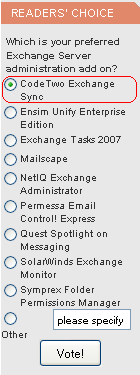
The prestigious site www.msexchange.org is organizing a poll in which CodeTwo Exchange Sync is a contestant. MSExchange.org is a renowned website dedicated to Microsoft Exchange including Microsoft Office Outlook as the premier and most advanced mail client for Exchange. In the poll the voters are asked to answer the question "Which is your preferred Exchange Server administration add on?". We are proud that our solution is included in this contest as CodeTwo Exchange Sync has been on the market for only a month or so. For this reason too CodeTwo Exchange Sync it is unlikely we will be able to defend the pole position our application is now occupying. Still, we need to stress the program really took off - it is a very popular item in our cart. If you are using the program and think we have done a good job, please cast your vote for our solution. You will find the poll on the front page of MSExchange.org in the Readers' Choice section to the left. More about CodeTwo Exchange Sync: Take a Quick Tour through CodeTwo Exchange Sync Download a Trial of CodeTwo Exchange Sync

The results of the last poll conducted by MSExchange.org in the Exchange Administration Category were good news for us. CodeTwo Exchange Sync was announced the second runner-up in MSExchange.org Readers’ Choice Awards. It is a great honour for us, since MSExchange.org is one of the most popular Microsoft Exchange Server resource sites, visited by over 350 000 Exchange experts a month. CodeTwo Exchange Sync enables automatic synchronization of selected data between folders of Microsoft Exchange Server. The program also supports synchronization of mobile devices (e.g. PDA, BlackBerry and devices based on Windows Mobile) with public folders of MS Exchange Server and Outlook. This is a perfect solution for professionals who need to create an Exchange group calendar, shared Exchange contact base, sync mobile phones with Exchange or simply monitor their workers' tasks. See practical applications of CodeTwo Exchange Sync. It's wonderful to know that users are content with CodeTwo Outlook Sync and choose this third-party solution to support their work with Exchange Server. CodeTwo Team says "Thank you" to MSExchange.org Readers for their votes! Download CodeTwo Exchange Sync
Visit CodeTwo Main Page

A couple of weeks ago we announced that the works on the new CodeTwo Exchange Sync are underway. And here it is. CodeTwo Exchange Sync is now shipping.
We have just released an update to CodeTwo Exchange Sync. The new version 2.2.4 includes several minor bug fixes and changes you have requested recently. We recommend all users to download the new installer and update their current installations. Here is the full list of changes in version 2.2.4: C2ExchangeSyncService-{GUID} profile created for the synchronization service is not removed during reinstallation/update. Its removal in earlier versions caused an issue starting the service if Exchange Sync worked in MAPI profile mode.
MAPI Profile mode detection improved. In earlier version the mode was detected only until the ‘Outlook conflict warning’ was closed ‘Do not show again’.
Support for Windows 2000.
Dynamic loading of MAPI libraries changed. The update is free of charge for all current license owners. To update your software, download the newest installer and install it on top of the existing installation. The previous version will be automatically patched and all your settings will be kept. See the version history of CodeTwo Exchange Sync
Download the newest version of CodeTwo Exchange Sync

My brother told me recently that he wants to share documents with his workers but the word 'synchronization' gives him the shivers. For the majority of people 'synchronization' or 'sync' smell like corporate, Japanese, big time, Blackberrian language only wise teenagers or IT geeks can understand. Take it easy! It's simple, trust me. I will make your shivers go away, just continue reading. Synchronization is common in nature and everyday life - marching soldiers, dancers, synchronized watches, oarsmen. So basically the same things happen in different places at the same time. If you synchronize your computers and their files, you have the same amount of data on different machines, at the same time. If you change anything on one computer, it is also changed on another one. Why do you need this? To enhance your teamwork (common calendars, inboxes, lists of tasks, common contacts and databases) - all is done automatically and in real time. You don't have to tell your secretary and workers you are out of town on Friday - they already know it because your calendars and documents are in sync!
CodeTwo Exchange Sync has been updated to version 2.2.0. The program enables an automatic, real-time synchronization of selected Exchange folders and allows users to access this data on their mobile devices, such as Blackberry, Android, iPhone, etc. The new version includes a number of important fixes and improvements, such as: Enhanced compatibility with Windows 7;
Better support for MAPI libraries in Outlook;
More convenient save folder location for log files - they are now saved in /ProgramData/ instead of the installation folder of CodeTwo Exchange Sync;
Synchronization process has been enabled or improved for:
- recurring files;
- items containing attachments, categories or "Subject" modifier; Recipients do not duplicate anymore;
Problem of Outlook profile changing automatically to C2ExchangeSyncAdmin profile after the installation of CodeTwo Exchange Sync has been eliminated;
An issue with opening message store has been fixed;
The mechanism of meeting requests' synchronization has been rebuilt to eliminate possible errors caused by this action. We advise all users of CodeTwo Exchange Sync to download and install the new version. This update is free of charge and can significantly enhance the program's efficiency, making your work with this application much more convenient. See a complete version history list for CodeTwo Exchange Sync.
Lear more about syncing your mobile with Public Folders of Exchange Server.

It's been raining cats and dogs for two days now and a lot of people in our town have stuck in a rut and they start to look like they won't snap out of it. Where is everybody? Come on! It's summer! Don't mind the rain. Here, at CodeTwo, the atmosphere is warm as usually, and we have just released an updated version of CodeTwo Outlook Sync - a tool for sharing Outlook between two computers. It can be downloaded from the product's website and is, naturally, free of charge for all CodeTwo Outlook Sync users. See below to learn what was improved in version 1.0.4 of CodeTwo Outlook Sync. Now you can run the licensing module from within the main application window.
The program can now correctly sync a read/unread state of messages.
Deleted items are now copied to the C2Backup folder. All items deleted by the program are also saved in the special folder called C2Backup.
Notifications in Windows XP tray area are now displayed properly.
Now the program checks its protocol version against other instances of the software present in the environment. If they are not compatible the appropriate notification window will be shown. To update the program, just install it on top of the existing installation, and it will be patched automatically. Thanks a lot for all your emails and phone calls. Your remarks and tips are much appreciated. We've also collected a bunch of feature requests from you, our testers and from ourselves too, and we will consider implementing them in the future updates. Download CodeTwo Outlook Sync
Learn more about CodeTwo
See why it is worth to use our programs

We have released a minor update versioned 2.0.14 to CodeTwo Exchange Sync, an application to synchronize Exchange Server folders in an easy and efficient way. In the newest version the mechanisms of MAPI function have been improved and an error causing the program to switch to demo mode has been eliminated. On the version history page you will find the full list of changes. The update is free of charge for all CodeTwo Exchange Sync users. To update the currently used version with the fix, download and run the installer available on our website. The previous version will be automatically patched and all your settings will be kept safe. Here you will find detailed information on the update procedure. Download the latest fix for CodeTwo Exchange Sync CodeTwo Exchange Sync Homepage
