sync

We have just released an update to CodeTwo Exchange Sync. Version 2.8.2.15 is now available for download on our website. The release includes a number of bug fixes handling issues reported by our users. Make sure to check the full version history of our product as well. The key fixes: Fixed: The subjects of synced items were not always up to date. Even if the program was configured to modify items’ subjects automatically
Fixed: Not all of the items were synchronized in case many of them were created in a short time span
Fixed: Synchronization stopped occasionally, mostly due to the failure of the connection with Exchange server. To continue with synchronization, the server had to be restarted
Fixed: The program could not connect to the server if its AD attributes did not include information of the MS Exchange Server version. CodeTwo Exchange Sync update is highly recommended as it will result in software performance improvement. Update your software immediately or learn more about the process.
What is CodeTwo Exchange Sync?
CodeTwo Exchange Sync is an Exchange Server data synchronization tool. It enables Microsoft Exchange Server folders’ real-time synchronization, allowing you to create group calendars and other common items.
The synchronization can fulfill various source-target scenarios, for example, replicate files from one folder to many, many-to-one, as well as from many-to-many. Synchronized items can be filtered and modified during the replication. The solution is widely known for its administrative purposes, as it enables users to synchronize their public folders with mobile devices or to create an automatically updated group calendar on Exchange. Visit CodeTwo Exchange Sync official webpage to learn more.
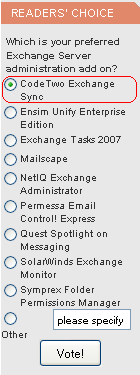
The prestigious site www.msexchange.org is organizing a poll in which CodeTwo Exchange Sync is a contestant. MSExchange.org is a renowned website dedicated to Microsoft Exchange including Microsoft Office Outlook as the premier and most advanced mail client for Exchange. In the poll the voters are asked to answer the question "Which is your preferred Exchange Server administration add on?". We are proud that our solution is included in this contest as CodeTwo Exchange Sync has been on the market for only a month or so. For this reason too CodeTwo Exchange Sync it is unlikely we will be able to defend the pole position our application is now occupying. Still, we need to stress the program really took off - it is a very popular item in our cart. If you are using the program and think we have done a good job, please cast your vote for our solution. You will find the poll on the front page of MSExchange.org in the Readers' Choice section to the left. More about CodeTwo Exchange Sync: Take a Quick Tour through CodeTwo Exchange Sync Download a Trial of CodeTwo Exchange Sync

CodeTwo Exchange Folders has been around for a while now, helping Android owners synchronize literally any Exchange calendar, contacts and tasks (public or personal) directly with their mobile phones. But so far the application was missing one crucial feature - compatibility with iOS devices. This lack did not go unnoticed. Hundreds of users from around the world sent us emails asking when they would be able to use the software to synchronize data between Exchange and their iPads, iPhones and iPods. What they didn’t know was that we were already developing a solution to meet their needs. The reason it took so long was because we wanted to get it just right.
And we did! The long awaited iOS compatible CodeTwo Exchange Folders (version 1.1.0) has just been released! You can download the new server module (Administration panel) directly from our website and the Mobile App from the Apple App Store or iTunes. To deploy the program you have to: Install the Administration panel on the Exchange Server and configure the synchronization service (more details here). NOTE: if you are already running the previous version (1.0.0), just install the new one (1.1.0) on top of it to update (all your settings and licensing information will be kept). Click here to learn more about how to update CodeTwo products. Install the Mobile Apps on mobile devices and connect them to your server. NOTE: if you are already running the previous version, just install the new one on top of it to update (all your settings and licensing information will be kept). Click here to learn more about how to update CodeTwo products. Select which Exchange folders will be available for synchronization (more details here). On the mobile devices choose which folders from Step 3 will be visible in the Mobile Apps (more details here). Here’s a list of benefits offered by CodeTwo Exchange Folders: Mobile access to contact, calendar and task folders located in all public and personal mailboxes on your company’s Microsoft Exchange Server. To ensure security all synchronized data are encrypted and travel directly between the mobile device and server (no Cloud storage) via a secure transfer tunnel opened by a TLS protocol and protected by Triple DES 168-bit encryption. Changes made either on a PC or Android/iOS device are synchronized in real-time and automatically. Your smartphones/tablets are updated wirelessly all the time via Wi-Fi or mobile Internet, regardless if you’re in your office or on the road. All HTML elements in calendar and task items (font formatting, tables, etc.) are synchronized to and from mobile devices intact. Reminders and meeting requests support. Administrator's control over access rights and settings. If you are not using CodeTwo Exchange Folders yet, make sure to give the free 30 day trial a go to see how it works. And if you have any questions related to the application, feel free to contact our Support team. Download CodeTwo Exchange Folders
CodeTwo Exchange Folders vs Exchange ActiveSync
Frequently asked questions

A couple of weeks ago we announced that the works on the new CodeTwo Exchange Sync are underway. And here it is. CodeTwo Exchange Sync is now shipping.
You may have noticed a new entry in the list of our products called CodeTwo FolderSync. As the name suggests the applications is used to synchronize folders.

We wouldn't be ourselves if we hadn't fixed an issue with a 3rd party product and then shared it with the world. Many of our tools were initially created solely for our own needs, tested by us in a live environment as we grew from a small business to what we are now, and then turned into products that many of you use today. So... here we come with another tool for Outlook and iPhone/iPad aficionados. We've heard from our fellow users that the iCloud feature from Apple™, which is meant to synchronize Outlook with iCloud, iPhone, iPad and other iCloud-compatible devices, is a great tool but does not really sync the stuff that you already have in Outlook but creates another set of folders. To delve into the problem, we started using iCloud Control Panel together with Outlook for our own needs and soon we realized that our Outlook synchronization algorithms can quickly fix the issue. That's how we came up with this: CodeTwo Sync for iCloud enables you to automatically synchronize Microsoft Outlook folders with iCloud folders - the rest is in done by iCloud itself. The program will let you seamlessly synchronize Outlook calendar, tasks and contacts with your smartphone. And, as always, it's easier and faster than you can imagine. Just check it out for yourself:Learn more and download CodeTwo Sync for iCloudCodeTwo's Official Website

There is a new free application available for download in Freeware section. The solution is CodeTwo Folder Sync Addin and can be used to synchronize data between folders in Outlook.