share outlook calendar

UPDATE: We are sorry, but CodeTwo Public Folders mentioned in this article has been discontinued. You can check the list of currently available CodeTwo products here. Working on office tasks very often requires sharing one’s Outlook calendar with other people. If you want to get things done quickly and efficiently, it is a good idea to share your calendar across a company. Why? Simply because your co-workers can check e.g. your availability in a timely manner and schedule meetings without bothering your.
To share a calendar in Outlook 2016, 2013, 2010 or 2007 you can use: native solutions available in Microsoft Outlook or a third party tool like CodeTwo Public Folders.
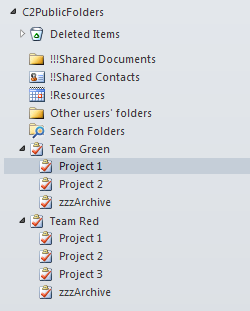
CodeTwo Public Folders is a versatile collaboration tool for Microsoft Outlook users that enables sharing all Outlook items across local network and between multiple PCs. It allows companies of small and mid sector to save a lot of money on IT services, since no server deployment and maintenance is required in this case. For less than $500, an average office can get a professional collaboration system that streamlines teamwork in Microsoft Outlook and makes every employee work faster and more efficient. See the video below to get a grip of how it works: In this article we will cover only a small selection of possibilities this program gives you and we will explain how to improve project management and work efficiency while working on tasks in Microsoft Outlook. Step 1: Arrange the folders in Outlook Let's start with building the right Outlook folder tree structure. As you can see in the picture above CodeTwo Public Folders lets you create public folders in the exact same way as it is done with private items. Every folder appearing in the C2Public Folders section is by default visible to all users in the network. If the access rights are not changed by the administrator, users can read, modify and delete public folders whenever they want. What's more all changes are synchronized with other machines in real time. Step 2: Assign smaller tasks to team members In this example we have split the whole office into two teams: Team Green and Team Red. Every team has its tasks grouped in projects and assigned to team members. The advantage of this method is that every project can be divided into smaller stages (tasks). This organizes teamwork in a better way and results in good job performance and quality. Step 3: Keep a diary of your work Thanks to CodeTwo Public Folders team members and managers can monitor the progress of the given project, since all changes are replicated to other machines in real time. Team members only need to update the status of a given assignment and keep a log of everything what's completed within the task (as shown below). Note that all data is synchronized together with the task, including documents and other files attached by users. Step 4 (optional) Set access rights for public folders in Outlook This collaboration model can also be enriched with access rights set up allowing team leaders to decide who can view, edit or delete Outlook items synchronized with CodeTwo Public Folders. These settings are easily accessible from the machine equipped with the Syncing Master module - a sort of brain in every CodeTwo Public Folders network. Learn more about the Administration Panel of CodeTwo Public Folders Try out for free If you want to test these settings live, feel free to evaluate the program at no cost. The 30-day fully functional trial version of CodeTwo Public Folders is available at www.codetwo.com. More about CodeTwo Public Folders
See how to install the program
Other Outlook and Exchange addins by CodeTwo
CodeTwo Home

If you have been to our website and spent at least a few seconds on reading about CodeTwo Public Folders, you've probably got its main idea already - it's all about sharing. Sounds like a well-worn aphorism? Maybe to some extent it is. My mother used to remind me of this sentence every time I bought sweets and didn't want to give some to my siblings. Well, when you are young, the world around you seems to be very easy, but when it comes to candies - you won't give them back without a fight! :) /My brother knows what I am talking about.../ But anyway... Coming back to Outlook. CodeTwo Public Folders allows you to share all Outlook items in a split second - but what does it actually mean for work organization in your company? Let us give you some hard facts about the practical aspects of using our simple solution. Spend some time reading how CodeTwo Public Folders is helpful in keeping common timetables, administrating company resources, managing tasks and projects, holding discussions and discussion groups within your team. If that still doesn't convince you, watch CodeTwo Public Folders Video - after that you shall make up your mind immediately :) Practical examples of using CodeTwo Public Folders
Watch the CodeTwo Public Folders Video