share Outlook

CodeTwo developers have just finished working on several improvements in CodeTwo Outlook Sync, one of our Outlook synchronization plugins. The newest build of the program, version 1.0.9, has successfully passed all necessary tests and is from now on available on our website. Grab it now and update your CodeTwo Outlook Sync for free! Here is the full list of changes in version 1.0.9: New: Connecting is seen when the computer is attempting to connect to another machine.
New: The link to the user manual is located under the Help menu.
Fixed: In the edit window showing synchronized folders the current profiles are shown.
Fixed: In certain cases the program failed to discover that an item was deleted and restored it to the folder.
Fixed: The stability of the peer connection has been improved. In the previous version, online/offline status tended to flicker.
Fixed: Names of subfolders were incorrectly detected if the only difference in their names was character capitalization.
Fixed: Improvements to User Interface. These are the minor improvements users requested from us during the past weeks. Thank you for all your bug reports and feature requests guys! For those of you who don't know CodeTwo Outlook Sync yet, here's a short walk-through of its features: See version history for CodeTwo Outlook Sync
How to update CodeTwo software

CodeTwo Public Folders has finally made its way to Android! Last week marked the release of the new version of the program featuring the first build of dedicated Android app. Thanks to the new mobile applications you will finally get to access your public Outlook contacts, calendars and tasks from an Android phone or tablet. What's more, the iOS version of the program is also coming up soon! The new CodeTwo Public Folders mobile app will give you the maximum of freedom in accessing your shared Outlook items, wherever you are and whenever you need. It uses the same type of connection with the Syncing Master as the desktop Client Apps on your PCs. It means your data is never uploaded to the Cloud and exposed to 3rd parties. The calendar entries, contacts and tasks are stored only on the linked devices and that's what makes CodeTwo Public Folders so special and safe. CodeTwo Public Folders Android app in fact consists of three separate applications for managing contacts, calendars and tasks. They allow for creating, editing and removing your public Outlook items, exactly the same way as the Client Apps on desktop machines. After installing the mobile app from Google Play you will be asked to establish a connection with the Syncing Master. Before you do that your CodeTwo Public Folders desktop installation should be already configured (Learn more). You can also choose to test the application with the Demo Server first. In this scenario the configuration of your own Syncing Master is not required. Managing Outlook items with the mobile app on Android device is very simple. Given that the administrator hasn't limited the access rights in the Administration Panel of the Syncing Master (Learn more), users can choose every public folder from Outlook to be displayed and synchronized. After that, the Outlook items are displayed in the dedicated Android apps and synchronized with other devices in real time. Whenever someone changes anything on any other device in the network, it will be replicated on other PCs and mobile phones immediately. Using CodeTwo Public Folders Android apps is free of charge for all users that own the license key for the current version of the program. However, in order to work properly with the mobile applications, the desktop installation of the program needs to be updated. Head on over to CodeTwo Public Folders download page and update your program now! Ready to go mobile with CodeTwo Public Folders yet? Get the mobile app from Google Play Store and test it by yourself! If you happen to use an iPhone or an iPad at your home or office, keep checking on us here or on our Facebook fanpage. The iOS applications for CodeTwo Public Folders are set for their launch very soon. We'll keep you posted!

It's been roughly 4 months since we released our previous program and we're ready to present a totally new stuff! Ladies and Gentelmen - please welcome CodeTwo Outlook Sync! It has been designed to live up to requirements of thousands of users worldwide who need a simple, logical and ridiculously easy-to-use sharing tool for Microsoft Outlook. The program will let you sync Outlook between two computers with a few clicks. And.. yes! It's also available in a free version.
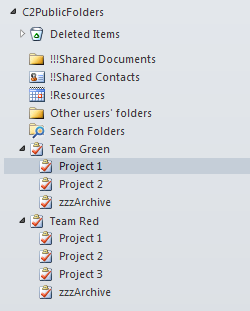
CodeTwo Public Folders is a versatile collaboration tool for Microsoft Outlook users that enables sharing all Outlook items across local network and between multiple PCs. It allows companies of small and mid sector to save a lot of money on IT services, since no server deployment and maintenance is required in this case. For less than $500, an average office can get a professional collaboration system that streamlines teamwork in Microsoft Outlook and makes every employee work faster and more efficient. See the video below to get a grip of how it works: In this article we will cover only a small selection of possibilities this program gives you and we will explain how to improve project management and work efficiency while working on tasks in Microsoft Outlook. Step 1: Arrange the folders in Outlook Let's start with building the right Outlook folder tree structure. As you can see in the picture above CodeTwo Public Folders lets you create public folders in the exact same way as it is done with private items. Every folder appearing in the C2Public Folders section is by default visible to all users in the network. If the access rights are not changed by the administrator, users can read, modify and delete public folders whenever they want. What's more all changes are synchronized with other machines in real time. Step 2: Assign smaller tasks to team members In this example we have split the whole office into two teams: Team Green and Team Red. Every team has its tasks grouped in projects and assigned to team members. The advantage of this method is that every project can be divided into smaller stages (tasks). This organizes teamwork in a better way and results in good job performance and quality. Step 3: Keep a diary of your work Thanks to CodeTwo Public Folders team members and managers can monitor the progress of the given project, since all changes are replicated to other machines in real time. Team members only need to update the status of a given assignment and keep a log of everything what's completed within the task (as shown below). Note that all data is synchronized together with the task, including documents and other files attached by users. Step 4 (optional) Set access rights for public folders in Outlook This collaboration model can also be enriched with access rights set up allowing team leaders to decide who can view, edit or delete Outlook items synchronized with CodeTwo Public Folders. These settings are easily accessible from the machine equipped with the Syncing Master module - a sort of brain in every CodeTwo Public Folders network. Learn more about the Administration Panel of CodeTwo Public Folders Try out for free If you want to test these settings live, feel free to evaluate the program at no cost. The 30-day fully functional trial version of CodeTwo Public Folders is available at www.codetwo.com. More about CodeTwo Public Folders
See how to install the program
Other Outlook and Exchange addins by CodeTwo
CodeTwo Home

My brother told me recently that he wants to share documents with his workers but the word 'synchronization' gives him the shivers. For the majority of people 'synchronization' or 'sync' smell like corporate, Japanese, big time, Blackberrian language only wise teenagers or IT geeks can understand. Take it easy! It's simple, trust me. I will make your shivers go away, just continue reading. Synchronization is common in nature and everyday life - marching soldiers, dancers, synchronized watches, oarsmen. So basically the same things happen in different places at the same time. If you synchronize your computers and their files, you have the same amount of data on different machines, at the same time. If you change anything on one computer, it is also changed on another one. Why do you need this? To enhance your teamwork (common calendars, inboxes, lists of tasks, common contacts and databases) - all is done automatically and in real time. You don't have to tell your secretary and workers you are out of town on Friday - they already know it because your calendars and documents are in sync!

Our most recent program, CodeTwo Outlook Sync has already proved its quality in Microsoft-designed testing for capability and reliability in Windows 7 environment. We can now officially label this product with Windows 7 Logo that ensures all users of this operating system that CodeTwo Outlook Sync will work like a charm on their machines. Let's make just a quick reminder of what you can use this program for: to synchronize MS Outlook data between your desktop PC and laptop;
to work in Outlook with your co-worker on the same tasks and use common calendars, e-mails, contacts and documents;
to back-up your Outlook to another machine. If you need a totally free, user-friendly program to sync your calendar and contacts with another person without Exchange and with no time limitations, go to the Download page of CodeTwo Outlook Sync and get it for free. To synchronize all Outlook data between two computers, order a full version of the program. And finally, if you need a reliable program to synchronize multiple computers in your network, check out CodeTwo Public Folders. Have you already used any of these programs? Do not hesitate to let us know your thoughts, suggestions or feature requests. There is a special widget on our home page (see image below) that lets you quickly communicate with us. As our clients, you can also take a part in our exclusive Testimonials Contest that lasts only by the 13th of May 2011. Thank you for your comments in advance. They are always the most valued feedback for us. CodeTwo Outlook Sync - sync Outlook between two PCs
CodeTwo Public Folders - use it in your business

1 December is another day with an update to one of our solutions CodeTwo Public Folders. This is an application that has its users worldwide and is rapidly gaining in popularity. CodeTwo Public Folders serves as an alternative to those small and mid-sized companies that do not want to buy a costly and complicated Exchange server. Just as with the big brother from Microsoft, installing this outlook add-in adds a sharing capability to Outlook clients in your company. Today we are releasing an update that adds some more functionality to the program as well as improves its performance.

It's been only three months since the premiere of CodeTwo Exchange Rules Pro, our most advanced Exchange Server add-on so far, and we're about to launch another new application that we hope you will find useful. This time the program is dedicated strictly to Outlook users. Our programmers have been developing it for past last couple of weeks and are now close to completing their work. I guess our team is like a rolling stone. We just need to do something new and challenging over and over again in order to stay satisfied :) CodeTwo Outlook Sync will allow you to share Microsoft Outlook folders between two machines linked in a local network. Using it, you will be able to keep Outlook data in sync on two computers without the need of buying costly and complicated solutions designed for larger office networks. Sounds interesting? It looks even better. We can hardly wait to show it to you. CodeTwo Outlook Sync is now being tested and the last improvements are currently implemented. Anytime soon the program will be available on our website in two versions: Freeware and Pro. Stay tuned! Other software solutions by CodeTwo
CodeTwo Home
