Outlook Add-in
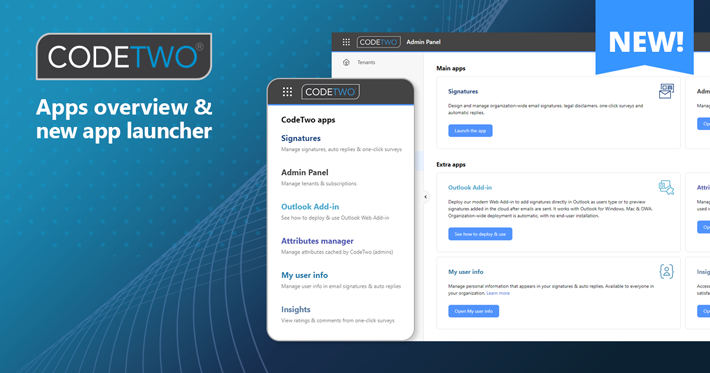
We’ve released a neat feature in CodeTwo Admin Panel that will allow you to quickly find and navigate through all apps included in your CodeTwo Email Signatures 365 subscription. Let’s take a closer look at the new app launcher and, while we’re at it, do a quick overview of the apps.

As mentioned earlier, CodeTwo’s CEO, Szymon Szczesniak, is showcasing our major upcoming feature for CodeTwo Email Signatures for Office 365 at Microsoft Ignite 2020. It’s a new Web Add-in, developed together with Microsoft, that will work with Outlook for Windows, OWA and Outlook for Mac, and add client-side signatures to the email body in real time. This add-in can be deployed from within the Microsoft 365 admin center company-wide, without any user interaction. What’s important, the deployment is per Microsoft 365 account, so your users aren’t tied to a single device when using our automated signatures in Outlook. See our CEO's session hosted by the Microsoft Outlook Add-in Team at Ignite:

Look! The autumn CodeTwo savings are twirling with the dancing leaves, they are at your fingertips now! And there is really not much to do to seize the 30% discount for the popular CodeTwo Public Folders, a great Outlook Add-in to share your emails, contacts, calendars and documents without Exchange Server! Become our fan on Facebook, share the latest video about CodeTwo Public Folders on your Facebook profile and wait for the promotional code from us! Click to share this video on Facebook
Learn more about CodeTwo Public Folders
See CodeTwo page on Facebook
Go to the official CodeTwo website