out of office

Looking to automate your daily Microsoft 365 grind? Discover our top tools for email signatures, migration, backups, and more.
A complete guide to automatic reply management in Microsoft 365.

Get inspired with these out of office examples and tips to create perfect automatic replies.
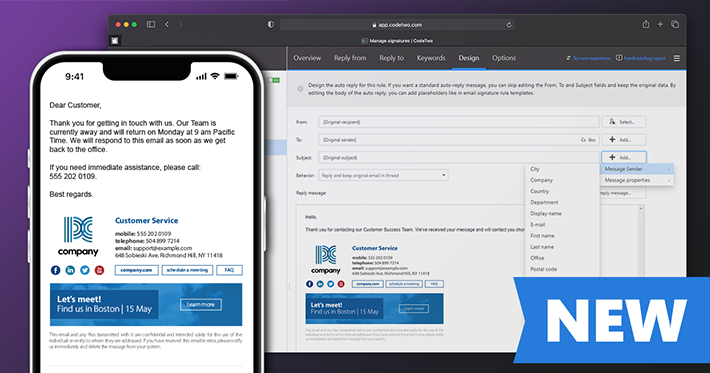
Autoresponder is a new major feature available in our world-leading email signature service. It allows you to create fully branded and personalized automatic replies & out of office messages and manage them centrally for all users in your Microsoft 365 organization. It’s available to all our customers at no extra charge. CodeTwo Email Signatures 365 is the world’s only cloud signature service to offer this!
UPDATE: We are sorry, but CodeTwo Out of Office Manager mentioned in this article has been discontinued. If you are looking for an alternative for Exchange Server, take a look at the auto respond feature in CodeTwo Exchange Rules Pro. During the holiday season, many IT admins face the problem of setting an autoreply for another user on Exchange Server or Office 365. The story is often the same… An employee goes on vacation and forgets to set the autoreply in the Exchange/Office 365 mailbox. The only person capable of fixing this is usually the IT guy, who can use his or her admin rights to set the autoreply in Exchange Admin Center. While many administrators don’t mind performing such small office tasks, others may find it distracting and would rather delegate setting autoreplies for users to a secretary or an HR specialist. In this article I am going to show you how you can grant Exchange or Office 365 autoreply editing rights to another user – not necessarily the admin - by installing a smart 3rd party tool called CodeTwo Out of Office Manager. Let’s get started then!

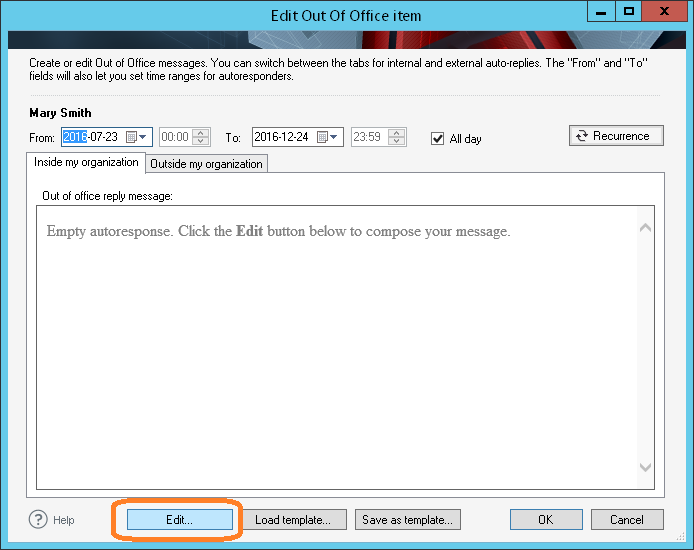
UPDATE: We are sorry, but CodeTwo Out of Office Manager mentioned in this article has been discontinued. If you are looking for an alternative for Exchange Server, take a look at the auto respond feature in CodeTwo Exchange Rules Pro. It's essential to keep your customers, business partners and employees abreast of the important stuff. If you're away due to illness, conference or a business trip with no access to your business email, it goes without saying that you should enable email automatic replies, which will notify all senders that you won't get back to them as quickly as usually, and suggest an alternative contact person. Creating auto-replies just for yourself on Exchange Server or Office 365 is pretty easy, but if you are an HR manager, receptionist or team leader, and you want to create such replies for a colleague or for multiple employees, there is no such option. Well, you could log in to each and every mailbox and set auto-replies manually, but that's a never-ending job and a security breach as you can see people's email. Today we stand an exciting moment together, as we have given a full unveiling to a new tool. CodeTwo Out of Office Manager makes it possible to centally manage Office 365 or Exchange Out of Office messages for many users. What's more, the product is extremely easy to use and the installation process takes literally 60 seconds. Make sure your HR team or the management is equipped with the program. The program has been designed with non-technical employees in mind to take the burden of setting group auto-replies from administrators' shoulders. When you open the program for the first time, you are greeted with the connection dialog box. Just use credentials of a user who has Organization Management rights and you're ready to go. The employees who will be using the program don't need those rights and they are also not able to use the entered credentials for any other actions whatsoever. The main window will launch once you connect to your server. In addition to being able to easily manage auto-reply items, you'll also get the general overview of all absences in you company, both upcoming and past. It helps you stay better organized and can serve as an absence monitor, planning aid, you name it. Scheduling multiple Out of Office items for weeks and months to come is also possible with CodeTwo Out of Office Manager. In other words, if someone is off every Thursday or if you know they will be out of office more than once, you can plan it in advance and be sure the program will activate and deactivate Out of Office items automatically. Fine-tune your automatic email replies with a built in editor. It's really easy to design whatever you want even if you have no experience in HTML. Using the editor view, you don't have to code anything to add tables, links and even Active Directory placeholders. Use smart email templates that can be used for hundreds or thousands of personalized automatic replies. Active Directory attributes used in one template will change into user data when a template is submitted to Exchange or Office 365 user's settings. It's just one minute to be up and running! I mean it. Install the program in a domain environemnt on any machine if you want to connect to Exchange global Out of Office settings. If you're an Office 365 user, you can use any computer to do it. What is more, the application works on Exchange 2010, 2013 and all Office 365 plans. Download CodeTwo Out

As all marketers know, eye-catching images are sometimes more than compelling words. Keeping this in mind, our Marketing team prepared something special for CodeTwo Exchange Rules Pro users. Once you are in the Template Editor in HTML preview, click on the Picture icon on the ribbon, select From Image Library ... and enjoy a brand new collection of various icons and labels that are designed to help you attract attention of your email recipients. Below I present how to open the Image Library: The program's library offers images that can be used for many purposes:
- as auto-replies, when, e.g., a staff member is away or to confirm that you have received a client's message; - to stress an important information enclosed to your e-mail, such as a legal disclaimer. - to promote products and spread the word of the hot seasonal offers. And the last point probably draws your attention the most, since such a simple image added to your email may visibly increase your sales or website traffic. People get hundreds of emails every day. If they open them, it is a half of success, but then they just quickly scan its content. A vibrant image can be most likely to attract their attention rather than just a plain text or big aggressive font, usually associated with a typical spam. Besides, a stylish graphic added to you e-mail looks more neat and professionally. To illustrate this theory, look below to compare a standard advertising e-mail with the one prepared in CodeTwo Exchange Rules Pro HTML editor, with a use of its reach library of images.
A plain commercial e-mail with text links: An e-mail prepared in CodeTwo Exchange Rules Pro with a clickable graphic: Using the image library provided with CodeTwo Exchange Rules Pro you can freely create beautiful email signatures with your contact details, logos and photos, as well as promotional banners, visual hyperlinks, greeting e-cards, random citations and professional autoresponders. See the new Image Library Manager below: To make CodeTwo Exchange Rules Pro even a more useful marketing tool, the program enables you to set time frames for each individual campaign. The function can be found in the Options Tab and it is called Rule Date Range. As you can see below, there are a few fields that you can complete according to your plan and then be sure that all promotional banners are sent in a right time Since an e-mail is now one of the most popular means of business communication, the way you manage your correspondence gives a picture of your service quality. Do not let your company stay behind the technology wave. Equip yourself with a multi-functional program that has been created to let you administrate your e-mail in a professional way.

UPDATE: We are sorry, but CodeTwo Out of Office Manager mentioned in this article has been discontinued. If you are looking for an alternative for Exchange Server, take a look at the auto respond feature in CodeTwo Exchange Rules Pro. As the speed of life and the number of our daily tasks increases, we search for ways to organize the chaos of our everyday duties. We try to automate as many things as possible to save up some time, or we delegate tasks to others in order to be able to take care of other important things. Microsoft Outlook, OWA and Office 365 have some useful options that help us manage our timetable in a more efficient way. The calendar, reminders and recurrence editor are certainly among them. But what about Out of Office messages? Is there a way to manage these items centrally so that users don't have to think about setting auto replies every time they leave the office? Can we set recurring Out of Office messages centrally on Exchange or Office 365, without doing anything on the client machines and bothering our busy employees? The answer is yes, as long as we have CodeTwo Out of Office manager onboard.
