new release

CodeTwo Email Signatures, our program for managing email signatures on email clients such as Outlook, Office 365 OWA or Google Apps, has been updated. The newest version of the software solves the problem which specifically affected Google Apps users, namely the program was not able to list more than 100 Google Apps mailboxes. Nevertheless, we recommend updating the program by all current users. To update the program, simply download the new installation file and run it on top of your current version of CodeTwo Email Signatures. More information on how to perform the update of our programs can be found here. All licensed users of CodeTwo Email Signatures are free to update the software at no additional cost. Download CodeTwo Email Signatures ver. 1.6.1 If you have any questions, please do not hesitate to contact us – we are available 24 hours a day, Monday through Friday.

We have released updates to our three prominent programs for Outlook synchronization. CodeTwo Public Folders and CodeTwo Outlook Sync have been upgraded to the new versions that fully support Outlook 2016 from now on and bring in some fixes and programmatic changes. CodeTwo Sync for iCloud has also been prepared to support Outlook 2016, but in order to gain full support it still needs Apple iCloud for Windows to be updated and work with Outlook 2016. CodeTwo Public Folders enables to share Outlook items and Windows files among computers and mobile devices. The latest 5.4.4 version supports Outlook 2016, however, Syncing Master cannot be installed on a computer with Outlook 2016. Apart from multiple programmatic improvements, the newest version introduces some cosmetic changes in error messages. Download CodeTwo Public Folders 5.4.4 CodeTwo Outlook Sync that synchronizes Outlook items between two computers, has been upgraded to the version 1.0.17, and thanks to programmatic changes it supports now Outlook 2016. There has also been slight changes to program’s displayed messages. Download CodeTwo Outlook Sync 1.0.17 CodeTwo Sync for iCloud, our dedicated software responsible for synchronizing Outlook items with iCloud folders, has been updated to the version 1.3.4. After fixing the program’s installer, it recognizes Outlook 2016, however, the program won’t fully support it unless Apple iCloud for Windows supports Outlook 2016. We are still awaiting Apple to update its software. Download CodeTwo Sync for iCloud 1.3.4 For a full list of changes please visit a dedicated version history page for CodeTwo Public Folders, CodeTwo Outlook Sync and CodeTwo Sync for iCloud. Updates are free of charge for all license holders for CodeTwo Outlook Sync and CodeTwo Sync for iCloud. For CodeTwo Public Folders it is free only if the first digit of the owned version number matches the first digit number of the current version of the program. In case you need our support feel free to contact us – we are available 24 hours from Monday to Friday. UPDATE (Dec 10 2015): We are happy to announce that Apple has just released a new version of iCloud for Windows which supports Outlook 2016, this enables full compatibility of CodeTwo Sync for iCloud with Outlook 2016! UPDATE (Jun 10, 2016): We are happy to let you know that now CodeTwo Public Folders has been updated to version 5.5.0 which allows the Syncing Master to be installed on Outlook 2016 machine as well. This means that CodeTwo Public Folders is now fully compatible with Outlook 2016.

We have just released updates to our Office 365 and Exchange mailbox backup solutions - CodeTwo Backup for Office 365 and CodeTwo Backup for Exchange. This update provides some major fixes to programs’ functionalities including: changes to the Backup Job Time Filter (filter parameters were not applied to selected users)
improvements to the restore functionality (fixed problem with long-name and deeply-nested folders)
corrections to the notification system (no warning was displayed when the connection to Exchange was lost)

We are delighted to announce that CodeTwo Exchange Rules PRO, a long-awaited program for Microsoft Exchange Server is out now! Unlike CodeTwo Exchange Rules, CodeTwo Exchange Rules PRO is not only a signature/disclaimer software for Exchange. It is a complete email management system that enables you to take full control over the flood of emails going everyday through your Exchange Server. Using CodeTwo Exchange Rules PRO, it is possible to set server-sided rules for Exchange mail, which cover such important tasks as mail filtering, email rerouting, autoresponding, email categorization, attachment control, email blocking, email signatures and disclaimers, and many more. With CodeTwo Exchange Rules PRO automatic email flow management and email content control on Exchange Server is now possible and it's amazingly easy. One of our main goals was to make the program as easy-to-use and intuitive as possible. Eventually, it's exactly what our company's mission says. Therefore, CodeTwo Exchange Rules PRO is equipped with a completely new User Interface. You can test CodeTwo Exchange Rules PRO in your environment for free for 30 days. Don't wait, download the program and set up your first rules now! We are looking forward to your feedback :) Learn more about CodeTwo Exchange Rules PRO
Learn more about CodeTwo Exchange Rules PRO pricing
Download CodeTwo Exchange Rules PRO 30-day trial
CodeTwo Exchange Rules PRO User's Manual
CodeTwo Home

1 December is another day with an update to one of our solutions CodeTwo Public Folders. This is an application that has its users worldwide and is rapidly gaining in popularity. CodeTwo Public Folders serves as an alternative to those small and mid-sized companies that do not want to buy a costly and complicated Exchange server. Just as with the big brother from Microsoft, installing this outlook add-in adds a sharing capability to Outlook clients in your company. Today we are releasing an update that adds some more functionality to the program as well as improves its performance.

CodeTwo Sync for iCloud synchronizes Outlook calendars, contacts and tasks with iCloud folders, its new version has just been released! The recent 1.3.3 update overhauls the issue of constant replication of meeting requests that were received from external contacts in synchronized calendars. Moreover, it solves the problem of using of temporary license key which may have caused the software to display wrong number of days until the trial expiration date. All CodeTwo Sync for iCloud users are recommended to download and install the newest update. It is free of charge for all license owners. In order to download the latest release, please follow the link provided. Download CodeTwo Sync for iCloud 1.3.3
Read more about CodeTwo Sync for iCloud
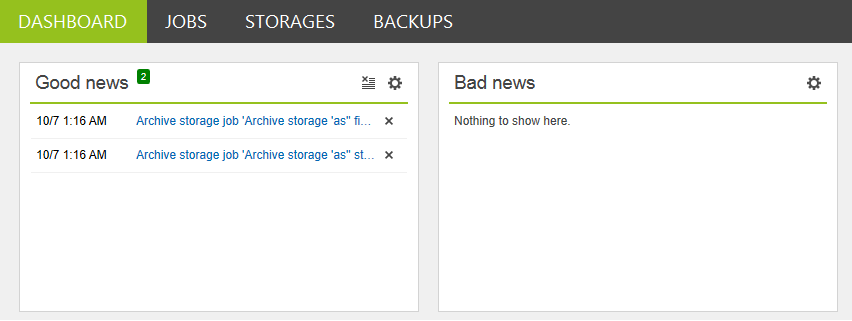
Our CodeTwo solutions for performing backups, restore jobs and keeping mailbox data on local drives, have just been upgraded to the version 1.3. CodeTwo Backup for Office 365 and CodeTwo Backup for Exchange gained new UI features which boosted up the programs’ functionalities and eased administrator’s work with a few improvements. CodeTwo developers added two alert windows to the program’s dashboard. Good news and Bad news windows inform you about key events included in the on-going backup or restore jobs. Now you can also keep yourself updated with good and bad news notifications automatically sent by the program to a specified email address. Moreover, some of the minor improvements to Backups time-filter and restore options will make now your admin’s tasks easier. To see a full list of changes, please visit the version history sites for CodeTwo Backup for Office 365 and CodeTwo Backup for Exchange. The newest version is free of charge for all license owners. Download CodeTwo Backup for Office 365
Download CodeTwo Backup for Exchange