migration

Looking to automate your daily Microsoft 365 grind? Discover our top tools for email signatures, migration, backups, and more.
Today we have published new versions of our migration software - CodeTwo Exchange Migration and CodeTwo Office 365 Migration. Both programs are now available for download in version 1.6.0. This release contains a number of small programmatic fixes, new reporting features and migration statistics visible in the GUI, and more importantly the migration speed improvements. The migration can be now even up to 5 times faster thanks to the new data transmission optimization technology implemented in this version of the software. For full list of changes go to the CodeTwo Exchange Migration version history or CodeTwo Office 365 Migration version history. Check out how fast you can migrate now - download trial versions from our websites: Download CodeTwo Exchange Migration 1.6.0
Download CodeTwo Office 365 Migration 1.6.0 CodeTwo Exchange Migration is a program that lets you transfer user's mailboxes between Exchange servers, within or even outside of the same domain. It also allows to perform direct migration from Exchange 2007 to Exchange 2013 or 2016 without any mid-steps. Similarly, CodeTwo Office 365 Migration allows to migrate mailboxes from the on-premise Exchange server to Office 365 organization without a hassle.
Last week we released an update to CodeTwo Exchange Migration and CodeTwo Office 365 Migration, our mailbox migration tools for Exchange Server and Office 365. Apart from fixing some minor bugs, we have also added new important features. One of the most important changes applied in this release is the possibility to filter out mailbox items according to their modification time - so called time filters.
What are time filters?
Time filters let you choose items for your Exchange or Office 365 migration according to their modification time. They are a part of the source server connection wizard. They give you a choice whether to migrate items older, or not older than certain date. For instance, you can choose to only migrate data from the last 30 days.

CodeTwo has been named Representative Vendor by Gartner and our migration tool for Microsoft 365 has been included in Gartner’s 2021 Market Guide for Cloud Office Migration Tools. This is the third time in a row that we receive such recognition, and we’re proud that CodeTwo Office 365 Migration is still acknowledged as one of the most reliable migration solutions and remains among the leading tools of its kind available in the market.

In December 2017, we wrote an article on our blog informing that CodeTwo Office 365 Migration had been included in Gartner’s report on cloud migration tools. This filled us with pride and reassured us that our product is one of the leading Office 365 migration tools on the market. However, that didn’t stop us from going the extra mile and improving our program even further. And now we are pleased to announce that CodeTwo has once again been named as a Representative Vendor in Gartner’s 2019 Market Guide for Cloud Office Migration Tools*.
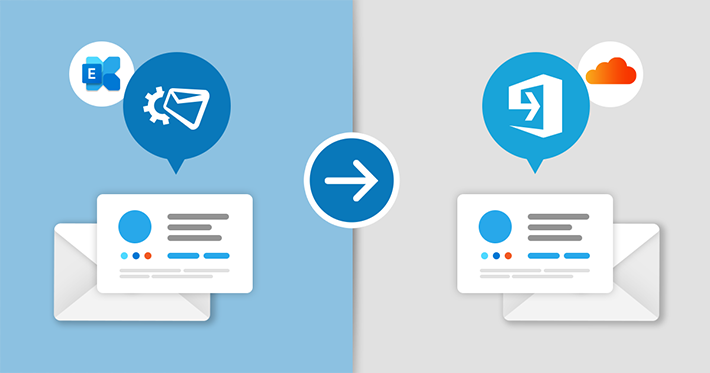
Great news for all admins using CodeTwo Exchange Rules and Exchange Rules Pro to manage their email signatures. We’ve just released CodeTwo Exchange Rules Converter. The tool lets you easily migrate email signature rules and designs defined in the CodeTwo Exchange Rules product family to CodeTwo Email Signatures for Office 365. If you follow the trend to move your organization from Exchange to the Microsoft 365 (Office 365) cloud, you can move your on-premises email signatures with you and manage them using the software you’re familiar with.

Numerous organizations around the globe still use Exchange 2003. The reasons for that are various – after 10 years on the market, administrators know the program inside out, server machines were powerful enough to suit companies’ needs etc. However, ten years in the IT industry is a whole era and much has changed. The explosion of mobile devices that are accessing Exchange mailboxes directly, the Cloud, the release of MS Exchange 2013 and many other factors are making the 2003 version obsolete. Not to mention that in 2014 Microsoft terminates technical support – no more patches, updates and security fixes for Exchange 2003. These reasons are pushing many administrators to consider migrating to more modern solutions, such as Exchange 2013. The sad fact is that Microsoft provides no way to migrate/upgrade Exchange 2003 directly to 2013 at this moment. It doesn’t mean, however, you are left with no options if you would like to move straight to the newest version of Microsoft’s email platform. There are several solutions you can consider. The first one is the “double hop” migration.
Drawbacks of double hop migration
Exchange 2003 and Exchange 2013 can’t co-exist in one Active Directory forest. On the other hand, moving users’ mailbox data between two different forests is complicated when you want to use only native migration tools. We can complaint about Microsoft’s policy on that matter but it will still remain a fact. Currently there is no native path to make an intra-organizational upgrade from Exchange 2003 to Exchange 2013. For that reason many system engineers recommend to split the process into two steps: First upgrade Exchange 2003 to 2010 version and then migrate to Exchange 2013. This method is called the double-hop migration, which obviously doubles the work required and the risk of the process going awry. It also requires some important resources, like spare hardware (if you have it), or putting up additional virtual machines only to host the temporary environment before moving it to the target location. The entire operation must be planned and done with maximum care, in order to reduce the downtime of mail servers. Will you take that risk?
Export/Import PST – good idea?
If you operate on a small amount of users working on PST files during the migration can work for you in a way. However, the thing might not be as simple as it seems. Not to mention the fact that the manual export/import operation between the two versions of Exchange might be a bit of time consuming, you might face some other problems which will make the whole process even longer to complete than you initially thought. The first issue is connected with legacyExchangeDN X.500 address that will have to be manually added to each re-imported mailbox as proxy address in the target location. If you don’t do that right after re-creating the mailboxes in Exchange 2013, your users will not be able to use their email in a normal way. The solution to that is quite simple, but obviously it adds some extra work to the entire migration process and carries a risk of longer service unavailability during the migration. You will find more information on that topic here. You can also use this article as a guide. The steps described in it can be used with an on-premises installation of Exchange 2013 as well. Another important problem to consider while using the export/import PST option are public folders, if you use them. Re-importing them in th

CodeTwo just renewed and continues to hold its Gold partnership with Microsoft for another year in the row - hooah! This means that our software is of the highest grade, and was thoroughly tested and reviewed by users.
Earlier this year we received the Cloud Accelerate badge! We earned it due to the growing base of our partners that we helped to migrate to the Office 365 cloud. With CodeTwo Office 365 Migration program and a help of our support team Exchange or Google migrations are a breeze.
