ipad

We've just updated CodeTwo Sync for iCloud - our blockbuster product for hassle-free synchronization of Outlook and iCloud folders (calendars, contacts, reminders/tasks). The new version brings back the meeting request sync feature that was blocked in the previous release due to iCloud resending invites to past events upon sychronization. We've also added support for Outlook 2013 and Windows 8. To update the program, simply download this version and install it on top of the exisiting installation. Your settings will remain unchanged. Thank you for all the comments, emails and phone calls regarding missing features. Without you, this program wouldn't be as killer as it is now. If you have more questions, ideas, or just want to send us your feedback, feel free to add your comment below. And for those of you who haven't heard about CodeTwo Sync for iCloud yet (is this still possible?), check out its website or the video here: Check out CodeTwo Sync for iCloud
Find out more about other synchronization tools for Outlook

It's been a while since CodeTwo's last software giveaway contest on MSExchange.org ended. We randomly picked 10 winners and the 10th selected person was supposed to get iPad 2 and CodeTwo Exchange Rules Pro. We, however, could not get hold of the luckiest person in the drawing until February 2012. Finally, Mahendra Mane responded to my email and we could send him the main prize. Just look at this sheer happiness: Congratulations Mahendra! We're happy we could end the contest as we had initially planned. Naturally, CodeTwo Exchange Rules Pro also supports emails sent from iPad or iPhone (and any other mobile devices that can connect to Exchange 2007 or 2010) and can stamp branded auto-signatures and email disclaimers to them. Check out what else CodeTwo Exchange Rules Pro can do for you and your email on Exchange. CodeTwo Exchange Rules Pro - more than Hub Transport in Exchange
CodeTwo's Offical Website

CodeTwo Exchange Folders has been around for a while now, helping Android owners synchronize literally any Exchange calendar, contacts and tasks (public or personal) directly with their mobile phones. But so far the application was missing one crucial feature - compatibility with iOS devices. This lack did not go unnoticed. Hundreds of users from around the world sent us emails asking when they would be able to use the software to synchronize data between Exchange and their iPads, iPhones and iPods. What they didn’t know was that we were already developing a solution to meet their needs. The reason it took so long was because we wanted to get it just right.
And we did! The long awaited iOS compatible CodeTwo Exchange Folders (version 1.1.0) has just been released! You can download the new server module (Administration panel) directly from our website and the Mobile App from the Apple App Store or iTunes. To deploy the program you have to: Install the Administration panel on the Exchange Server and configure the synchronization service (more details here). NOTE: if you are already running the previous version (1.0.0), just install the new one (1.1.0) on top of it to update (all your settings and licensing information will be kept). Click here to learn more about how to update CodeTwo products. Install the Mobile Apps on mobile devices and connect them to your server. NOTE: if you are already running the previous version, just install the new one on top of it to update (all your settings and licensing information will be kept). Click here to learn more about how to update CodeTwo products. Select which Exchange folders will be available for synchronization (more details here). On the mobile devices choose which folders from Step 3 will be visible in the Mobile Apps (more details here). Here’s a list of benefits offered by CodeTwo Exchange Folders: Mobile access to contact, calendar and task folders located in all public and personal mailboxes on your company’s Microsoft Exchange Server. To ensure security all synchronized data are encrypted and travel directly between the mobile device and server (no Cloud storage) via a secure transfer tunnel opened by a TLS protocol and protected by Triple DES 168-bit encryption. Changes made either on a PC or Android/iOS device are synchronized in real-time and automatically. Your smartphones/tablets are updated wirelessly all the time via Wi-Fi or mobile Internet, regardless if you’re in your office or on the road. All HTML elements in calendar and task items (font formatting, tables, etc.) are synchronized to and from mobile devices intact. Reminders and meeting requests support. Administrator's control over access rights and settings. If you are not using CodeTwo Exchange Folders yet, make sure to give the free 30 day trial a go to see how it works. And if you have any questions related to the application, feel free to contact our Support team. Download CodeTwo Exchange Folders
CodeTwo Exchange Folders vs Exchange ActiveSync
Frequently asked questions

Many companies rely on Microsoft Exchange Server’s public folders to store shared data, archive documents and collaborate on projects. At the same time, the native capabilities of Exchange Server do not allow users to view Exchange public folders on mobile devices. This wouldn’t be a major issue, if not for the fact that smartphones, tablets and other handhelds are gradually replacing laptops and desktops as primary workplace devices. Luckily, CodeTwo has a solution: CodeTwo Exchange Sync. An application which allows you to automatically synchronize Exchange public folders with users’ personal mailboxes, making the public data instantly available on users’ mobile phones. Owing to this, Exchange tasks, contacts, calendars, and other outlook items, can be viewed and modified via devices running on iOS, Android, Windows Phone, or any other system supporting Active Sync protocol.
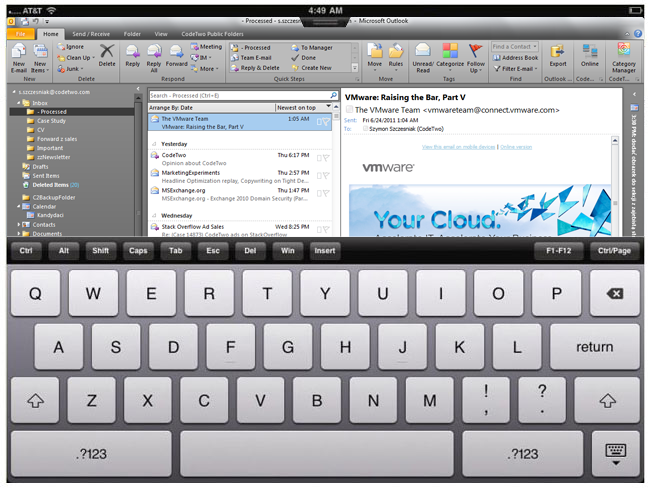
Since the world of tablets is getting bigger, better and more versatile, many of us (iPad aficionados and those who are now becoming ones) ask a question: Can I run Outlook on the Ipad? Well.. it would be a Sci-Fi question, if it wasn't for VMware View, thanks to which you can have Outlook displayed in the iPad or iPad 2 totally for free. VMware has finally made it possible to access your Windows Desktop from the iPad, which means you can not only display your favorite mail client there, but also use your tablet as a remote client of your desktop machine. If you don't want to use any remote desktop connections and want to simply synchronize your iPad with Outlook, you can do it pretty easily with the iCloud service and its iCloud Control Panel for Windows, which allows you to share Outlook data with iPad automatically. The iCloud-Outlook synchronization is, however, a little bit tricky as upon installing the control panel you get a new tree of folders in Outlook with your iCloud data. This has little to do with syncing as your master folders are still left intact. You can luckily fix this thanks to CodeTwo Sync for iCloud. See for yourself how easy it is: Learn more about CodeTwo Sync for iCloud and download it. © All rights reserved. No part or whole of this article may not be reproduced or published without prior permission.

Greetings! It's been a few weeks since the release of the first version of CodeTwo Sync for iCloud - a program designed for synchronizing iCloud and Outlook. We've reported thousands of downloads so far and have received lots of emails from users like you. You have our sincere thanks! Based on your remarks and comments, we updated the program. The latest release (v. 1.2) has a new feature that automatically hides calendar reminders for iCloud folders. We've also blocked an option that enabled a user to use the same folder in different synchronization pairs. Take a look at the list of other bug fixes: Improved edition of synced items. Fixed issue with deleted attachments reappearing in Outlook. The "Sync with iCloud..." option in the context menu is no longer available for folders that cannot be synced with iCloud. Fixed identification of deleted sync folders. Updating is naturally free of charge. Just download the program from here, launch the installer and follow the wizard. There is no need to uninstall the previous version. All your settings and sync associations will not be changed. Should you have any questions feel free to post them in the comments or contact Support directly. We're here to help all the time. Download CodeTwo Sync for iCloud here. Oh and take a look at this great video that we made some time ago ;)
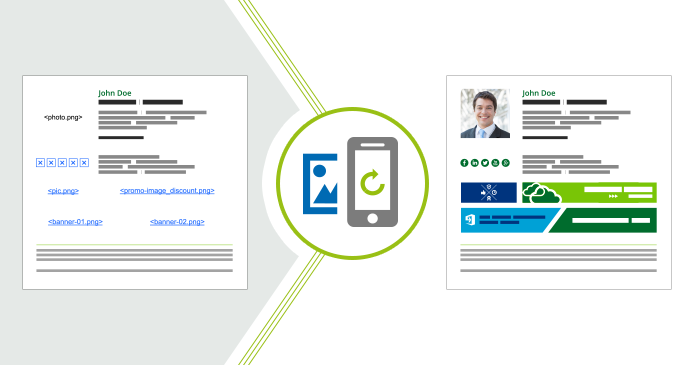
Do you use pictures in your emails? Most people do. Did you know that there is a problem you might face if you use iOS devices like iPhone or iPad? Whenever you reply to a message or forward it using such a native mail app, graphical elements such as pictures, logos or banners get deleted. That is a default behavior for iPhones and iPads, but there is a solution which works on Exchange Server. Why are images deleted from iPhone or iPad?
That is just the default behavior in native iOS mail app to delete images from email body when you reply to a message. It might be a way to declutter mailboxes and to save some space. Maybe it is designed that way because the original recipient has already seen the images. Although this might be found as perfectly logical, for some it is a twisted logic as it makes doing your job harder.

We wouldn't be ourselves if we hadn't fixed an issue with a 3rd party product and then shared it with the world. Many of our tools were initially created solely for our own needs, tested by us in a live environment as we grew from a small business to what we are now, and then turned into products that many of you use today. So... here we come with another tool for Outlook and iPhone/iPad aficionados. We've heard from our fellow users that the iCloud feature from Apple™, which is meant to synchronize Outlook with iCloud, iPhone, iPad and other iCloud-compatible devices, is a great tool but does not really sync the stuff that you already have in Outlook but creates another set of folders. To delve into the problem, we started using iCloud Control Panel together with Outlook for our own needs and soon we realized that our Outlook synchronization algorithms can quickly fix the issue. That's how we came up with this: CodeTwo Sync for iCloud enables you to automatically synchronize Microsoft Outlook folders with iCloud folders - the rest is in done by iCloud itself. The program will let you seamlessly synchronize Outlook calendar, tasks and contacts with your smartphone. And, as always, it's easier and faster than you can imagine. Just check it out for yourself:Learn more and download CodeTwo Sync for iCloudCodeTwo's Official Website
