exchange

With EWS disablement in Exchange Online scheduled for October 2026, now is the time to find the right tool for public folder migrations.
We have released a minor update versioned 3.1 to CodeTwo Exchange Rules, an application used in the management of disclaimers and signatures in Exchange mail. The new items in the program include: Extra Active Directory cache has been added to the application. This will reduce the queries to Active Directory leading to enhanced performance.
It is possible now to add custom Active Directory fields used by the program. The file containing custom variables named SchemaExtension.txt must be placed in the installation directory of the application. The newly added variables are available in the signature editor after restarting the server.
New installer for a desktop installation. It is possible to install the program on a desktop without Exchange. This is useful for customers who want non-admin users without access to Exchange to prepare the settings and footer templates to be later copied to the server. Read more about how to use the desktop version.
The rare problem in which messages containing large attachments or addressed to large distribution groups were not delivered has been fixed. The update is dedicated for users of 3.0 and is free of charge. To update the currently used version with the fix, download and run the installer. The previous version will be automatically detected and patched. Detailed information on the update procedure can be found here.

We have released a minor update versioned 2.1 to CodeTwo Exchange Rules 2007, an application used in the management of disclaimers and signatures in Exchange mail. The new items in the program include: It is possible to split a single message sent to large number of users to insert varied disclaimers. This feature is useful when a message needs to be processed by multiple rules of CodeTwo Exchange Rules 2007, e.g. a single message need different footers for different recipients. By default a message sent to multiple users will be handled as a single message by Exchange Server. This is why inserting different footers caused a problem. This is now fixed. Read more about how to split messages addressed to multiple recipients.
It is possible now to add custom Active Directory fields used by the program. The file containing custom variables named SchemaExtension.txt must be placed in the installation directory of the application. The newly added variables are available in the signature editor after restarting the server.
Extra Active Directory cache has been added to the application. This will reduce the queries to Active Directory leading to enhanced performance.
New installer for a desktop installation. It is possible to install the program on a desktop without Exchange. This is useful for customers who want non-admin users without access to Exchange to prepare the settings and footer templates to be later copied to the server. Read more about how to use the desktop version. For a full list of changes, please see the version history page. The update is dedicated for users of 2.0 and is free of charge. To update the currently used version with the fix, download and run the installer. The previous version will be automatically detected and patched. Detailed information on the update procedure can be found here. Download the latest fix for CodeTwo Exchange Rules 2007 Version history page CodeTwo Exchange Rules 2007 Homepage
Today we have published new versions of our migration software - CodeTwo Exchange Migration and CodeTwo Office 365 Migration. Both programs are now available for download in version 1.6.0. This release contains a number of small programmatic fixes, new reporting features and migration statistics visible in the GUI, and more importantly the migration speed improvements. The migration can be now even up to 5 times faster thanks to the new data transmission optimization technology implemented in this version of the software. For full list of changes go to the CodeTwo Exchange Migration version history or CodeTwo Office 365 Migration version history. Check out how fast you can migrate now - download trial versions from our websites: Download CodeTwo Exchange Migration 1.6.0
Download CodeTwo Office 365 Migration 1.6.0 CodeTwo Exchange Migration is a program that lets you transfer user's mailboxes between Exchange servers, within or even outside of the same domain. It also allows to perform direct migration from Exchange 2007 to Exchange 2013 or 2016 without any mid-steps. Similarly, CodeTwo Office 365 Migration allows to migrate mailboxes from the on-premise Exchange server to Office 365 organization without a hassle.

Recently we have published new versions (1.7.1) of CodeTwo Exchange Migration and CodeTwo Office 365 Migration which are now available for download.
Amongst new features you can find: Folder type selection. You can choose what specific item types are migrated - emails, tasks, contacts etc.
Migration priority. Decide which mailboxes should be copied first and which ones later by assigning the higher or lower priority to them.
Google Apps archive folders are now supported.
Migration speed from Google Apps has been improved.
And more. For full list of changes go to the CodeTwo Exchange Migration version history or CodeTwo Office 365 Migration version history.
Feel free to download trial versions from our websites:
Download CodeTwo Exchange Migration 1.7.1Download CodeTwo Office 365 Migration 1.7.1
CodeTwo Exchange Migration and CodeTwo Office 365 Migration are tools that allow to copy all contents of user's mailboxes from your old Exchange Server to the new one, or even to the Office 365 cloud service. What's more, they even eliminate the double-hop scenarios when migrating from Exchange 2007 to 2016 and assure no downtime as the program works in the background with no impact to end users.
We have just released new updates for products from the Exchange Rules family (email signature managers for Exchange 2007, 2010 and 2013). The updates are identical for all products from the family and contain 2 new features and 3 fixes, all of which were suggested or reported by our users - thank you and keep those emails coming!
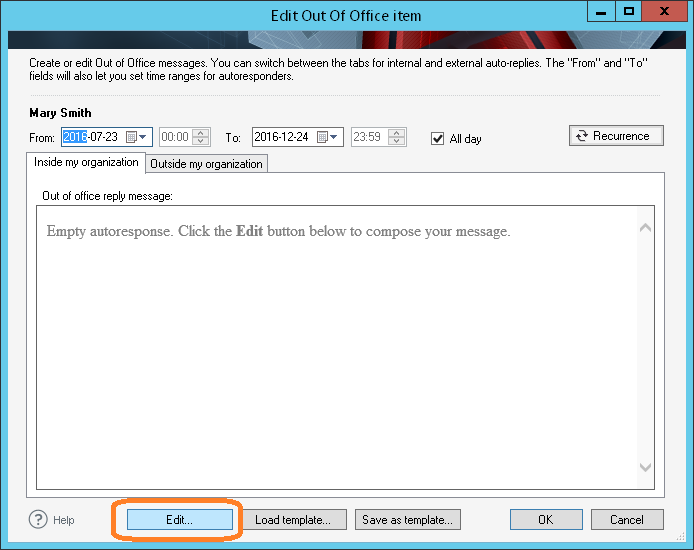
UPDATE: We are sorry, but CodeTwo Out of Office Manager mentioned in this article has been discontinued. If you are looking for an alternative for Exchange Server, take a look at the auto respond feature in CodeTwo Exchange Rules Pro. During the holiday season, many IT admins face the problem of setting an autoreply for another user on Exchange Server or Office 365. The story is often the same… An employee goes on vacation and forgets to set the autoreply in the Exchange/Office 365 mailbox. The only person capable of fixing this is usually the IT guy, who can use his or her admin rights to set the autoreply in Exchange Admin Center. While many administrators don’t mind performing such small office tasks, others may find it distracting and would rather delegate setting autoreplies for users to a secretary or an HR specialist. In this article I am going to show you how you can grant Exchange or Office 365 autoreply editing rights to another user – not necessarily the admin - by installing a smart 3rd party tool called CodeTwo Out of Office Manager. Let’s get started then!
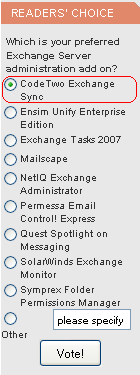
The prestigious site www.msexchange.org is organizing a poll in which CodeTwo Exchange Sync is a contestant. MSExchange.org is a renowned website dedicated to Microsoft Exchange including Microsoft Office Outlook as the premier and most advanced mail client for Exchange. In the poll the voters are asked to answer the question "Which is your preferred Exchange Server administration add on?". We are proud that our solution is included in this contest as CodeTwo Exchange Sync has been on the market for only a month or so. For this reason too CodeTwo Exchange Sync it is unlikely we will be able to defend the pole position our application is now occupying. Still, we need to stress the program really took off - it is a very popular item in our cart. If you are using the program and think we have done a good job, please cast your vote for our solution. You will find the poll on the front page of MSExchange.org in the Readers' Choice section to the left. More about CodeTwo Exchange Sync: Take a Quick Tour through CodeTwo Exchange Sync Download a Trial of CodeTwo Exchange Sync
