UPDATE: We are sorry, but CodeTwo Out of Office Manager mentioned in this article has been discontinued. If you are looking for an alternative for Exchange Server, take a look at the auto respond feature in CodeTwo Exchange Rules Pro.
Imagine you write to someone who has just gone on their annual leave. Not a big deal, everyone needs a vacation once in a while. But what if they forget to set up their Out of Office reply or take a sudden leave and your email is not forwarded? Personally, I would be pretty furious if I had to wait for a week just to find out someone was absent. Another problem with Out of Office replies is that sometimes they are unique, user-created. Sometimes, those automatic responses might be even worse. Most people just want to know when you come back and who to contact when you are gone. They are not that interested in your family life, or what you like to do in your free time. Some Out of Office messages make you think what kind of company is into such oversharing policy. Unfortunately, such situations happen. Neither Exchange Server, nor Office 365 lets you centrally manage those automatic replies for other users in a user-friendly way. That is why we have thought that a free Out of Office Manager might come in handy.

UPDATE: We are sorry, but CodeTwo Public Folders mentioned in this article has been discontinued. You can check the list of currently available CodeTwo products here. If you already use CodeTwo Public Folders for sharing Outlook folders between many computers, or are on an Exchange Server account with some public data stored in the Exchange public folders, you have probably already noticed that Outlook categories are not synchronized by means of these solutions. Luckily, there’s an easy way to sort it out. Long story short, all you have to do to solve this problem is equip your Outlook with a free extension called CodeTwo CatMan, the rest is very easy…
CodeTwo CatMan is a smart FREE Outlook add-in that allows sharing Outlook categories across many computers via a local connection or through the Internet. The program can be downloaded at no cost from www.codetwo.com.
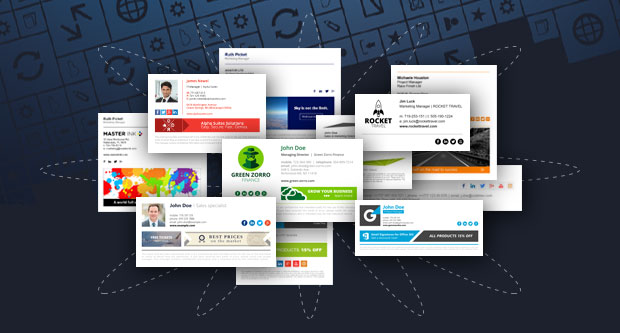
Do you need to create an email signature, but you have no idea where to start? Against all appearances, designing and creating email signatures is not a simple task. When drafting a signature, you should remember of certain design rules that make it look professional and well-thought-out. When you are finally happy with the results, it is time to bring your project into a live email signature. But this part, in most cases, requires at least basic HTML knowledge. Otherwise, you will have a hard time trying to implement the signature the way it looks in your draft. But, if you feel like neither designing your signature nor learning the HTML code, there is a smart alternative - Free Email Signature Generator powered by CodeTwo.

Yesterday we released our next freeware for Exchange Server users. It's called CodeTwo Active Directory Photos and, as the name suggests, it allows you to manage photographs in Active Directory. What makes it so great is that you can upload and manage even thousands of Active Directory users' pictures very quickly and easily. Uploaded pictures can later be displayed in Outlook 2010 internal emails, in GALs or contact cards. You can also add them to server-sided email signatures appended to internal or outbound correspondence. And it's really free. Learn more about CodeTwo Active Directory Photos. We created this program because many of you have sent us tech support questions concerning employees' pictures in email signatures. Since it is possible to add images to Active Directory (one image per user), it is also possible to automatically insert them to Exchange email signatures when messages fly through Exchange. If you combine CodeTwo Active Directory Photos and CodeTwo Exchange Rules Pro, you will be able to do that by adding just one placeholder to your template - a {Photo} placeholder. Learn more about adding Active Directory pictures to server-sided email signatures. We're happy to share CodeTwo Active Directory Photos with you - it's absolutely free and there are no time limitations. To install the program, download it from this link and install it either on a server machine equipped with Exchange Server or on a client PC with Admin's rights. Frequently Asked Questions
User's Manual
CodeTwo Active Directory Photos - official site

If you are a Microsoft Outlook user you probably know a common problem with blocked attachments that you can neither open, nor save to your hdd.. The most common files of this type are: .exe, .bat, .asp, .url, gadget., .js, .reg etc. Outlook blocks these files automatically due to the security reasons and Microsoft's strategy aiming to protect Outlook users from virus attacks. Nevertheless, this method is not always convenient and pretty often becomes unacceptable for some people. Unblocking disabled attachments is not an easy thing to do. There are numerous questions in this matter regularly posted by irritated users on social forums and IT blogs. So to save your time spent on digging in manuals and in advanced settings of the program, CodeTwo has created a quick and friendly application that immediately brings you back a control of all attachments coming to your inbox. The tool is called CodeTwo Attach Unblocker and is totally free of charge. The program has been successfully serving Outlook users for the last four years. Now we are happy to show you this handy add-on once again, as it has been improved. What is new in CodeTwo Attach Unblocker 1.2.4? Apart from a completely new, 'refreshed' user interface, the program is now independent from Outlook and can be launched and running even when Outlook is offline. The installation file automatically checks bit version of your Microsoft Outlook and installs a proper version. We have also eliminated a problem with Windows 2000 installation error. To define the attachments types that you wish not to be blocked by Outlook anymore, you just need to create your own list by entering file extensions in a proper field (see a picture below). After restarting Outlook all attachments from your list will no longer be blocked and you will be able to open, save or forward them. Learn more about CodeTwo Attach Unblocker
Download CodeTwo Attach Unblocker

Here in Poland people are used to say that if something is for free, it definitely has to be junk. Sometimes it's hard to disagree but in my opinion there are some exceptions, especially as far as software is concerned. The Web is chock-full of various freeware for any purpose. All you have to do is to type the word "free" in the search engine in front of the solution you are looking for and pick the one that's the most suitable for you. Which one to choose? Picking up a solution from a reliable source is always crucial in such cases. Since designing Outlook add-ins became CodeTwo's second nature, if you are looking for a smart free Outlook extension, you should definitely check out CodeTwo's freeware offer, it won't cost you anything except time:)
We have released an update to our another freeware, CodeTwo NetCalendars. Starting from version 2.1.0 the program is fully compatible with Outlook 2010 64-bit. Feel free to download this useful tool FOR FREE from our website! CodeTwo NetCalendars enables you to create and share computer-based group calendars within your local network or Internet. Using it users can work on several schedules at one time and display them in one view. Thanks to this great ability, the program increases the general efficiency of your team and lets you implement new groupwork scenarios within your company. It even allows you to share Outlook calendars with your teammates (including Outlook 2010 64-bit)! Don't wait - download CodeTwo NetCalendars for free and test it immediately! Learn more about CodeTwo NetCalendars
Need more sharing abilities? Find out more about CodeTwo Public Folders and test it for free!
Learn more about CodeTwo freeware
Learn more about CodeTwo products

There is a new free application available for download in Freeware section. The solution is CodeTwo Folder Sync Addin and can be used to synchronize data between folders in Outlook.
