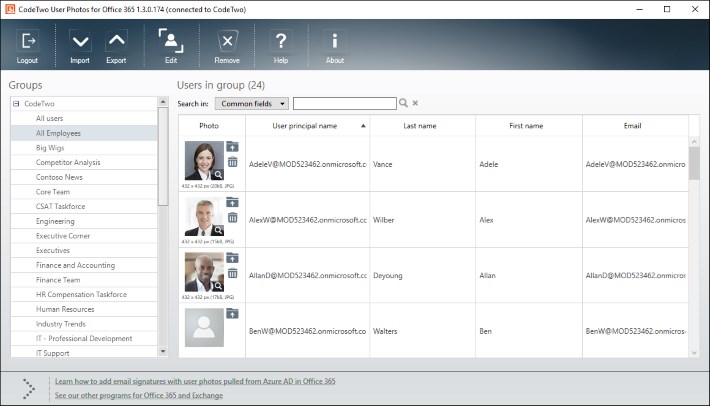
Many of you already know and use our freeware CodeTwo Active Directory Photos – a smart tool designed to ease user photo management in Active Directory.
Starting October 31, 2018, the support for Transport Layer Security (TLS) versions 1.0 and 1.1 is discontinued in Office 365. This means that TLS 1.0 and 1.1 will still work, but Microsoft will not provide support in case of connection/compatibility issues. For this reason, we have updated all our software that connects to or otherwise interacts with Office 365. To avoid possible issues in the future, we recommend that you update your software to the latest version.

It is time for new Outlook freeware from CodeTwo! We have already been giving away smart apps that remind about missing attachments, export PST files to Excel, unblock files such as .exe or .reg, sync Outlook mails, tasks, calendars or categories between computers or even automatically configure your e-mail account in Outlook, and many more... Now we are pleased to announce that yet another totally new, practical Outlook add-on has been released and offered to all of you for free. Its concept has appeared in our office based on our own every-day experience when sending bunch of e-mails to other staff members, supervisors or clients. This time the idea concerns group messages, when we have many recipients specified in the To: or Cc: field. It was happening to many of us to hastily press the Reply instead of the Reply to All button while responding to such e-mails. It is sometimes very troublesome and embarrassing and we definitely do not want this to happen when exchanging a business group correspondence. Fortunately, the new tool called CodeTwo Outlook Reply All Reminder helps Outlook users to prevent such situations. It is a user-friendly application which does not require any configuration. After you install it, you can be sure that next time you click Reply, when replying to a group correspondence, the plugin will trigger a notification window informing that your message will be received by one person only (the original sender of the e-mail that you are replying to). The program will ask you if you want to send the Reply to All instead, what you can confirm by clicking an appropriate button, as shown below: Want it already? Nothing easier, just go to CodeTwo Outlook Reply All Reminder's website and download it for free. :) CodeTwo Outlook Reply All Reminder - download page
All Outlook add-ons from CodeTwo

Since we do a lot of applications for Outlook, we also use them in our everyday work. We use CodeTwo Public Folders and CodeTwo Exchange Rules. Some time ago we created a program for ultra-fast and automatic email account configuration. We love this app so much that we decided to share it with you! We have just released a free tool called CodeTwo Outlook AutoConfig. It's an amazingly easy application that automatically configures an email account in Microsoft Outlook, Outlook Express, Windows Mail or Windows Live Mail. If you want to use any of the above-mentioned email clients, you no longer need to know any technical details like SMTP and POP3 addresses, mail server port numbers, encryption methods, etc. Using CodeTwo Outlook AutoConfig, you can create your email account in split second only by providing your email address. Download CodeTwo Outlook AutoConfig and launch it. Enter your email address - a suggested Display name will appear beneath. Display name is what is shown to recipients instead of your full email address. Naturally, you can change the display name to anything you want, e.g. your name and surname.

Today we are releasing an update to a freeware application used to share Outlook categories between multiple users in the network CodeTwo CatMan v.3.1. Recently, the program was optimized for users of Outlook 2007 who installed the security update MS09-060 issued by Microsoft in October and for this reason experienced a problem sharing public categories. With this update, CodeTwo CatMan becomes capable of sharing categories not only in the local network but also over the Internet. This is done by placing the single public category file, used by the program to update categories on client machines, on an FTP or WWW server. Now, you will also have a quicker start with the program as you will be able to easily copy your existing private categories to the public pool of categories using drag and dropping functionality. CodeTwo CatMan is compatible with Microsoft's latest version of operating system Windows 7. Download CodeTwo CatMan CodeTwo CatMan - Version History Other Feewares by CodeTwo

On 14 April we officially released a beta version of Giegieo, an add-in merging the most popular Polish instant messenger Gadu-Gadu with Microsoft Outlook. You may have read an earlier post on this product. Giegieo is an extension to Outlook - it displays information on the status and description of Gadu-Gadu contacts and people we chat with. This helps us see at a glance if they are online so that we can start off a conversation, send a text message to their cell, or make a phone call using built-in service. Giegieo is a significant aid in managing contacts and conversations. For a detailed list of the functionalities see the previous post on Giegieo. We are delighted with the fact that the release has met with tremendous interest from the users and the media. The application was featured in major Polish websites CHIP, DobreProgramy, Wirtualna Polska, Gazeta.pl. Giegieo Website
In October Microsoft published the patch for MS Outlook 2007 described in the article KB972363, which installs the security update MS09-060. The update resolves the vulnerabilities in ATL ActiveX Controls. After installing this update the users of our free tool CodeTwo CatMan may experience problems with disappearing of the private categories or with proper displaying the colors of the categories. After installing this update, Outlook 2007 stopped being resistant to frequent operations on the categories from Master Category List and this was the root cause of the problem. To let our users work with the software without problems we have just published the new version of CodeTwo CatMan which has been optimized to operate on categories properly. We advise all CodeTwo CatMan users to upgrade to the latest version available on program website. If you haven't tested CatMan yet, it may be a good time to do it. This freeware lets the users in the network share the categories for all elements in Outlook.

How often does it happen to you... You scroll down the Outlook folder tree, accidentally grab one of its items and then unintentionally drop onto a different. Sounds familiar? Or maybe you have recently deleted a whole Outlook folder instead of one item only? These situations keep happening to everyone, no matter if you are a Outlook newbie or an experienced user. Outlook doesn't warn about such situations natively. Luckily, here comes CodeTwo Move & Delete Watchdog, the newest free Outlook addin by CodeTwo. CodeTwo Move & Delete Watchdog warns about unintentional moving or deleting folders in Microsoft Outlook. It is typical install-and-forget software. Once it is installed on a PC equipped with Outlook, it fully integrates with your mail client and starts working straight away. Whenever you move a folder in Outlook's navigation pane or are about to delete something from the Outlook folder tree, a popup dialog appears asking for your confirmation. Although the application requires absolutely no configuration to work properly, you can decide if you wish to be notified when you move a folder, delete it, or in both of these cases. So... If you're tired of looking for folders that accidentally changed their locations in Outlook or want to be sure you don't loose important Outlook data by accident, better install CodeTwo Move & Delete Watchdog on your PC right now. It's free, contains no adds and - like all our apps - will save you heaps of time and nerves with working with your mail client. Learn more about the program and download for free
Check out other free Outlook tools by CodeTwo
CodeTwo Products
